


The $2.8 Trillion Problem That AI Prototyping Solves
Every year, companies waste $2.8 trillion globally on failed products and features that never should have been built. The reason is building the wrong thing, too late, with too much investment.
Consider this: 72% of new features are rarely or never used by customers. Traditional product development forces you to make critical decisions based on static mockups, endless meetings, and gut feelings. By the time you discover a feature doesn't work, you've already spent months of engineering time and thousands of dollars.
But what if you could validate any product idea in under 2 hours with a working prototype that looks and feels real?
Welcome to the age of AI prototyping where product managers can go from concept to clickable demo in minutes, not months.
Why AI Prototyping Is a Game-Changer for PMs
Old Way:
- PM writes PRD → Designer creates mockups → Engineering estimates effort → Stakeholders provide feedback → Repeat 3-5 times
- Timeline: 4-8 weeks to get first working version
- Cost: $50,000-200,000 in engineering resources
- Risk: High chance of building something users don't want
AI Prototyping Way:
- PM describes idea → AI builds working prototype → Stakeholders interact with real demo → Customer feedback in hours
- Timeline: 2-4 hours to get working prototype
- Cost: $0-50 in AI tool costs
- Risk: Validate before any engineering investment
The Four Superpowers AI Prototyping Gives You
- Speed of Thought Validation: Test 10 variations of an idea in the time it used to take to schedule one meeting
- Stakeholder Clarity: Show, don't tell – eliminate miscommunication with interactive demos
- Customer Truth: Get real user feedback on functional prototypes, not abstract concepts
- Engineering Efficiency: Hand off working examples instead of theoretical specifications
The Complete Tool Arsenal: Choosing Your AI Prototyping Stack
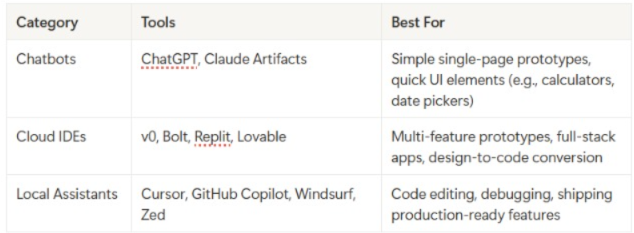
Tier 1: Entry-Level (Perfect for PM Beginners)
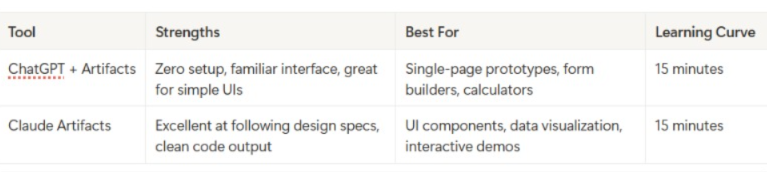
When to Use: First-time prototyping, simple features, quick concept validation
Tier 2: Power User Tools (For Regular Prototyping)
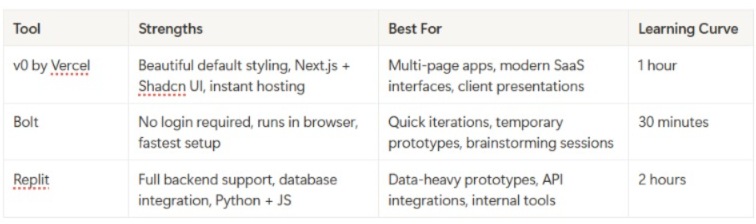
When to Use: Regular prototyping workflow, stakeholder demos, customer validation
Tier 3: Production-Ready (For Serious Development)
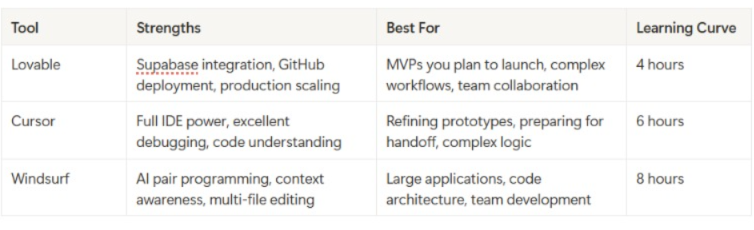
When to Use: Building for production, complex applications, long-term projects
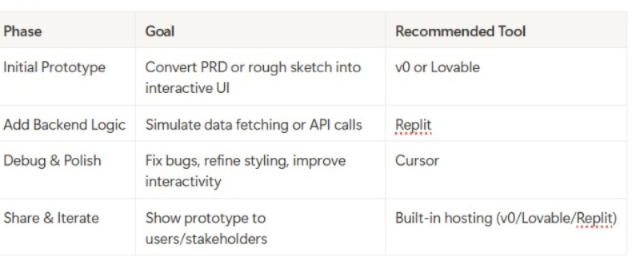
Tool Selection by Phase
Prototype Validation Metrics
The PM's Tool Selection Framework
The "Speed-to-Insight" Matrix:
- High Complexity + High Speed Needed = Bolt or v0
- High Complexity + High Quality Needed = Lovable + Cursor
- Low Complexity + High Speed Needed = ChatGPT/Claude
- Low Complexity + High Quality Needed = v0 + light Cursor polish
Master-Level Prompting: The Templates That Actually Work
The Universal Prompt Structure (Use This Every Time)
[CONTEXT] + [SPECIFIC REQUEST] + [CONSTRAINTS] + [SUCCESS CRITERIA]
Example:
`CONTEXT: I'm building a SaaS dashboard for marketing teams
SPECIFIC REQUEST: Create a user onboarding flow with 3 steps
CONSTRAINTS: Use Tailwind CSS, mobile-responsive, modern design
SUCCESS CRITERIA: Users should understand how to connect their data source by step 3`
Category 1: Design-to-Code Prompts
From Figma/Sketch:
`Build a pixel-perfect prototype matching this design exactly.
- Use Tailwind CSS for styling
- Match fonts: [specify fonts]
- Match colors: [hex codes if available]
- Ensure responsive design for mobile and desktop
- Add hover states for interactive elements
- [Attach screenshot or design file]
Focus on visual accuracy over functionality initially.`
From Rough Sketch/Wireframe:
`Convert this rough wireframe into a high-fidelity interactive prototype:
- Interpret the layout professionally
- Use modern SaaS design patterns
- Apply consistent spacing and typography
- Add appropriate icons from Lucide or Heroicons
- Make it look like it belongs in [competitor product name]
- [Attach sketch/wireframe]`
Category 2: Feature Addition Prompts
Adding New Functionality:
`Add [specific feature] to this existing prototype:
Current state: [describe what exists] New feature requirements:
- Trigger: [what causes it to appear/activate]
- Behavior: [exactly what it should do]
- UI: [where it appears, how it looks]
- Data: [what information it needs/shows]
- Edge cases: [what happens when...]
Integration: [how it connects to existing elements]`
Real Example:
`Add a bulk action feature to this user list:
Current state: Table showing users with individual action buttons New feature requirements:
- Trigger: Checkbox appears when user clicks "Select" button
- Behavior: Select multiple users, show bulk action bar at bottom
- UI: Floating bar with "Delete", "Export", "Change Status" options
- Data: Track selected user IDs, show count "3 users selected"
- Edge cases: Deselect all if user navigates away
Integration: Replace individual action buttons when in bulk mode`
Category 3: Data Integration Prompts
For Mock Data:
`Create realistic mock data for [feature/component]:
- Data type: [users, products, analytics, etc.]
- Volume: [how many records]
- Variety: [different scenarios to show]
- Edge cases: [empty states, long text, special characters]
Make the data believable for [industry/use case] and include:
- Realistic names, companies, dates
- Varied data points showing different patterns
- Some entries that test UI limits (very long names, etc.)`
For API Integration:
`Integrate with [API name] to fetch real data:
- Endpoint: [API endpoint if known]
- Authentication: [if needed, how to handle]
- Data structure: [expected format]
- Loading states: Show spinner while fetching
- Error handling: Display message if API fails
- Fallback: Use mock data if API unavailable
Parse the response and display [specific fields] in [component type].`
Category 4: Behavioral Prompts
For Complex Interactions:
Implement this user flow:
Step 1: [user action] → [system response] Step 2: [user action] → [system response] + [side effect] Step 3: [user action] → [final state]
Requirements:
- Transitions: [smooth/instant/fade/slide]
- Validation: [check for X before allowing Y]
- Feedback: [success message, error states]
- Persistence: [what should be remembered]`
For State Management:
`Create stateful behavior for [component]:
Initial state: [what user sees first] State changes triggered by:
- [trigger 1] → [new state] → [visual change]
- [trigger 2] → [new state] → [visual change]
- [trigger 3] → [back to initial state]
Persistence: [remember state across page reloads/sessions] Reset conditions: [when to clear state]`
Category 5: Polish & Debug Prompts
For Styling Improvements:
`Improve the visual design of this prototype:
Current issues I see:
- [specific problem 1]
- [specific problem 2]
Style goals:
- Feel: [modern/professional/playful/minimalist]
- Inspiration: [mention similar products/websites]
- Branding: [colors, fonts, personality if known]
Focus on:
- Spacing and typography hierarchy
- Color consistency and contrast
- Interactive states (hover, active, disabled)
- Mobile responsiveness`
For Bug Fixes:
`Fix this specific issue:
Problem: [exactly what's happening wrong] Expected: [what should happen instead] Steps to reproduce:
- [action]
- [action]
- [observe problem]
Constraints: Don't break [existing functionality] Additional context: [any relevant details]`
Category 6: Customer Validation Prompts
For User Testing Setup:
`Prepare this prototype for customer validation:
Testing goals:
- Validate: [specific assumptions]
- Learn: [key questions to answer]
- Measure: [success criteria]
Prototype requirements:
- Add analytics tracking for [key interactions]
- Create realistic data scenarios for [use cases]
- Include edge cases: [empty states, errors, loading]
- Add instruction tooltip/overlay for first-time users
Make it feel production-ready but clearly mark as prototype.`
Advanced Prototyping Strategies: Beyond Basic Building
The "Progressive Fidelity" Method
Level 1: Concept Validation (30 minutes)
- Build basic layout and core interaction
- Focus on information architecture
- Use placeholder content
- Goal: "Does this make sense?"
Level 2: Workflow Validation (2 hours)
- Add realistic data and content
- Implement key user flows end-to-end
- Include error states and loading
- Goal: "Can users complete their task?"
Level 3: Detail Validation (4-6 hours)
- Polish visual design
- Add micro-interactions and animations
- Implement edge cases
- Goal: "Does this feel production-ready?"
The "Assumption Testing" Framework
Before building, list your assumptions:
User Behavior Assumptions:
- Users will understand [X] without explanation
- Users prefer [Y] over [Z]
- Users will use this feature [frequency]
Technical Assumptions:
- Feature [X] is technically feasible
- Integration with [Y] will work smoothly
- Performance will be acceptable with [Z] data volume
Business Assumptions:
- This feature will increase [metric] by [amount]
- Users will pay [amount] for this capability
- This solves a problem worth [value]
Build your prototype to specifically test these assumptions.
The "Stakeholder Journey" Method
For Engineering Stakeholders:
- Show working code they can inspect
- Demonstrate edge cases and error handling
- Provide clear handoff documentation
- Include performance considerations
For Design Stakeholders:
- Match visual specifications exactly
- Show responsive behavior across devices
- Demonstrate interaction states
- Include accessibility considerations
For Business Stakeholders:
- Focus on user value and business metrics
- Show competitive differentiation
- Demonstrate ROI potential
- Include usage analytics
For Customer Stakeholders:
- Use their real data when possible
- Focus on workflow efficiency
- Show time/effort savings
- Include customization options
Scenario Deep-Dive: Building an AI-Powered Feature
Company: MarketingFlow (B2B SaaS, 2,000 customers)
Challenge: Customers spend 4 hours/week manually analyzing campaign performance
Opportunity: AI-powered insights could save customers 75% of analysis time
Business Impact: Could justify 40% price increase ($50M ARR impact)
Phase 1: Rapid Concept Validation (Day 1, 2 hours)
Tool Choice: Claude Artifacts (fastest for concept validation)
Initial Prompt:
`Create an AI insights dashboard for marketing campaign analysis:
Core concept:
- Main dashboard showing campaign performance charts
- AI insights panel that analyzes the data automatically
- Provides 3-5 actionable recommendations
- Shows confidence level for each recommendation
UI requirements:
- Clean, modern SaaS interface
- Insights panel slides in from right side
- Uses blue/white color scheme
- Mobile responsive
Mock data: Include 3 marketing campaigns with different performance patterns`
Iteration Prompts:
1. "Make the AI insights more specific - include actual numbers and percentages" 2. "Add a 'Explain this insight' button that shows the AI reasoning" 3. "Include a feedback system where users can rate insights quality"
Validation Questions Tested:
- Do users immediately understand what this feature does?
- Is the insights panel discoverable?
- Do the recommendations feel actionable?
Results: 8/10 internal stakeholders understood the concept. 2 suggested moving the AI trigger to be more prominent.
Phase 2: User Flow Validation (Day 3-4, 6 hours)
Tool Choice: v0 (for multi-page flows and better styling)
Enhanced Prompt:
`Build a complete user flow for AI campaign insights:
Flow stages:
- Dashboard overview with "Generate AI Insights" button
- Loading state while AI analyzes (3-5 seconds)
- Insights results with categorized recommendations
- Detailed drill-down for each insight
- Action tracking (mark insights as "implemented" or "dismissed")
Advanced features:
- Historical insights comparison
- Export insights to PDF
- Schedule automated insights delivery
- Integration with existing campaign tools
Use real marketing terminology and metrics (CTR, CPA, ROAS, etc.)`
Customer Testing Setup:
- Recruited 5 marketing directors from existing customer base
- 30-minute Zoom sessions with screen sharing
- Asked them to "think aloud" while exploring
Key Learnings:
- Users wanted insights prioritized by potential impact
- "Explain this insight" was clicked 80% of the time
- Users needed ability to customize insight categories
- Historical comparison was surprisingly important
Phase 3: Technical Feasibility (Day 5-6, 4 hours)
Tool Choice: Replit (for backend logic simulation)
Backend Simulation Prompt:
`Create a realistic AI insights engine simulation:
Input: Campaign performance data (impressions, clicks, conversions, spend)
Processing: Simulate AI analysis with realistic delays
Output: Structured insights with confidence scores
Insight categories:
- Budget optimization opportunities
- Audience targeting improvements
- Creative performance analysis
- Timing and scheduling recommendations
- Competitive positioning insights
Include edge cases:
- Insufficient data scenarios
- Conflicting recommendations
- Seasonal adjustments
- Platform-specific insights`
Technical Validation:
- Confirmed data structure compatibility with existing analytics
- Estimated API response times and costs
- Identified required integrations with ad platforms
- Calculated server resource requirements
Phase 4: Business Case Validation (Day 7, 2 hours)
Tool Choice: Claude for business analysis + Cursor for final polish
Business Metrics Tracking:
`Add business value tracking to the prototype:
Metrics to capture:
- Time saved per insight implemented
- Revenue impact of recommendations followed
- User engagement with insights over time
- Insights accuracy vs user feedback
Dashboard additions:
- "ROI Calculator" showing potential savings
- "Success Stories" carousel with anonymized case studies
- "Usage Analytics" for internal PM tracking
- Integration cost calculator for IT stakeholders`
Final Stakeholder Demo:
- 15-minute presentation to C-suite
- Interactive demo with realistic customer data
- Business case presentation with ROI projections
- Technical implementation timeline
Results:
- Approved for Q1 development (6-week timeline)
- $200K development budget allocated
- 5 design partners committed to beta testing
- Revenue projections validated by finance team
Key Success Factors
- Started Simple: Basic concept first, added complexity iteratively
- Real Data: Used actual customer campaign data for authenticity
- Multiple Perspectives: Tested with users, engineering, and business stakeholders
- Measured Everything: Tracked user interactions and feedback systematically
- Clear Handoff: Provided working prototype + detailed documentation
Total Investment: 20 hours of PM time, $50 in AI tool costs
Alternative Cost: 8-week discovery phase with $150K in engineering resources
Advanced Prompt Template Library
Customer Research Integration
Customer Interview Prep:
`Prepare this prototype for customer validation interviews:
Interview goals: [what you want to learn]
Key assumptions to test: [list 3-5 assumptions]
Prototype modifications needed:
- Add click tracking for [specific interactions]
- Create realistic scenarios for [use cases]
- Include error states for [edge cases]
- Add subtle instruction hints for [complex features]
Create a interview guide with:
- 3 warm-up questions about current workflow
- 5 task-based questions using the prototype
- 3 follow-up questions about value proposition`
A/B Testing Setup:
`Create two variations of [specific feature] to test:
Variation A: [current approach] Variation B: [alternative approach]
Differences should focus on:
- [specific UI element]
- [interaction pattern]
- [information presentation]
Make variations easy to switch between.
Track: [key metrics to measure]
Success criteria: [how to determine winner]`
Competitive Analysis Integration
Competitive Feature Analysis:
`Analyze how [competitor] implements [similar feature]:
Research their approach to:
- User flow and information architecture
- Visual design and interaction patterns
- Feature depth and configuration options
- Integration points with other tools
Build our version that:
- Matches their core functionality
- Improves on [specific weakness we identified]
- Adds our unique value proposition: [differentiator]
- Feels native to our existing product experience`
Technical Handoff Optimization
Engineering Handoff Package:
`Prepare complete technical handoff for this prototype:
Documentation needed:
- User flow diagrams with decision points
- API endpoints and data requirements
- Third-party integrations and dependencies
- Error handling and edge case specifications
- Performance requirements and constraints
Code deliverables:
- Clean, commented prototype code
- Reusable component library
- Database schema recommendations
- Testing scenarios and acceptance criteria
Make the handoff so clear that engineering can start immediately.`
Accessibility and Inclusion
Inclusive Design Validation:
`Audit this prototype for accessibility and inclusion:
Check for:
- Color contrast ratios (WCAG 2.1 compliance)
- Keyboard navigation support
- Screen reader compatibility
- High contrast mode support
- Text scaling up to 200%
Inclusive design considerations:
- Language complexity and clarity
- Cultural assumptions in UI/content
- Accessibility of key interactions
- Alternative input methods support
Provide specific recommendations for improvements.`
The PM's Prototyping Playbook: 12 Proven Workflows
Workflow 1: The "60-Second Validation"
- Use Case: Initial gut-check on feature idea
- Timeline: 5 minutes
- Tool: ChatGPT/Claude Artifacts
- Process:Write one-sentence feature description
- Ask AI to create basic UI mockup
- Show to 2-3 colleagues for instant feedback
- Decide: build more or pivot
Workflow 2: The "Customer Co-Creation"
- Use Case: Designing with customer input
- Timeline: 2 hours over 2 days
- Tool: v0 + customer interviews
- Process:Build basic prototype based on customer problem
- Screen share with customer, get live feedback
- Iterate in real-time during call
- Follow up with refined version
Workflow 3: The "Stakeholder Alignment Sprint"
- Use Case: Getting everyone on the same page
- Timeline: 4 hours over 1 week
- Tool: Lovable + presentation
- Process:Build comprehensive prototype covering all perspectives
- Create separate demos for each stakeholder type
- Gather feedback asynchronously
- Present unified vision with incorporated feedback
Workflow 4: The "Technical Feasibility Check"
- Use Case: Understanding implementation complexity
- Timeline: 3 hours
- Tool: Replit + Cursor
- Process:Build functional prototype with realistic backend
- Identify technical challenges and dependencies
- Create proof-of-concept for hardest parts
- Estimate development effort with engineering
Workflow 5: The "Competitive Response"
- Use Case: Quickly matching or beating competitor feature
- Timeline: 6 hours
- Tool: v0 + competitive analysis
- Process:Document competitor's approach thoroughly
- Build equivalent functionality
- Identify 2-3 improvement opportunities
- Create differentiated version
Workflow 6: The "User Journey Mapping"
- Use Case: Understanding end-to-end experience
- Timeline: 4 hours
- Tool: Multiple tools for different touchpoints
- Process:Map current user journey
- Identify pain points and opportunities
- Prototype improved touchpoints
- Connect into seamless experience
Workflow 7: The "Data Story Validation"
- Use Case: Features that depend on data insights
- Timeline: 5 hours
- Tool: Replit + data visualization
- Process:Create realistic dataset
- Build data processing logic
- Prototype multiple visualization options
- Test comprehension with users
Workflow 8: The "Mobile-First Validation"
- Use Case: Features primarily used on mobile
- Timeline: 3 hours
- Tool: v0 with mobile focus
- Process:
- Design for smallest screen first
- Validate thumb-friendly interactions
- Test on actual devices
- Scale up to desktop
Workflow 9: The "Integration Stress Test"
- Use Case: Features requiring multiple system connections
- Timeline: 6 hours
- Tool: Lovable + API mocking
- Process:Map all required integrations
- Mock each API with realistic responses
- Build error handling for each integration point
- Test failure scenarios
Workflow 10: The "Onboarding Optimization"
- Use Case: Improving new user experience
- Timeline: 4 hours
- Tool: v0 + user flow testing
- Process:Build current onboarding flow
- Identify drop-off points
- Create 3 alternative approaches
- A/B test with new users
Workflow 11: The "Performance Impact Preview"
- Use Case: Features that might affect app performance
- Timeline: 2 hours
- Tool: Replit with performance simulation
- Process:Build prototype with realistic data volumes
- Simulate slow network conditions
- Test memory usage with large datasets
- Optimize before handoff
Workflow 12: The "Monetization Validation"
- Use Case: Features that directly impact revenue
- Timeline: 3 hours
- Tool: v0 + pricing calculator
- Process:Build feature with usage tracking
- Model different pricing approaches
- Calculate customer ROI scenarios
- Validate willingness to pay
Measuring Success: The KPIs That Matter
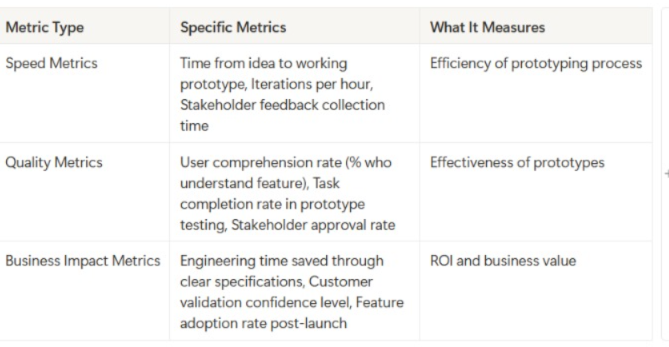
Prototype Validation Metrics
Speed Metrics:
- Time from idea to working prototype
- Iterations per hour
- Stakeholder feedback collection time
Quality Metrics:
- User comprehension rate (% who understand feature)
- Task completion rate in prototype testing
- Stakeholder approval rate
Business Impact Metrics:
- Engineering time saved through clear specifications
- Customer validation confidence level
- Feature adoption rate post-launch (tracked back to prototype quality)
Customer Validation Framework
Comprehension Testing:
- "What do you think this feature does?" (understanding)
- "What problem would this solve for you?" (relevance)
- "How does this compare to what you do today?" (value)
Usability Testing:
- Task completion rate
- Time to complete key actions
- Error rate and confusion points
Value Proposition Testing:
- "Would you pay for this feature?" (willingness to pay)
- "How often would you use this?" (frequency)
- "What's the biggest benefit?" (primary value driver)
ROI Calculation Framework
Traditional Development Path:
- Discovery: 2-3 weeks × $15K/week = $30-45K
- Design: 2-3 weeks × $12K/week = $24-36K
- Development: 6-12 weeks × $20K/week = $120-240K
- Total: $174-321K
AI Prototyping Path:
- Prototyping: 2-3 days × $1K/day = $2-3K
- Validation: 1 week × $3K = $3K
- Refined Development: 4-8 weeks × $20K/week = $80-160K
- Total: $85-166K
Average Savings: $89-155K per feature (45-50% cost reduction)
Common Pitfalls and How to Avoid Them
Prototype Perfection Paralysis
- Symptoms: Spending days polishing visual details instead of validating core assumptions
- Solution: Set strict time limits per fidelity level
- Prevention: Always start with "what's the riskiest assumption?" and prototype to test that first
The Demo That Never Dies
Symptoms: Prototype becomes the specification; features creep in endlessly
Solution: Define clear handoff criteria upfront
Prevention: Version control your prototypes and set "feature freeze" points
Stakeholder Telephone
- Symptoms: Prototype changes based on contradictory feedback from different stakeholders
- Solution: Facilitate group feedback sessions instead of individual input
- Prevention: Document all feedback with stakeholder attribution
Technical Debt Blindness
- Symptoms: Prototype works great but would be nightmare to implement
- Solution: Include engineering review at 50% prototype completion
- Prevention: Start with technical constraints, build prototype within them
Customer Confirmation Bias
- Symptoms: Only showing prototype to customers who you know will like it
- Solution: Include skeptical customers and edge case users
- Prevention: Random customer selection, not cherry-picked advocates
Preparing for the Next Wave
- Build Your Prompt Library: Save and categorize your best prompts
- Document Your Processes: Create repeatable workflows for your team
- Train Your Stakeholders: Help others understand how to give better feedback on prototypes
- Measure Everything: Build data collection into your prototyping workflow
- Stay Current: Follow AI tool development closely; capabilities change monthly
Your 30-Day AI Prototyping Transformation Plan
Week 1: Foundation Building
- Day 1-2: Set up accounts with ChatGPT/Claude, v0, and Replit
- Day 3-4: Practice with 3 simple prototypes using provided templates
- Day 5-7: Build one prototype of existing feature to compare with current implementation
Week 2: Stakeholder Integration
- Day 8-10: Present prototypes to 3 different stakeholder types, gather feedback
- Day 11-12: Iterate based on feedback, document what works
- Day 13-14: Create your first customer validation prototype
Week 3: Process Optimization
- Day 15-17: Test 3 different tools on same feature, compare results
- Day 18-19: Build your personal prompt template library
- Day 20-21: Document your preferred workflow for different use cases
Week 4: Team Scaling
- Day 22-24: Train one teammate on AI prototyping
- Day 25-26: Create team standards for prototype quality and handoffs
- Day 27-30: Plan integration of AI prototyping into official product development process
Success Metrics for 30 Days:
- Build 10+ prototypes across different complexity levels
- Validate 3 new feature ideas with customers
- Reduce average feature specification time by 50%
- Increase stakeholder alignment scores on new features
Conclusion: Your Competitive Advantage Starts Now
The companies winning in today's market aren't just building better products, they're building the right products faster than their competition. AI prototyping isn't just a new tool; it's a fundamental shift in how product decisions get made.
The Early Adopter Advantage:
- While your competitors debate features in meetings, you're testing them with customers
- While they spend months on specifications, you're iterating based on real feedback
- While they build features users don't want, you're building exactly what creates value
Your Next Action:
- Choose your first prototype project (start simple)
- Set aside 2 hours this week to build it
- Share it with one stakeholder and one customer
- Document what you learn
The future belongs to product managers who can think, build, and validate at the speed of thought. That future starts with your next prototype.
Remember every day you wait to start AI prototyping is a day your competition gets closer to discovering these advantages. The tools are ready. The customers are waiting.
What will you build first?


.png&w=1200&q=75)