


Here's What It Actually Is, What It Can Do Today, and Why Product Managers Should Pay Attention
When Anthropic launched Claude Cowork in January 2026, software stocks didn't just dip, they cratered. Thomson Reuters fell nearly 16% in a single day. LegalZoom dropped 20%. FactSet sank over 10%. A software industry ETF had its worst session since April.
Markets were pricing in a threat, not a feature update.
Whether that reaction was overdone is a separate question. But the underlying signal is worth taking seriously: Cowork represents something structurally different from the AI tools that came before it. And for product managers specifically, it changes what's possible in ways that aren't obvious from the marketing copy.
This piece is an honest look at what Cowork actually does, where it's genuinely useful today, where it still has gaps, and how to start using it productively, without the hype.
What Cowork Actually Is
The clearest description of Cowork came not from Anthropic's marketing but from Simon Willison, a developer who reverse-engineered it on launch day: it's Claude Code wrapped in a less intimidating interface, made accessible to people who've never touched a terminal.
Anthropic described Cowork as "Claude Code for the rest of your work." That framing matters. Claude Code was already a general-purpose agent, it could execute multi-step tasks, write and run code, manipulate files, and operate with significant autonomy. The limitation was that it required developer-level comfort to use effectively. Cowork removes that barrier.
In Cowork, you give Claude access to a folder of your choosing on your computer. Claude can then read, edit, or create files in that folder. That's the core mechanic. You're not uploading files into a chat window and getting text back. You're giving Claude a working directory and asking it to produce finished outputs, reorganized folders, synthesized reports, populated spreadsheets, drafted documents, directly inside that directory.
Under the hood, Claude uses Apple's Virtualization Framework and boots a custom Linux root filesystem to execute tasks safely. Everything happens in a sandboxed environment. Major actions require confirmation before they're applied.
As of late February 2026, Cowork has expanded significantly beyond its research preview origins. It now supports connectors for Google Workspace (Drive, Gmail, Calendar), DocuSign, FactSet, WordPress, LegalZoom, MSCI, and others, allowing Claude to pull context directly from workplace systems rather than relying solely on what users type.
Claude can now handle multi-step projects across Excel and PowerPoint, passing context between the two, meaning a user could ask Claude to run an analysis in Excel and then turn that analysis into a presentation, without restarting or re-explaining the task.
Eleven pre-built, open-source plugins span key business functions at launch, and organizations can build custom plugins using Plugin Create. Enterprise admins can build private plugin marketplaces, essentially configuring a specialized version of Cowork that follows company-specific workflows, what Anthropic calls "Cowork for legal at your company" rather than just "Claude for legal."
What This Means for Product Managers
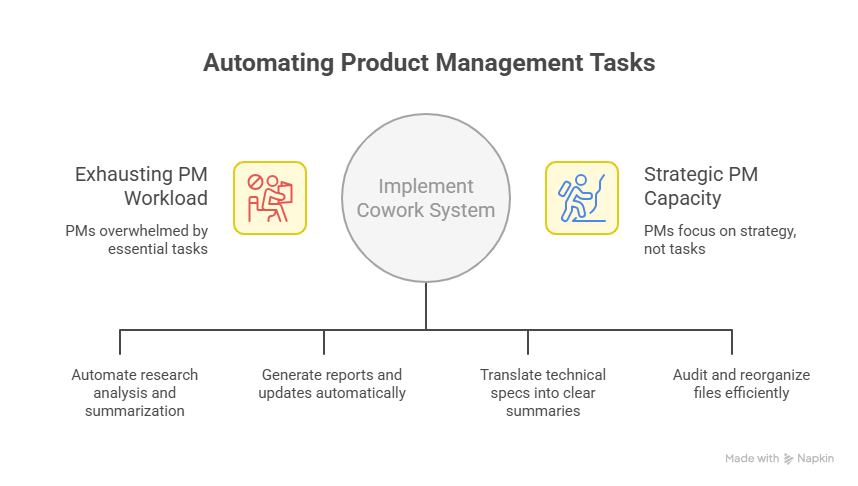
Product managers sit at the intersection of exactly the work Cowork is built for: synthesis, documentation, communication, and analysis. Most PM time is distributed across tasks that are individually essential but collectively exhausting, compiling research, formatting reports, updating decks, preparing stakeholder briefs, organizing files, extracting patterns from qualitative data.
None of this is strategy. But all of it consumes strategic capacity.
The meaningful change Cowork introduces isn't speed. It's delegation. You stop doing the work and start describing the outcome, and the system produces the output in your working directory, ready to review and refine.
Here's what that looks like concretely for common PM workflows:
Research Synthesis
This is the highest-leverage use case for most PMs. Raw research is unwieldy, transcripts in one folder, support exports in another, NPS verbatims in a spreadsheet, stakeholder notes from last month's interviews scattered across docs.
With Cowork, you point it at a folder containing your raw research and describe what you need back. A realistic instruction:
"Read all interview transcripts in this folder. Cluster the findings into themes. For each theme, list supporting quotes, a severity rating, and the user segment most affected. Write an executive summary (one page) and a detailed insights document. Save both to the Research_Summaries subfolder."
Cowork reads the files, executes the synthesis, and delivers finished documents, not a chat response you have to format yourself.
The output requires review and refinement. It doesn't replace judgment about which insights matter most given your strategic context. But it compresses what used to be a multi-day synthesis into a task you review before lunch.
Documentation and Reporting
Recurring documentation is the PM tax that never stops. Sprint retrospectives, weekly product updates, monthly metric summaries, quarterly reviews, these follow predictable structures and pull from predictable sources. They're exactly the kind of work Cowork handles well.
A working example:
"Every Monday, pull last week's metric exports from the Metrics folder. Identify trends in activation, retention, and churn. Flag anything that moved more than 10% week-over-week with a possible explanation. Write a one-page summary and a five-slide deck version. Save to Weekly_Reports and create a draft Slack message I can review and send."
You review the output, add context only you have, and send. The research and formatting are done.
Stakeholder Communication
PMs spend an underestimated portion of their time translating, taking information from one context (an engineering spec, a data export, a customer interview) and reframing it for a different audience (a sales team, a board member, a new customer).
Cowork reduces this translation tax significantly. You can ask it to take a technical spec and produce a customer-facing FAQ, or to take a detailed PRD and produce a three-paragraph executive summary that doesn't bury the recommendation.
Because Cowork can read from connected tools like Google Drive and Gmail, it can pull context from where you already work rather than requiring you to copy-paste everything into a chat window first.
File and Knowledge Organization
This is the least glamorous use case and the one that pays dividends the fastest. Most PM workspaces accumulate months of poorly named files, redundant documents, and folders that reflect how information arrived rather than how it should be accessed.
"Audit the Product_Docs folder. Identify duplicate files and outdated documents (anything not modified in 90+ days that has a newer version). Propose a folder taxonomy. After I approve it, reorganize the files and create a change log."
The confirmation step matters here. Cowork won't move files without showing you the plan first. You review, approve, and the reorganization happens.
The Right Approach
The original instinct most people have with a new tool is to start with their most important work. That's the wrong approach here, especially because Cowork is still in active development.
Start with low-stakes, high-frequency tasks. Weekly summaries, research clustering, template formatting, documentation cleanup. These are tasks where the cost of an imperfect output is low and the pattern is clear enough that Cowork produces consistent results. Build confidence through repetition.
Create a dedicated PM workspace folder. Before giving Cowork access to your computer, structure a clean working directory:
Grant Cowork access only to this directory. This keeps your sensitive files outside the working scope and gives you a clean audit trail of what Cowork has produced.
Describe outcomes, not steps. The most common mistake is writing Cowork instructions like a to-do list. "Open file A. Extract the data. Format it as a table. Save it." That's micromanagement, you're doing the planning work that Cowork can handle. Better instructions describe the deliverable:
"Create a competitive analysis matrix from the files in Competitor_Research. Include: product features, pricing, target customer, and key differentiators. Output as a spreadsheet with a summary insights tab. Save to Outputs/Competitive."
Cowork plans the execution. You review the result.
Use global and folder instructions to customize behavior. You can set global preferences about your tone, format, or role background that apply across every session, as well as folder-specific instructions that activate whenever you're working in that directory. Use these to encode your PM context, your team size, your product, your audience's technical level, your preferred document formats, so you're not re-explaining it every time.
Honest Limitations
A useful blog about any tool should tell you where it falls short.
Cowork is still in research preview. It's capable but inconsistent, the quality of output varies by task type, and complex multi-step workflows occasionally require correction midway through. This will improve, and Anthropic is iterating quickly, but it means Cowork requires more supervision than a mature tool would.
It doesn't replace judgment. Cowork can synthesize your user research, but it can't decide which insight should change your roadmap. It can write the executive summary, but it can't know whether the framing aligns with your company's political dynamics. The higher the strategic stakes, the more human review the output needs.
The integration layer is new and still maturing. The Google Drive, Gmail, and other connectors are genuinely useful, but they're not seamless yet. Expect occasional friction in pulling context from external tools, especially in enterprise environments with access controls.
And access isn't universal. Cowork remains in research preview and is available to paid subscribers, it launched first for Max subscribers and expanded to Team and Enterprise plans through early 2026. If you're on a free plan, you'll need to wait or upgrade.
Why This Is Different From Chat AI
Most PMs are already using Claude or ChatGPT for their thinking work — drafting, reasoning, analyzing. That use case isn't going away, and it's genuinely valuable.
What Cowork adds is execution. Not faster answers, but actual outputs delivered to your working directory, produced by a system that planned the approach, read your files, and ran the task.
As Anthropic's head of product Scott White put it: "Cowork makes it possible for Claude to deliver polished, near-final work. It goes beyond drafts and suggestions, actual completed projects and deliverables."
That distinction, between a system that helps you think and a system that does the work, is what makes Cowork structurally significant rather than incrementally useful.
The comparison that keeps coming up internally at Anthropic is Claude Code. As Kate Jensen, Anthropic's head of Americas, said: "Engineers think about Claude Code as a tool that they just couldn't live without anymore. We expect that every knowledge worker will feel that way about Cowork." That's a high bar, but it explains the ambition: not a tool you use occasionally for specific tasks, but a tool that becomes part of how you work by default.
Whether Cowork gets there depends on how quickly the execution reliability improves and how well the integrations mature. But the direction is clear, and the early capability is real.
Prompt Templates for PM Workflows
These are starting points, not finished solutions. Adjust the folder names, output formats, and criteria for your actual workspace.
User Research Synthesis
"Access the User_Research folder. Read all interview transcripts and feedback documents. Cluster findings into themes, each theme should be supported by at least 3 separate sources. For each theme: write a 2-sentence description, list supporting quotes, rate severity 1–5, and note the most affected user segment. Create: (1) a one-page executive summary PDF, (2) a detailed insights document, (3) a list of unmet needs formatted as 'Users need a way to X so they can Y.' Save all outputs to Research_Summaries."
Weekly Product Update
"Every Monday morning: review the Metrics folder for last week's data exports. Identify movements in activation, retention, DAU, and churn. Flag anything that moved more than 10% week-over-week. Write a one-page summary with: what moved, probable cause, and recommended response. Also create a 3-slide deck version and a Slack-ready paragraph. Save to Weekly_Reports/[current date]."
Sprint to Stakeholder Update
"Read the latest sprint notes in Sprint_Notes. Extract all shipped features, decisions made, and issues flagged. Write two versions: (1) a technical summary for engineering (keep the detail), (2) a stakeholder update for non-technical audiences (translate the outcomes, remove the jargon). Save both to Stakeholder_Reports."
Competitive Analysis
"Review all files in Competitor_Research. For each competitor, extract: product capabilities, pricing structure, target customer segment, stated positioning, and anything flagged as a weakness or gap in the source materials. Create a comparison matrix spreadsheet. Add a summary tab with: our differentiators, their differentiators, shared table-stakes features, and 3 strategic implications for our roadmap. Save as both Excel and PDF."
Quarterly Review Package
"Compile all monthly reports from Q_Reports/Q1. Identify the three biggest wins, three biggest failures, and five most significant metric movements. Write: (1) a 10-slide board-ready deck with context and analysis, (2) a two-page narrative memo, (3) a bullet summary for the CEO update. Maintain consistent framing across all three. Save to Quarterly_Reviews/Q1_Final."
The Bigger Picture
Cowork's launch landed in a market already anxious about AI's trajectory in the workplace. The stock market reaction wasn't irrational, it was a recognition that a tool capable of doing real knowledge work at scale has genuine implications for the demand for human knowledge workers.
Anthropic's head of economics has been direct about this. Peter McCrory expressed concern specifically about AI automating "pure implementation" jobs, data entry workers who handle unstructured data, or technical writers who synthesize and explain jargon, noting that Claude is already being used for the central tasks associated with those roles.
For product managers, the most vulnerable parts of the role are exactly the execution tasks this blog has been describing, the documentation, the synthesis, the formatting, the reporting. Those tasks aren't going away overnight, but they're going to require less human time to complete. That's a compression, not an elimination.
What expands is the value of the judgment work: deciding what the research means, choosing which problems to solve, navigating the organizational dynamics that determine what actually gets built, maintaining the strategic narrative that holds a product team together. Those are the things Cowork cannot do, and they're the things that make a product manager worth having.
The shift is real. The right response isn't to ignore it or to be defensive about it. It's to move as much of your work as possible into the high-judgment category, and to use tools like Cowork to get out of the execution bottleneck faster.
That's the premise. The tool is here. It's worth using.


.png&w=1200&q=75)