


Beyond "Autocomplete"
When OpenAI Codex first emerged, it promised something revolutionary: an AI that could write code from natural language descriptions. Developers marveled at its ability to generate functions, fix bugs, and translate requirements into working snippets. It was autocomplete on steroids, impressive, but fundamentally reactive.
Fast forward to 2026, and Codex has undergone a transformation that redefines what AI-assisted development actually means. It's no longer about generating the next line of code or suggesting a clever refactor. Today's Codex is a command center for agentic development, orchestrating multiple AI agents that work in parallel, managing complex workflows, and automating entire swaths of the development lifecycle.
For engineers drowning in context-switching, product leaders fighting to maintain velocity, and CTOs navigating the economics of modern software delivery, this evolution isn't just interesting. It's fundamental to how competitive teams will ship software in 2026 and beyond.
What OpenAI Codex Is in 2026
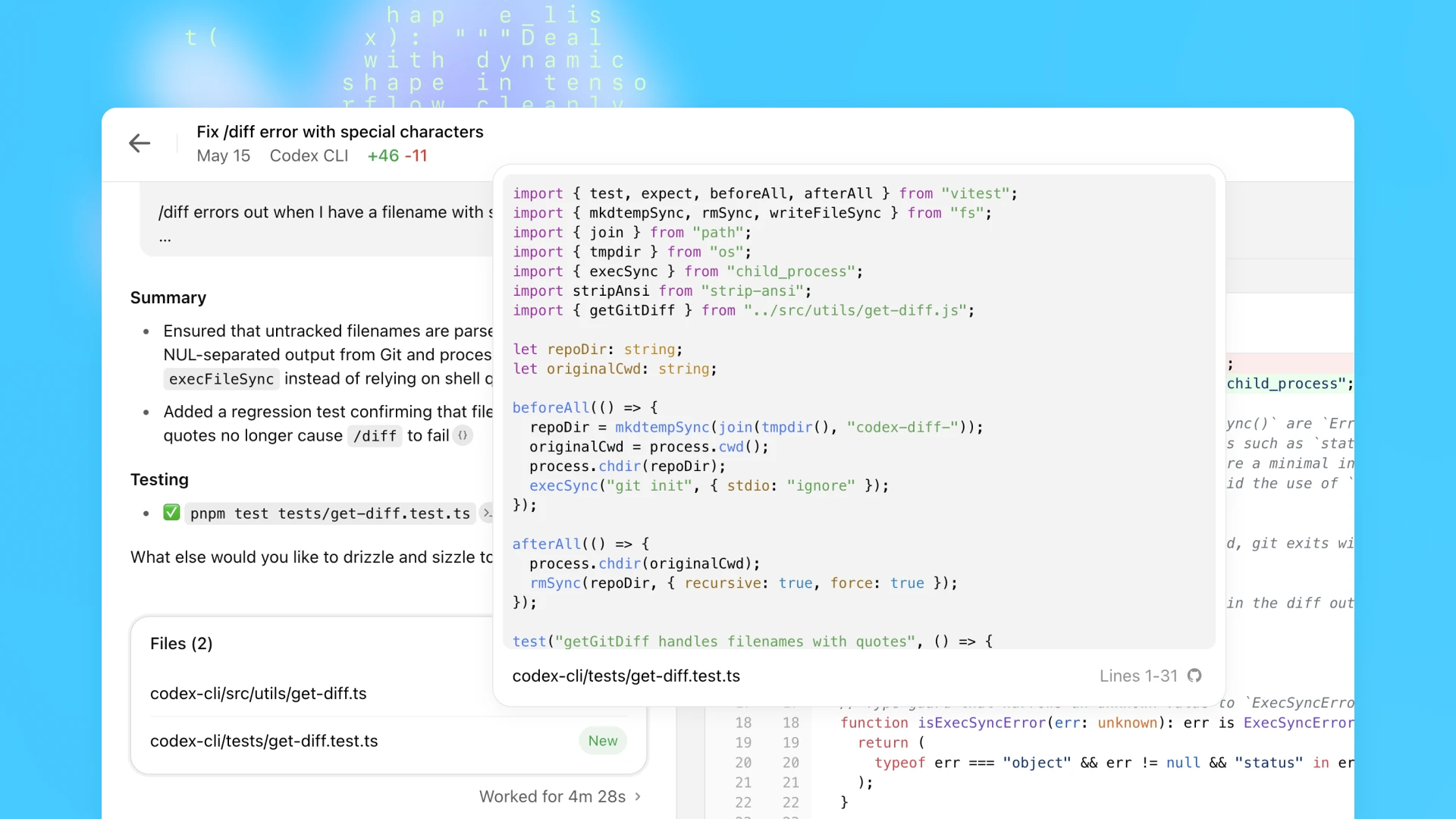
The new Codex macOS app represents a paradigm shift from suggestion to orchestration. Instead of waiting for you to write code so it can offer improvements, Codex now operates as an agentic coding platform, one where multiple AI agents execute long-horizon tasks simultaneously, each in isolated environments, working toward coordinated outcomes.
This is agentic coding: the practice of deploying autonomous agents that can decompose complex development work, execute tasks in parallel, and integrate across your entire toolchain. While ChatGPT helps you think through problems and GitHub Copilot suggests code as you type, Codex orchestrates actual workflows. It's the difference between a helpful assistant and a team of junior developers who never sleep.
Here's what makes 2026 Codex fundamentally different:
Multi-agent parallel execution means you can simultaneously build features, triage bugs, write tests, and audit security, each agent operating independently with clear boundaries.
Worktree isolation ensures each agent works in its own git worktree, eliminating merge conflicts and allowing clean, reviewable diffs before integration.
Background automations handle recurring development tasks without manual prompting, daily test failure summaries, continuous dependency updates, scheduled code quality reports.
Skills extend Codex beyond pure coding into ecosystem integrations: converting Figma designs to components, orchestrating cloud deployments, fetching external assets, even managing infrastructure configurations.
The result is a development environment where AI doesn't just assist, it actively contributes across the entire software delivery pipeline.
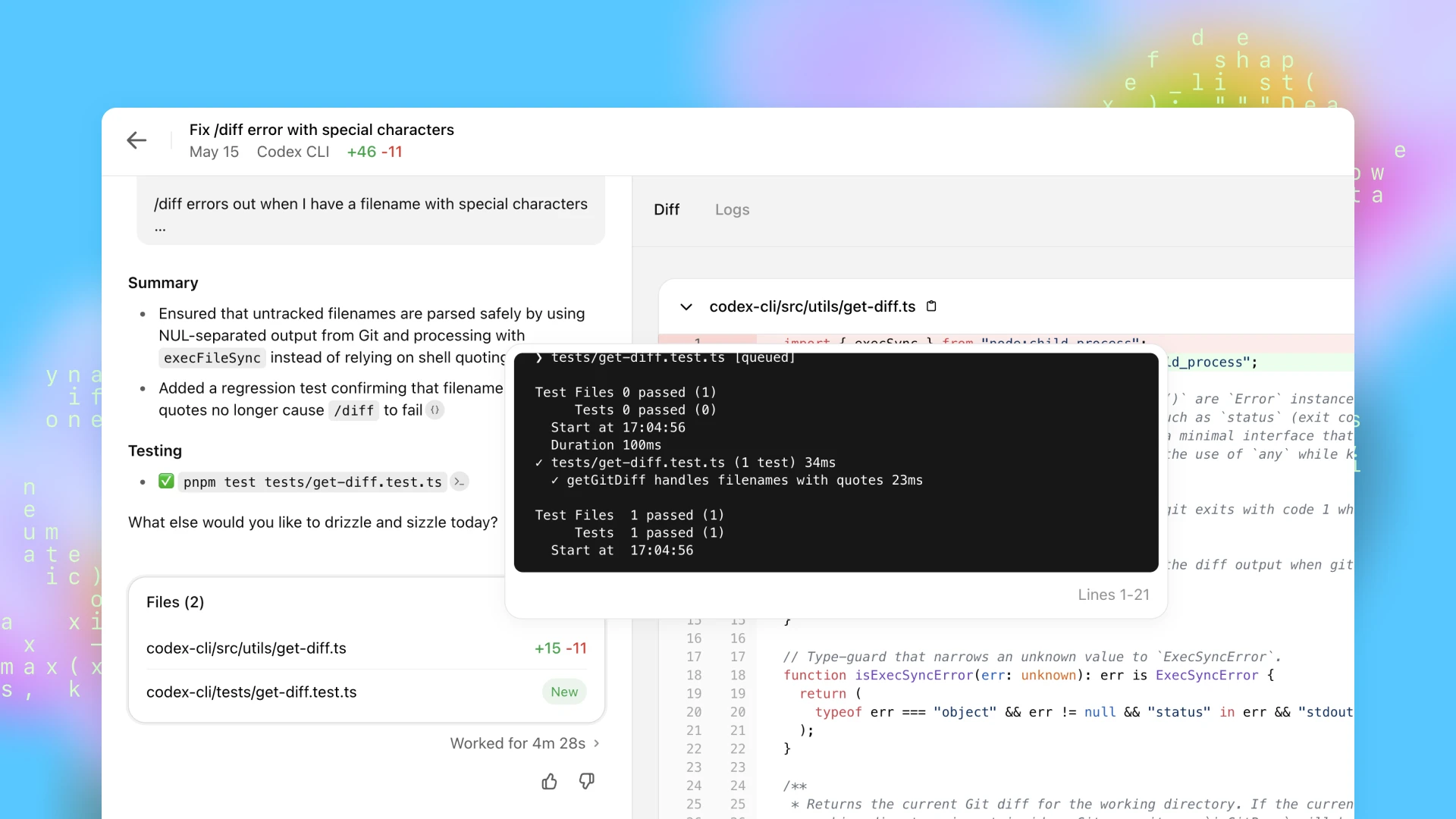
Real User Case: Parallel Feature Build & Bug Triage
Let me paint a picture of how this actually works in practice.
The Scenario:
A mid-sized engineering team at a fintech startup needs to ship a new payment reconciliation dashboard, address a backlog of legacy authentication bugs, and expand test coverage across their API layer, all within their standard weekly sprint cadence.
The Problem:
Their senior engineers are spending more time context-switching than coding. Sara starts building the dashboard UI, gets pulled into a production bug, loses two hours, then has to rebuild mental context before continuing. Meanwhile, automated tests languish because "there's never time," and technical debt accumulates faster than they can address it.
Manual context switching is killing their velocity. Developers spend hours juggling tasks instead of actually writing code.
The Codex Approach:
Sara opens the Codex app Monday morning and orchestrates four parallel agents:
Agent A begins feature scaffolding, generating the React components for the reconciliation dashboard, setting up routing, implementing state management patterns that match their existing architecture.
Agent B triages the legacy bug backlog, analyzing error logs, grouping issues by severity and root cause, and proposing remediation strategies for each cluster.
Agent C builds automated test coverage, writing unit tests for existing API endpoints, creating integration tests for critical user flows, and generating a coverage gap report.
Agent D runs static analysis and security checks, scanning for potential memory leaks, identifying outdated dependencies with known vulnerabilities, and flagging authentication edge cases.
Each agent operates in its own isolated worktree. No conflicts. No stepping on each other's toes. Just parallel progress across four critical workstreams.
The Outcome:
By Wednesday, Sara and her team review clear, isolated diffs from each agent. The dashboard foundation is ready for styling and business logic refinement. The bug triage reveals that 70% of authentication issues stem from two root causes, now they can fix them systematically instead of whack-a-mole. Test coverage jumps from 43% to 71%. The security audit identifies three critical vulnerabilities before they hit production.
Parallel execution reduced their cycle time by more than 40%. More importantly, it freed senior engineers to focus on architecture decisions and complex problem-solving rather than grinding through repetitive implementation work.
Sara also sets up an automation: every morning at 10am, Agent B now automatically summarizes test failures from the previous 24 hours and proposes remediation steps. Repetitive work becomes background noise instead of constant interruption.
Why This Example Matters:
This isn't science fiction. It's a fundamental shift from reactive assistance to proactive contribution across the development lifecycle. Codex isn't helping Sara write code faster, it's handling entire categories of work that previously required human attention, letting her team operate at a higher level of abstraction.
Key Features & How They Impact Workflows
Multiple Agents, Parallel Work
The ability to run concurrent agents, each in its own git worktree, eliminates the traditional bottleneck of sequential task execution. You're no longer choosing between building the feature or writing the tests or fixing the bugs. You're doing all of it, simultaneously, with clear isolation boundaries.
Example prompts that leverage this capability:
/plan: Create project scaffolding for the user analytics feature set,
including routing, state management, and API integration layer.
Generate and run tests for all existing API endpoints, report coverage
gaps, and propose test cases for uncovered edge cases.
Each agent produces isolated work that you can review, merge, or discard independently. The architecture mirrors how effective teams actually operate, parallel workstreams with clear handoff points.
Skills & Ecosystem Integrations
Skills are where Codex transcends pure code generation and becomes genuinely useful in real development environments. These are pre-built integrations that let agents interact with your actual toolchain, not just your codebase.
The Figma skill, for instance, doesn't just convert designs to code in some generic way. It translates design files into production-ready components that follow your existing style conventions, use your component library patterns, and integrate with your state management approach.
Example in practice:
Use the Figma skill to translate the checkout-flow-v3 design file into
production-ready React components, following our established design system
and accessibility standards.
The deployment skill orchestrates cloud infrastructure updates:
Use the deployment skill to push staging updates upon test pass, configure
blue-green deployment, and provide rollback instructions with automated
health checks.
This ecosystem integration means Codex operates within your development reality, not in an isolated code-generation sandbox. It understands your deployment pipeline, your design system, your monitoring stack, your issue tracker.
Automations for Background Work
Perhaps the most underrated feature is the automation scheduler. Set repetitive tasks to run without direct prompting, transforming maintenance work from constant interruption to automated background process.
Example automation configuration:
Schedule: Daily at 10am
Task: "Summarize test failures from the last 24 hours, categorize by
component, and propose specific remediation steps with code examples."
Schedule: Every Monday at 9am
Task: "Review dependency updates, flag breaking changes, and generate
migration guides for each affected package."
These automations run whether you're thinking about them or not. They produce consistent reports, catch issues early, and eliminate the "we should really check that" tasks that perpetually fall through the cracks.
Plan Mode for Strategy First
Before any agent writes a single line of code, Plan Mode lets you draft high-level strategies and formalize structured workflows. This is where Codex helps you think, not just execute.
Example planning prompt:
plan create a detailed roadmap for integrating the new payments API,
including authentication flow, webhook handling, idempotency patterns,
error recovery, and interactions with existing order management services.
Codex returns a structured plan, not code, but architecture. Decision points. Dependencies. Risk areas. You can refine this plan, get team feedback, and only then deploy agents to execute specific pieces.
This planning phase prevents the "we built it fast but built the wrong thing" problem that plagues AI-assisted development. Strategy first, execution second.
Prompt Guide - Steering Codex Like a Colleague
Effective Codex usage in 2026 isn't about writing better code prompts. It's about learning to delegate like you would to a capable colleague, with clear intent, explicit success criteria, and verifiable deliverables.
Prompt Type 1: Task Decomposition
Instead of asking for finished code, ask for structured breakdown:
Generate a step-by-step plan for building the inventory microservice with
Redis caching layer, health check endpoints, circuit breaker patterns, and
graceful degradation under cache failure.
This produces a roadmap you can review, modify, and then assign to agents for execution.
Prompt Type 2: Quality Assurance
Leverage Codex for code review that goes beyond style checks:
Review the last 50 commits in the payment processing module. List
potential memory leaks, race conditions, or performance bottlenecks
with specific line references and justification for each concern.
The key is specificity, not "review this code" but "review for X, Y, Z with justification."
Prompt Type 3: Agent Coordination
Explicitly orchestrate multiple agents with clear responsibility boundaries:
Assign parallel tasks: Agent 1 handles backend GraphQL schema and
resolvers, Agent 2 builds frontend query hooks and cache management,
Agent 3 writes integration tests covering happy path and error cases.
Provide a coordination summary showing dependencies between agents.
This mirrors how you'd delegate to a team, clear roles, explicit handoffs, coordination awareness.
Prompt Type 4: Skill-Driven Actions
Invoke ecosystem integrations for non-coding workflows:
Use the deployment skill to push staging updates upon successful test
completion, configure automatic rollback if error rate exceeds 2%, and
post deployment summary to #engineering-updates Slack channel.
These prompts treat Codex as infrastructure orchestrator, not just code generator.
The Critical Pattern:
Always clarify expected outcome plus review criteria. Don't say "make it better." Say "provide actionable change list prioritizing test failures and security vulnerabilities, with specific line numbers and remediation code for each issue."
This paradigm emphasizes clear intent and verifiable deliverables, not vague descriptions. It's the difference between delegating to an intern who needs constant guidance and delegating to a senior engineer who can run with requirements.
Safety & Governance Considerations
As Codex becomes more agentic and autonomous, the stakes around safety and control become more significant. Here's how to think about governance in 2026:
Review before merge is mandatory. Despite automation capabilities, manual verification of diffs remains non-negotiable. Agent-generated code should be treated like any pull request from a new team member, reviewed for correctness, security implications, and architectural fit. The isolated worktree model makes this feasible; each agent's changes are clearly bounded and reviewable.
Sandboxing and permission control. Codex includes built-in system sandboxing to limit risky commands. Agents can't arbitrarily execute shell commands with elevated privileges or modify production infrastructure without explicit permission gates. You define the boundaries, which APIs agents can call, which files they can modify, which external services they can access.
Audit trails for accountability. Every diff is tagged with which agent produced it, when, and in response to what prompt. If a bug ships, you can trace it back to the specific agent session, review the original requirements, and understand what went wrong. This audit capability is essential for teams operating in regulated environments or maintaining SOC 2 compliance.
The goal isn't to eliminate human oversight, it's to make oversight efficient and focused on high-value decisions rather than line-by-line syntax checking.
Broader Industry Impact
Codex's evolution to agentic development isn't happening in isolation. The entire industry is converging on this model:
Apple integrated Codex into Xcode for agentic coding directly within the IDE environment. Developers can now spin up agents that write, test, and verify work without leaving their primary development tool. The integration respects Xcode's existing build system, testing framework, and debugging tools, Codex agents operate as native participants in the Apple development ecosystem.
GitHub expanded its AI suite to include Codex agents as optional companions during pull requests and code reviews. Instead of just suggesting improvements to your code, GitHub Copilot can now deploy a Codex agent to automatically address review comments, refactor based on feedback, or expand test coverage in response to maintainer requests.
This industry-wide movement signals something fundamental: we're shifting from AI as autocomplete to AI as active teammate. The question is no longer "Can AI write code?" but "How do we structure workflows where AI agents contribute alongside human developers?"
Major platforms are betting that the future of software development involves orchestrating both human and AI contributors across parallel workstreams, not replacing developers, but fundamentally changing what "development work" means.
What This Means for 2026 Engineering
We've reached an inflection point. Codex in 2026 is a command center for agentic software development, not a code generator with extra features. It orchestrates parallel workflows, deploys autonomous agents with specific expertise, and integrates reusable skills across your entire toolchain.
This evolution signals a broader trend that every engineering leader needs to internalize: AI is becoming an active teammate, not a passive assistant. The competitive advantage won't go to teams that use AI to write code slightly faster. It will go to teams that redesign their entire development workflow around AI-augmented collaboration.
The engineers who thrive in this environment will be those who learn to think in terms of task orchestration rather than implementation details. The CTOs who succeed will be those who recognize that velocity now means "how effectively can we coordinate human creativity with AI execution" rather than "how many lines of code can we ship per sprint."
In 2026, software engineering isn't about writing code faster. It's about designing AI-augmented workflows that deliver reliable, high-velocity results while freeing human developers to focus on the problems that actually require human judgment, creativity, and strategic thinking.
The command center is open. The agents are ready. The question is: how will you orchestrate them?


.png&w=1200&q=75)