
Since ChatGPT came out, there’s been a lot of buzz about AI and how it can help businesses—especially among non-technical senior leaders. Every company wants to use this technology in ways that fit their industry and boost growth.
But how do you actually do that?
The answer is simple: businesses can tap into the fast-growing OpenAI API, created by the team behind ChatGPT, to build custom solutions that match their specific needs.
As beginner data scientists and machine learning learners, we know OpenAI has been around for a while, long before ChatGPT became popular. But many of us haven’t yet used it to solve real business challenges. With all the recent advances, understanding this API is more important than ever.
In this tutorial, we’ll cover just that: a quick intro to OpenAI and its API, a step-by-step guide from setting up an OpenAI account to making API calls, and tips on how to use the API effectively. This will give you a solid overview of the OpenAI API.
Interested in seeing the OpenAPI in action?
An Overview of OpenAI and Its API
OpenAI is an AI research and deployment company focused on making sure artificial general intelligence benefits everyone.
It started in 2015 as a non-profit, founded by people like Elon Musk and Sam Altman. Over time, OpenAI shifted from a non-profit to a mixed model, teaming up with big tech companies like Microsoft to help achieve its mission.
What is OpenAI API?
The OpenAI API is a tool that connects you to OpenAI’s advanced machine learning models, making it easy to add AI features to your projects.
Simply put, the API acts like a helper that lets you use OpenAI’s smart programs like understanding and generating text without needing to know all the technical details behind them.
.addepto
Is the OpenAI API free?
You can get an OpenAI API key for free and try out the technology without any cost. During the free tier, you can make unlimited API requests but with access to a limited set of models.
Once your $5 free credit runs out or expires, you can add billing details and pick a pay-as-you-go plan. The cost depends on which AI model you use and how many tokens you consume.
Tokens are chunks of words—about 1,000 tokens equal roughly 750 words. For example, GPT-3.5-turbo costs around $0.002 per 1,000 tokens, while the Davinci model is about $0.02 per 1,000 tokens.
For image generation, pricing varies by resolution: a 1024×1024 image costs $0.02, 512×512 is $0.018, and 256×256 is $0.016.
In most cases, using the OpenAI API is cheaper than a ChatGPT Plus subscription, but it depends on how much you use it.
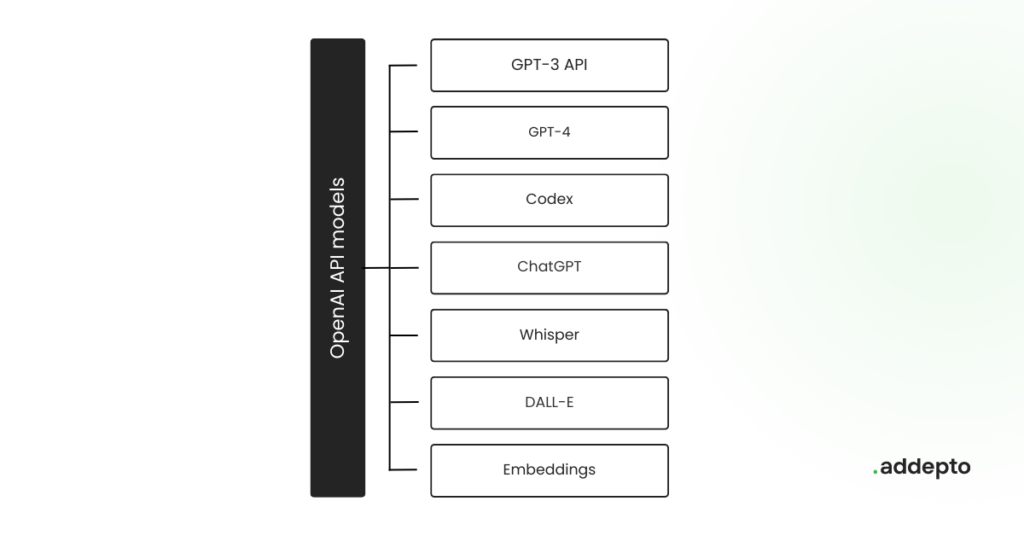
Type of OpenAI API Models
1. GPT (Generative Pre-trained Transformer) Models
- Purpose: General language models used for tasks like writing, understanding, summarizing, translating, chatting, and more.
- Examples: GPT-3, GPT-3.5, GPT-4
- Overview: These models learn from huge amounts of text and create relevant, clear responses based on your input. GPT-4 is the newest, with better reasoning, creativity, and ability to follow instructions than the earlier versions.
2. Codex Models
- Purpose: Models designed for writing, understanding, and helping with code.
- Examples:
code-davinci-002,code-cushman-001 - Overview: Codex is built on GPT-3 and trained with lots of public source code. It can write code snippets, complete or explain code, translate between languages, and create full functions from plain language. It’s the engine behind tools like GitHub Copilot.
3. DALL·E Models
- Purpose: Create images from text descriptions.
- Examples: DALL·E 2, DALL·E 3
- Overview: These models turn detailed text prompts into images. They understand things like objects, colors, and styles to generate artwork, product designs, or realistic pictures.
4. Whisper Models
- Purpose: Convert speech into text.
- Examples: Whisper base, Whisper large
- Overview: Whisper is a speech recognition system that accurately transcribes audio into text, supporting many languages and accents.
5. Embedding Models
- Purpose: Turn text into numerical vectors for tasks like search, grouping, or classification.
- Example:
text-embedding-ada-002 - Overview: These models convert words or sentences into fixed-size vectors that capture their meaning, helping with better search and similarity matching.
.addepto
OpenAI API Features
Here are some key features that make the OpenAI API a great choice for businesses wanting to add AI capabilities:
1. Pre-trained AI models
Pre-trained models are machine learning models already trained on large datasets for general tasks before being used for specific purposes. OpenAI trains these models once and provides them via API, saving time and resources.
Some popular models include:
- GPT-4: Advanced version of GPT-3.5, can understand and create text and code.
- GPT-3.5: Improved GPT-3 models that handle text and code well.
- GPT Base: Basic models for text or code but with limited instruction-following.
- DALL·E: Creates and edits images from text prompts.
- Whisper: Converts speech into written text.
- Embeddings: Turns text into numeric vectors for better search and analysis.
- Moderation: Detects unsafe or sensitive content.
These models require huge data and computing power that’s hard for most to access. Thanks to OpenAI’s API, data scientists and businesses can now easily use these powerful models.
2. Customizable AI models
Customizing OpenAI models mostly means fine-tuning—adjusting pre-trained models to fit your specific needs better.
With the OpenAI API, you can take a pre-trained model, train it further using your own data, and then use this fine-tuned model for your projects. You can learn more about fine-tuning GPT-3. Fine-tuning can reduce costs and speed up response times for your applications.
3. Simple API interface
The OpenAI API platform is beginner-friendly and easy to use. With just a few lines of code and helpful quick-start examples, you can start using the API quickly without a tough learning curve.
This makes it great for newcomers in data science, turning AI into something approachable and exciting.
4. Scalable infrastructure
OpenAI uses huge Kubernetes clusters with 7,500 nodes to support big models like GPT-3, CLIP, and DALL·E, plus fast research. The Azure OpenAI Service runs on Microsoft’s global network, ensuring strong security, compliance, and availability worldwide.
As your projects grow, you need infrastructure that can keep up. OpenAI API scales smoothly from small tests to large, demanding applications, making it a reliable choice for your AI needs.
Industry Use-Cases of OpenAI API
More than 300 apps use GPT-3 through the OpenAI API, showing how many creative and unique solutions are being built worldwide. Here are some popular ways industries are using the OpenAI API:
1. Chatbots and virtual assistants
OpenAI’s ability to understand and generate human-like text makes it perfect for building smart chatbots and virtual assistants. Models like GPT-4 or ChatGPT can power conversational agents that chat naturally with users, improving engagement and providing automated support on websites, apps, or customer service platforms.
2. Sentiment analysis
Sentiment analysis helps understand emotions behind text like reviews or social media comments. Using models like GPT-4 or GPT-3.5, you can automate this process to quickly gauge customer feelings and public opinion—valuable insights for shaping business strategies.
3. Image Recognition
While OpenAI is known for text, it also works with images through models like CLIP. CLIP links images with text descriptions, enabling tasks like object detection and image classification. This has uses in areas like healthcare, where it can help identify conditions from medical images.
4. Gaming and Reinforcement learning
OpenAI’s models are also used in gaming and reinforcement learning, where they learn to make decisions and play games either autonomously or by helping players. Examples include Dactyl solving a Rubik’s cube and OpenAI Five competing in Dota 2 against humans.
OpenAI Capabilities
Before we dive deeper, here’s a quick overview of what the OpenAI API can do. You can access these powerful tools through API endpoints using either:
curlcommands, or- the official
openaiPython library.
- Text Generation: The GPT family (GPT-3, GPT-3.5, GPT-4) generates text — whether it’s writing documents, coding, answering questions, or chatting. You provide a prompt, and the model responds with relevant, coherent text.
- Image Generation: DALL·E creates and manipulates images based on your text prompts, allowing you to generate original artwork or modify existing images.
- Embeddings: Text embeddings turn sentences into numerical vectors for use cases like semantic search, clustering, recommendations, and anomaly detection. The
text-embedding-ada-002model is a popular choice here. - Speech to text: Whisper converts audio into text, supporting transcription and translation of audio files via the API.
- Fine-tuning: You can customize OpenAI’s models by fine-tuning them with your own training data to improve performance on your specific tasks beyond basic few-shot prompting.
Hands-On: Getting Started with OpenAI API
If you’re new to OpenAI API, no worries! Let’s walk through your first API call step-by-step and get you started on using this exciting technology.
Step 1: Create an OpenAI Platform Account
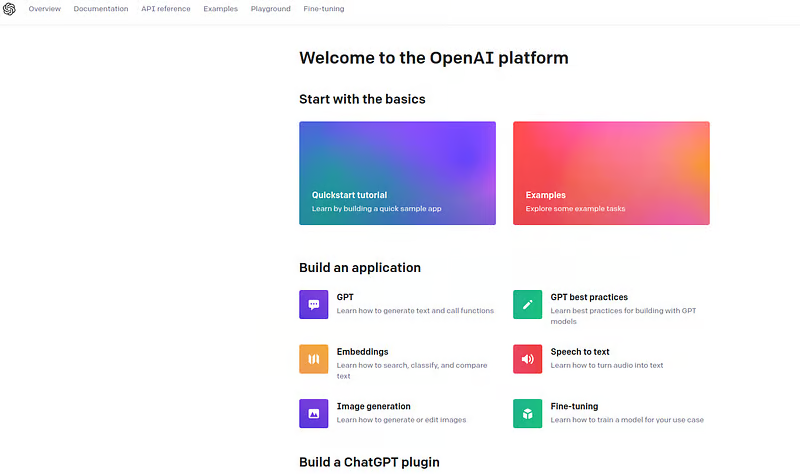
First things first you need to create an account on the OpenAI platform.
Go to OpenAI’s platform and follow the sign-up instructions. Once you complete the process, you’ll have access to your dashboard, where you can manage API keys, monitor usage, and explore the available tools.
Step 2: Get Your API Key
After setting up your account, the next step is to obtain your API key. This key is essential—it authenticates your requests and lets you interact with the OpenAI API securely.
To get your API key:
- Log in to your OpenAI platform account.
- Navigate to the API Keys section from your dashboard or profile menu.
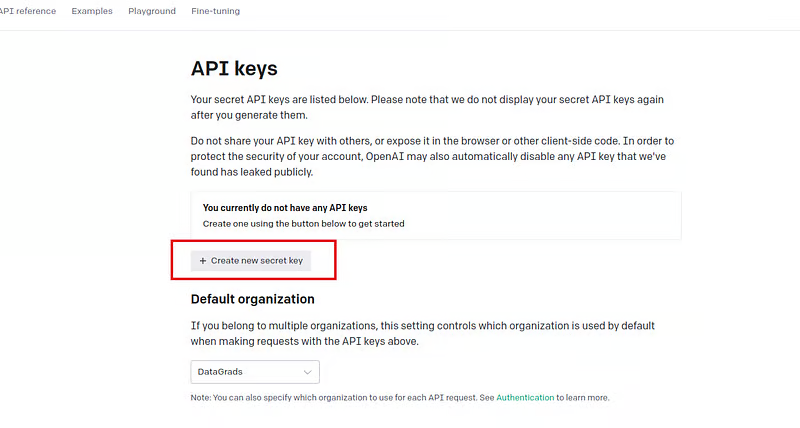
- Click Create new secret key.
- Copy the generated API key and store it securely—this key won’t be fully visible again for security reasons.
Here’s a diagram showing where to find the API Keys page:
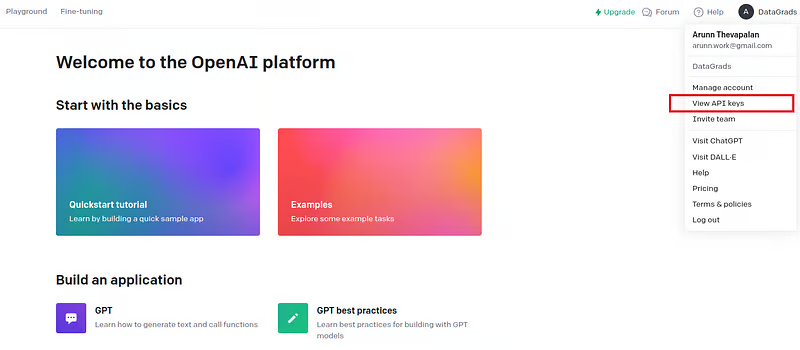
You can now create an API key. Make sure to copy and keep it safe, as you won’t be able to view it again later. If you lose your key or need a new one, you can always generate a fresh API key from the dashboard.
Step 3: Install the OpenAI Python library
With your account and API keys ready, the next step is to set up your local environment. You can connect to the OpenAI API easily using OpenAI’s Python library on your own computer.
You can install it using pip using the command below:
Step 4: Making your first API Call
Now that you have your API key and the OpenAI library installed, it’s time to make your first API call.
Here’s the code to do so:
We create a helper function that uses the ChatCompletion API with the “gpt-3.5-turbo” model. It takes a user prompt as input and returns the generated response.
Here’s the response (please feel free to validate it if you know a bit of Spanish!):

Step 5: Exploring further
You’ve made your first API call, great job! Now you can:
- Try out different models to see which fits your needs best.
- Play around with prompts and settings to understand how the API behaves.
- Check out the OpenAI docs to explore more features.
This is your starting point to think creatively about how to apply the API to your own projects or business challenges. (More resources are available at the end of this guide.)
Best Practices When Using OpenAI API
Now that you’ve got some hands-on experience, here are some key tips to keep in mind before integrating the API into your projects:
1. Know the pricing structure: The API charges you based on usage, measured in tokens. Tokens are chunks of words—1,000 tokens roughly equals 750 words. Each model has its own cost per 1,000 tokens. Check the latest rates on the OpenAI pricing page.
When you sign up, you get $5 free credit valid for three months. This lets you explore and test without paying upfront.
2. Keep your API key secure: Avoid putting your API key directly in your code. Instead, store it in environment variables. This keeps your key safe and makes it easier to manage, especially in teams. If you ever need to change the key, you won’t have to hunt through your code.
3. Use the newest Models: Newer models usually perform better but may cost more. It’s a good idea to test a few models and pick the one that balances cost and performance best for your needs.
4. Optimize with batching: Batching means sending multiple requests together in one API call instead of many small ones. This helps if you hit request limits but still have token capacity left. It reduces the number of calls and can save money while keeping within rate limits.
Learn more about batching here: Batching with ChatCompletion endpoint
Resources
1. OpenAI Official API Documentation
- What: Full documentation for all OpenAI API models, usage examples, developer guides, and reference.
- Link: https://platform.openai.com/docs
2. OpenAI Pricing Page
- What: Detailed pricing info for different models and usage tiers.
- Link: https://openai.com/pricing
3. OpenAI Research Papers & Publications
- What: Access to research papers and official publications by OpenAI.
- Link: https://openai.com/research
4. OpenAI GitHub Repository
- What: Official OpenAI repos, including example projects, SDKs, and tools.
- Link: https://github.com/openai
5. OpenAI API Playground
- What: Interactive playground to test models like GPT, Codex, DALL·E, etc.
- Link: https://platform.openai.com/playground
6. OpenAI Developer Community Forum
- What: Community Q&A, discussions, troubleshooting, and announcements.
- Link: https://community.openai.com
7. OpenAI Blog
- What: Updates, new model announcements, research insights.
- Link: https://openai.com/blog
8. OpenAI Image & Vision Models (DALL·E)
- What: Info and examples for OpenAI’s image generation and vision models.
- Link: https://openai.com/dall-e
9. OpenAI API Quickstart Tutorial
- What: Step-by-step beginner tutorial for using the OpenAI API.
- Link: https://platform.openai.com/docs/quickstart
10. OpenAI Pricing Calculator (Unofficial)
- What: Community-made calculator to estimate usage cost.
- Link: https://openai.com/pricing#calculator (built-in)
Conclusion
The OpenAI API offers powerful, easy-to-use AI tools that enable businesses and developers, whether beginners or experts, to build intelligent applications quickly. By leveraging pre-trained models like GPT for text generation, Codex for code, DALL·E for images, and Whisper for speech, you can create customized AI solutions that fit your unique needs without deep technical expertise.
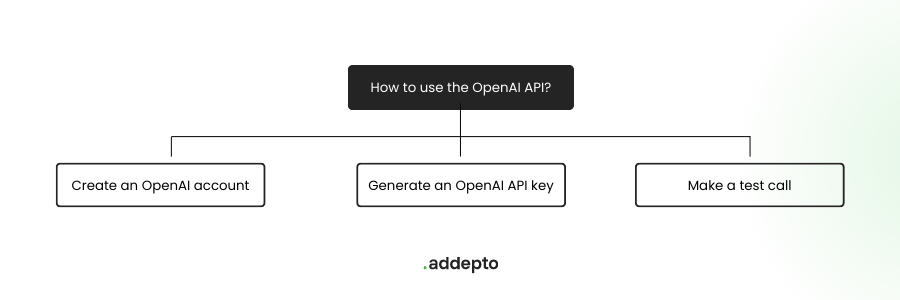
Getting started is straightforward: create an OpenAI account, obtain your API key, and use simple libraries like the OpenAI Python SDK to integrate AI capabilities into your projects. The API’s scalability, flexibility, and pay-as-you-go pricing make it accessible for small experiments and large-scale applications alike.
As AI continues to transform industries, mastering the OpenAI API opens up vast opportunities to innovate, automate, and enhance business processes. Whether building chatbots, performing sentiment analysis, generating images, or fine-tuning models, this guide equips you with the foundation to explore and harness AI effectively.


.png&w=1200&q=75)