


Large language models are advancing incredibly fast and capturing serious attention across the AI industry. Companies aren't just curious about LLMs anymore; they're completely fascinated by them, especially when it comes to the possibilities that come with fine-tuning these models. Recent investments in LLM research and development have reached astronomical amounts. Business leaders and technology experts are increasingly eager to gain deeper insights into LLMs and how to customize them effectively.
As this area of natural language processing continues to grow rapidly, keeping up with developments becomes absolutely essential. How much value LLMs can bring to your organization really comes down to how well you understand and can work with this technology.
The journey of developing a large language model involves multiple important phases, and today we're focusing on one of the most demanding yet rewarding aspects of this journey: the fine-tuning process. This represents an intensive, resource-heavy undertaking that plays a crucial role in many language model development workflows.
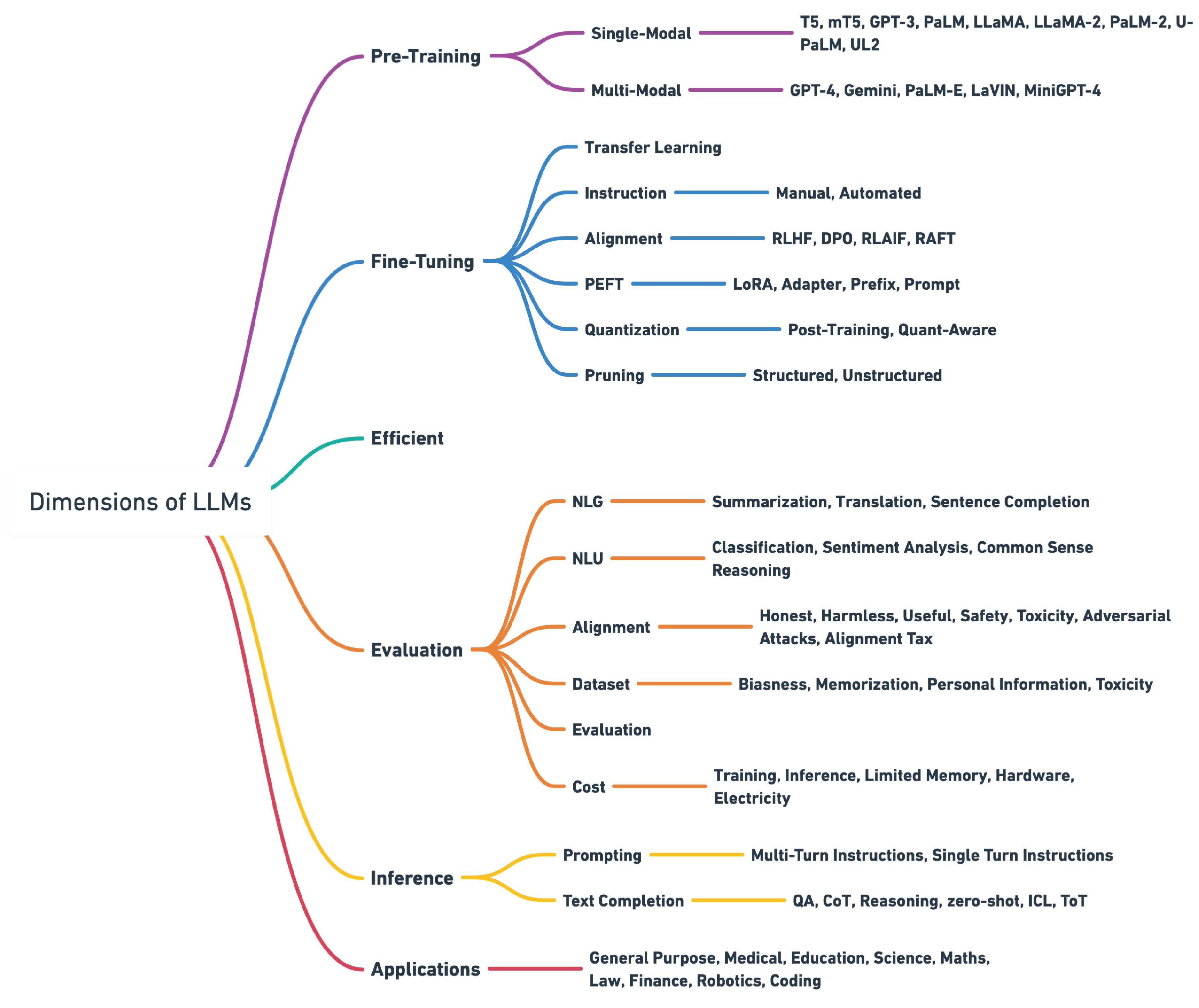
Getting to Know How Pre-trained Language Models Function
A Language Model represents a machine learning system built to predict what word comes next in a sentence by analyzing the words that came before it. These systems rely on the Transformer framework as their foundation.
Pre-trained language models like GPT (Generative Pre-trained Transformer) go through training using enormous collections of written content. This training allows LLMs to learn the basic rules that govern how words work and how they connect together in everyday language.
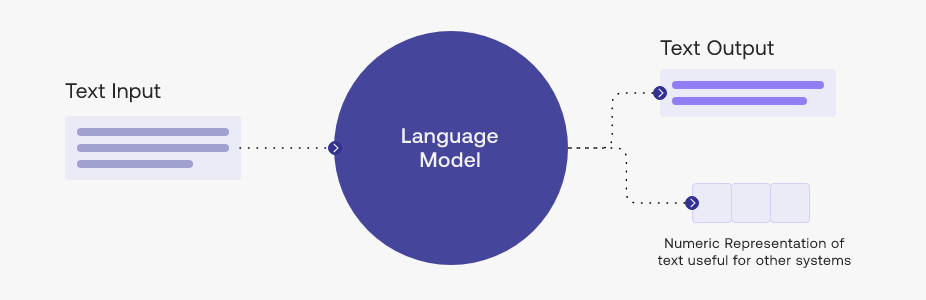
The most significant aspect is that these models excel not just at comprehending natural language but also at producing text that sounds remarkably human when responding to what they're given.
What makes this even better?
These models are now accessible to everyone through APIs. If you're interested in learning how to harness the capabilities of OpenAI's most advanced LLMs.
LLM Development Cycle
Before we explore LLM fine-tuning, we need to grasp the LLM development process and its mechanics.
- Vision & scope: Start by establishing your project's purpose. Decide whether your LLM will serve as a general-purpose tool or focus on specific tasks like identifying named entities. Having clear goals prevents wasted time and resources.
- Model selection: Pick between building a model from the ground up or modifying one that already exists. Often, working with an existing model proves more efficient, though certain situations call for fine-tuning with a completely new model.
- Model's performance and adjustment: Once your model is ready, you need to evaluate how well it performs. If the results fall short, consider prompt engineering or additional fine-tuning. This is where we'll concentrate our attention. Make sure the model's responses align with what humans expect.
- Evaluation & iteration: Run regular assessments using specific metrics and standards. Keep cycling through prompt engineering, fine-tuning, and LLM testing until you achieve your target results.
- Deployment: When the model meets your performance expectations, put it into action. Focus on making it computationally efficient and user-friendly during this phase.
What is Fine-Tuning?
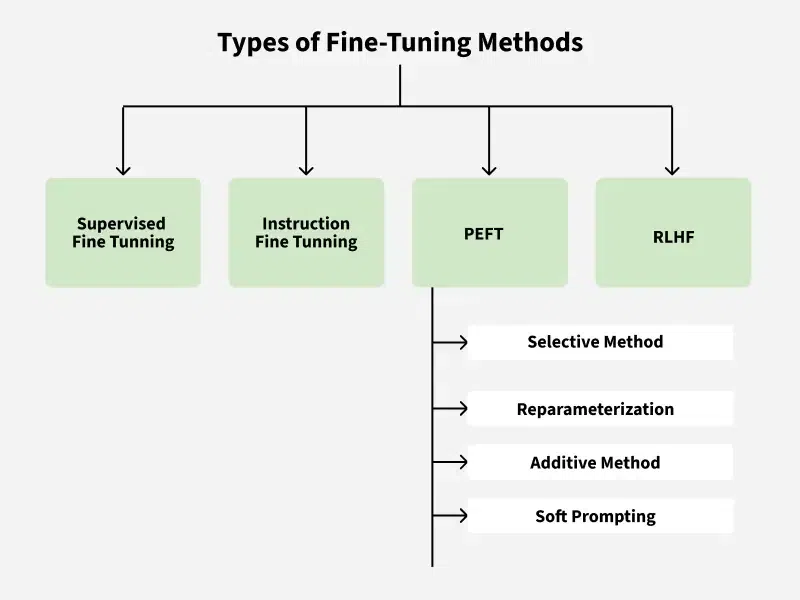
Fine-tuning takes a pre-trained model, like those in OpenAI's GPT family, and uses it as a starting point. The method involves additional training using a smaller, specialized dataset. This technique builds on what the model already knows, boosting its performance on particular tasks while needing less data and computing power.
Fine-tuning moves the learned patterns and characteristics from the pre-trained model to new applications, which improves results and cuts down on training data requirements. It's gained popularity in NLP for applications like text classification, sentiment analysis, and question-answering systems.
Types of LLM Fine-Tuning
Unsupervised Fine-Tuning
This technique doesn't need labeled information. The LLM gets exposed to extensive collections of unlabeled text from the specific field, which helps improve its language comprehension. This method works well for specialized areas like law or medicine but isn't as accurate for particular tasks such as classification or summarization.
Supervised Fine-Tuning (SFT)
SFT means giving the LLM labeled information designed for the specific task. For instance, customizing an LLM for business text classification uses a collection of text samples with category labels. Though this works well, it needs considerable labeled data, which can be expensive and take a lot of time to gather.
Instruction Fine-Tuning via Prompt Engineering
This approach focuses on giving the LLM clear instructions in natural language, which helps create specialized assistants. It cuts down on the need for huge amounts of labeled data but relies heavily on how well the prompts are written.
Importance of Fine-Tuning LLMs
- Transfer Learning: Fine-tuning uses the knowledge gained during initial training, adapting it to particular tasks with less computation time and resources.
- Reduced Data Requirements: Fine-tuning needs less labeled information, concentrating on adjusting pre-trained features for the specific task.
- Improved Generalisation: Fine-tuning boosts the model's capacity to work well on specific tasks or fields, capturing broad language characteristics and personalizing them.
- Efficient Model Deployment: Fine-tuned models work better for practical applications, being computationally smart and well-matched for particular tasks.
- Adaptability to Various Tasks: Fine-tuned LLMs can adjust to many different tasks, working effectively across multiple applications without needing task-specific designs.
- Domain-Specific Performance: Fine-tuning lets models shine in field-specific tasks by adapting to the particular details and terminology of the target area.
- Faster Convergence: Fine-tuning typically reaches faster convergence, beginning with weights that already understand general language characteristics.
Seven-Stage Fine-Tuning for LLM
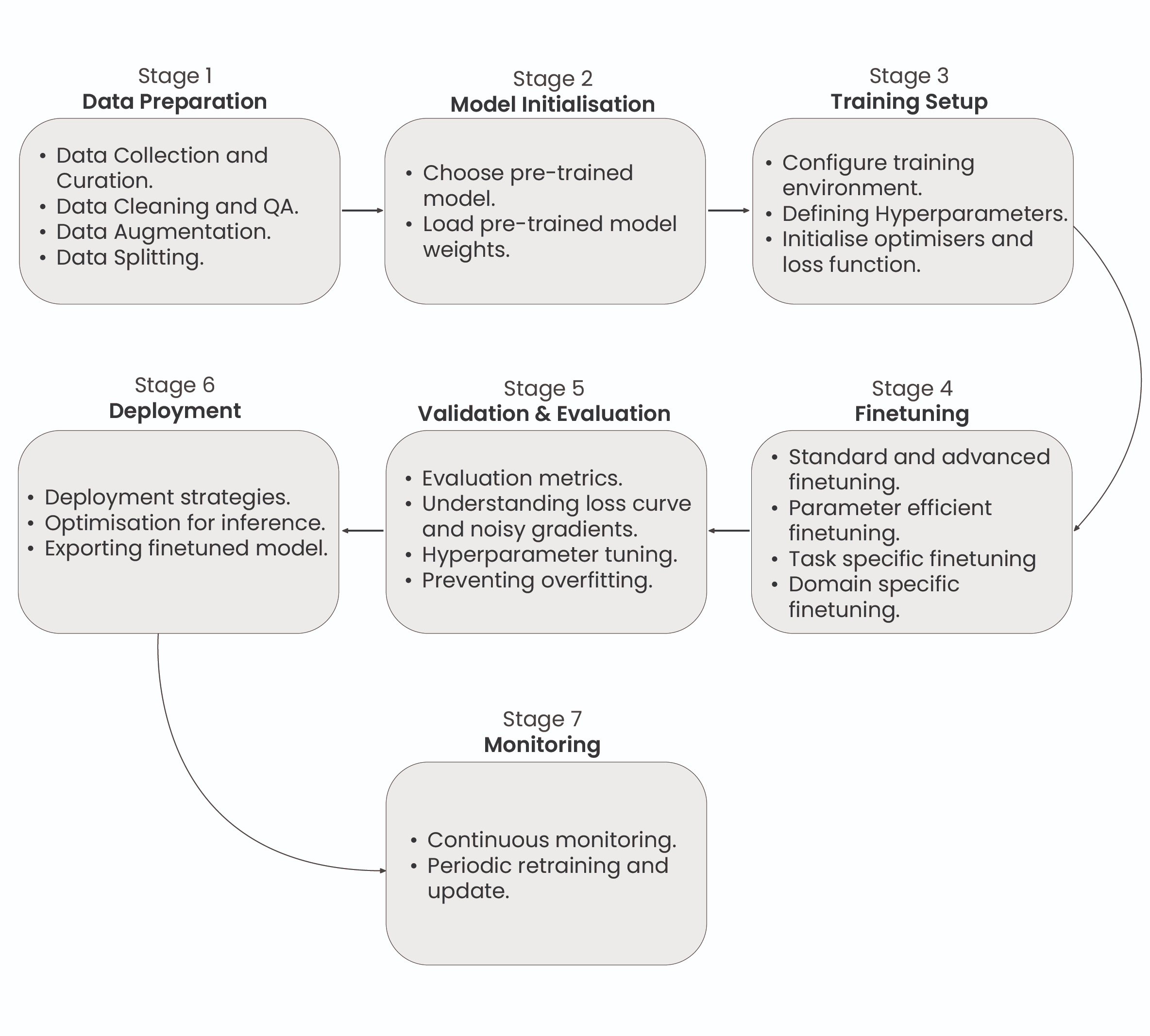
A complete workflow for fine-tuning Large Language Models shows the seven critical phases: Data Preparation, Model Setup, Training Infrastructure Configuration, Fine-Tuning Process, Assessment and Testing, Implementation, and Ongoing Monitoring and Upkeep.
Every phase serves a vital function in customizing the pre-trained model for particular applications and maintaining peak performance across its entire operational lifespan.
This demonstrates the full workflow for fine-tuning LLMs, covering every required phase from initial data preparation through continuous monitoring and maintenance activities.
1: Dataset Preparation
Fine-tuning a Large Language Model begins with customizing the pre-trained model for particular applications by modifying its parameters through a new dataset. This requires cleaning and structuring the dataset to align with the intended task, whether that's instruction training, emotion detection, or category classification. The dataset consists of input-output combinations that show the model what behavior is expected.
For instance, in instruction training, the dataset might appear as: ###Human: $<Input Query>$ ###Assistant: $<Generated Output>$
In this format, the 'Input Query' represents the user's question, while the 'Generated Output' shows how the model should respond. The format and approach of these combinations can be modified depending on what the specific task requires.
2: Model Initialization
Model initialization refers to establishing the starting parameters and settings of the LLM before training or putting it to work. This phase is essential for making sure the model works at its best, trains effectively, and prevents problems like disappearing or expanding gradients.
3: Training Environment Setup
Creating the training environment for LLM fine-tuning means organizing the required infrastructure to modify an existing model for particular purposes. This includes choosing appropriate training information, establishing the model's structure and settings, and conducting training cycles to modify the model's weights and preferences.
The goal is to improve the LLM's ability to produce precise and contextually suitable results customized for specific uses, such as content generation, language conversion, or emotion analysis. Effective fine-tuning depends on thorough preparation and detailed testing.
4: Partial or Full Fine-Tuning
This phase involves modifying the LLM's parameters using a task-focused dataset. Complete fine-tuning adjusts every parameter in the model, providing thorough adaptation to the new application. As an alternative, Partial fine-tuning or Parameter-Efficient Fine-Tuning methods, like using adapter components, can be used to selectively fine-tune the model.
This approach adds extra layers to the pre-trained model, enabling effective fine-tuning with fewer parameters, which can tackle issues related to computational effectiveness, overfitting, and optimization.
5: Evaluation and Validation
Assessment and validation mean checking how well the fine-tuned LLM performs on new data to make sure it works well generally and achieves the intended goals. Assessment measures, like cross-entropy, calculate prediction mistakes, while validation tracks loss patterns and other performance signs to spot problems like overfitting or underfitting.
This phase helps direct additional fine-tuning to reach the best model performance.
6: Deployment
Putting an LLM into action means making it functional and available for particular uses. This includes setting up the model to work effectively on chosen hardware or software systems, making sure it can manage tasks like natural language processing, text creation, or understanding user questions. Implementation also involves establishing integration, security protocols, and tracking systems to guarantee dependable and secure operation in practical applications.
7: Monitoring and Maintenance
Tracking and maintaining an LLM after implementation is essential to guarantee continued performance and dependability. This means constantly watching the model's performance, handling any problems that come up, and updating the model when necessary to adjust to new information or changing needs.
Good monitoring and maintenance help keep the model accurate and effective over time.
OpenAI’s Fine-Tuning API
OpenAI's Fine-Tuning API represents a complete platform that makes it easier to customize OpenAI's pre-trained LLMs for specific tasks and fields.
This service is built to be accessible, allowing various users, from companies to individual programmers, to use advanced AI power without the usual complexities of model training and implementation.
Steps Involved in Using OpenAI’s Fine-Tuning API
Model Selection:
- Choosing a Pre-Trained Model: Users must collect and organize a dataset that represents the specific task or field they want to fine-tune the model for. This information is vital for teaching the model to perform the wanted function more effectively.
- Customisable Base: These models come pre-trained with vast amounts of data, providing a solid foundation that can be further refined to suit specific requirements.
Data Preparation and Upload:
- Curating Relevant Data: Users need to gather and prepare a dataset that reflects the specific task or domain they wish to fine-tune the model for. This data is crucial for teaching the model to perform the desired function more effectively.
- Uploading Data to the API: The Fine-Tuning API makes data upload simple. Users can input their organized datasets into the API using simple commands, making the process reachable even for those with basic technical knowledge.
Initiating Fine-Tuning:
- Automated Process: After the data is uploaded, OpenAI's system manages the fine-tuning procedure. The API modifies the model's parameters using the new information to improve performance on the specified tasks.
Deploying the Fine-Tuned Model:
- API Integration: The fine-tuned model can be reached and implemented through OpenAI's API. This enables smooth integration into different applications, like chatbots, automated content generation tools, or specialized customer service systems.
Limitations of OpenAI’s Fine-Tuning API
- Pricing Models: Fine-tuning and using OpenAI's models through the API can be expensive, particularly for large-scale implementations or ongoing usage. This can be a major factor for smaller organizations or projects with tight budgets.
- Data Privacy and Security: Users must send their data to OpenAI's servers for the fine-tuning procedure. This creates potential worries about data privacy and the protection of sensitive or confidential information.
- Dependency on OpenAI Infrastructure: The dependence on OpenAI's infrastructure for model hosting and API access can create vendor dependency, reducing flexibility and control over the implementation environment.
- Limited Control Over Training Process: The fine-tuning procedure is mostly automated and handled by OpenAI, providing limited visibility and control over the specific changes made to the model.
How to Fine-Tune OpenAI GPT 3.5-Turbo Model: A Step-by-Step Guide
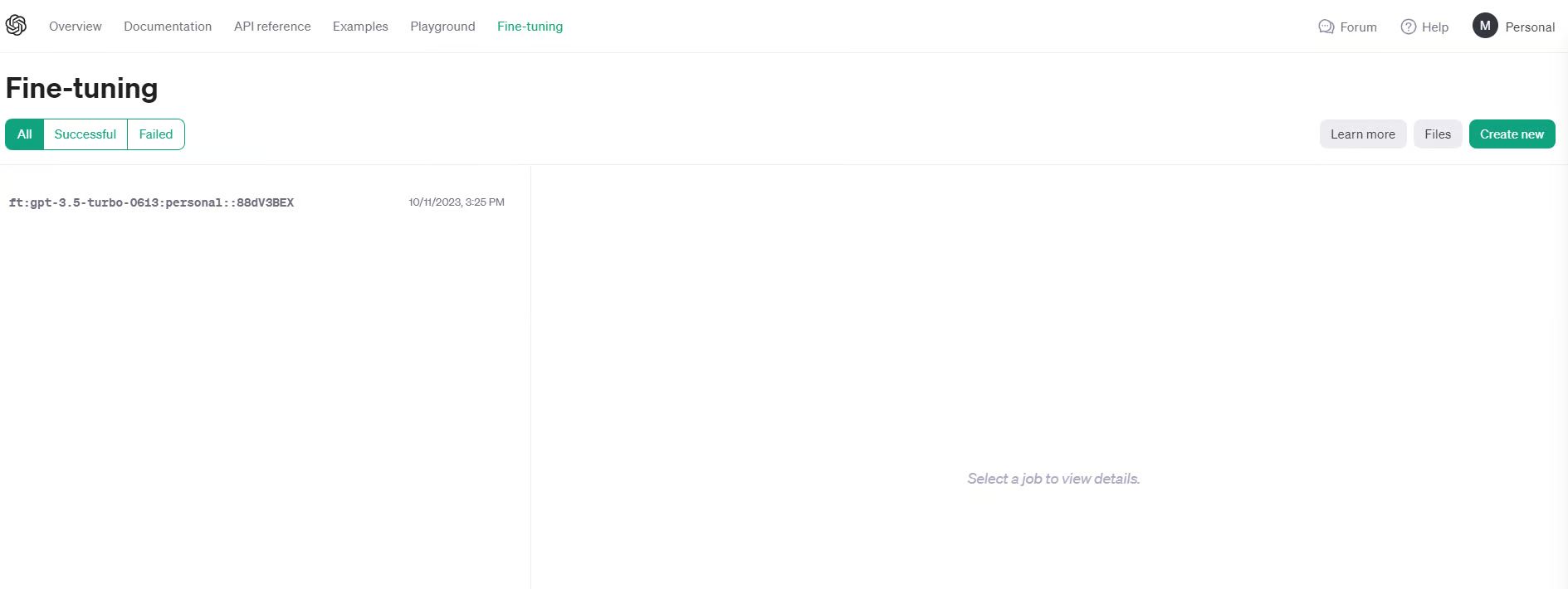
OpenAI has recently released a UI interface for fine-tuning language models. In this tutorial, I will be using the OpenAI UI to create a fine-tuned GPT model. To follow along with this part, you must have an OpenAI account and key.
1. Log in to platform.openai.com
2. Prepare your data
For demonstration, I have curated a small dataset of question answers, and it is currently stored as a Pandas DataFrame.
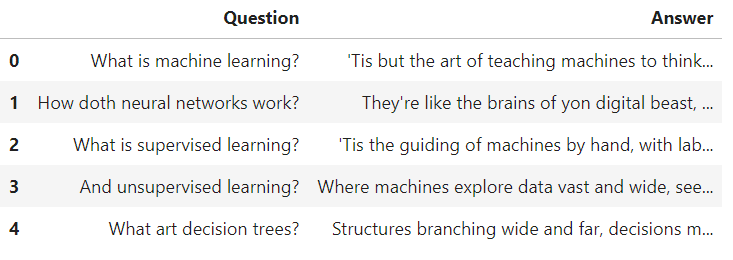
Just to demonstrate what I have done, I created 50 machine learning questions and their answers in Shakespeare style. Through this fine-tuning job, I am personalizing the style and tone of the GPT3.5-turbo model.
Even though it's not a very practical use-case, as you may simply add “Answer in Shakespeare style” in the prompt, GPT3.5 is certainly aware of Shakespeare and will generate answers in the required tone.
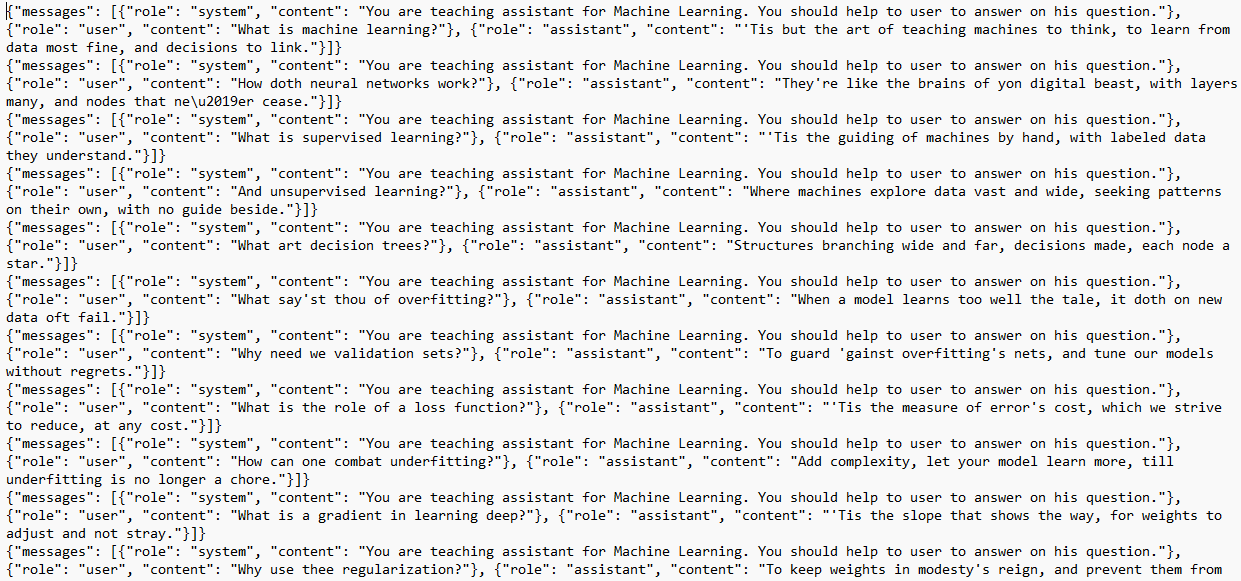
For OpenAI the data must be in jsonl format. JSONL is a format where each line is a valid JSON object, separated by newlines. I have written a simple code to convert pd.DataFrame into jsonl.
This is what my json file looks like:
3. Create the fine-tuning job
Head over to platform.openai.com and navigate to Fine-tuning in the top menu and click on Create New.
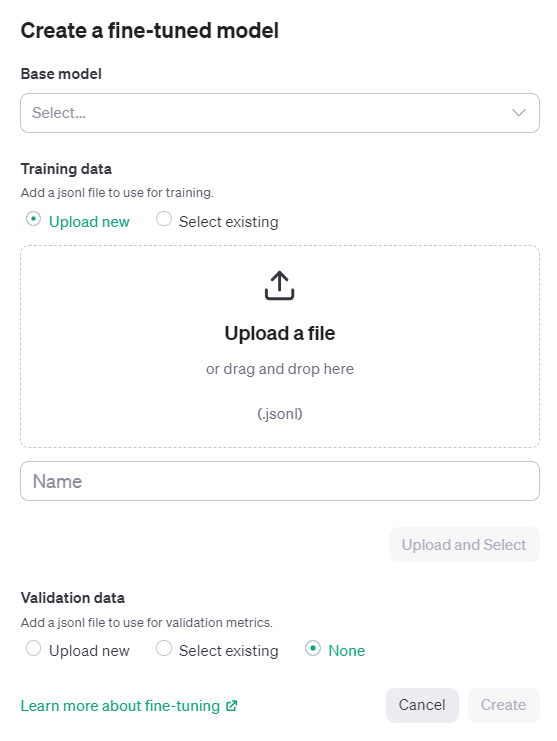
Select the base model. As of right now, only 3 models are available for fine-tuning (babbage-002, davinci-002, gpt-3.5-turbo-0613).
Next, simply upload the jsonl file, give the name of the job, and click Create.
The tuning job may take several hours or even days, depending on the size of the dataset. In my example, the dataset only had 5,500 tokens, and it took well over 6 hours for fine-tuning. The cost of this job was insignificant (<$1 = 5,500/1000 x $0.08).
4. Using the fine-tuned model
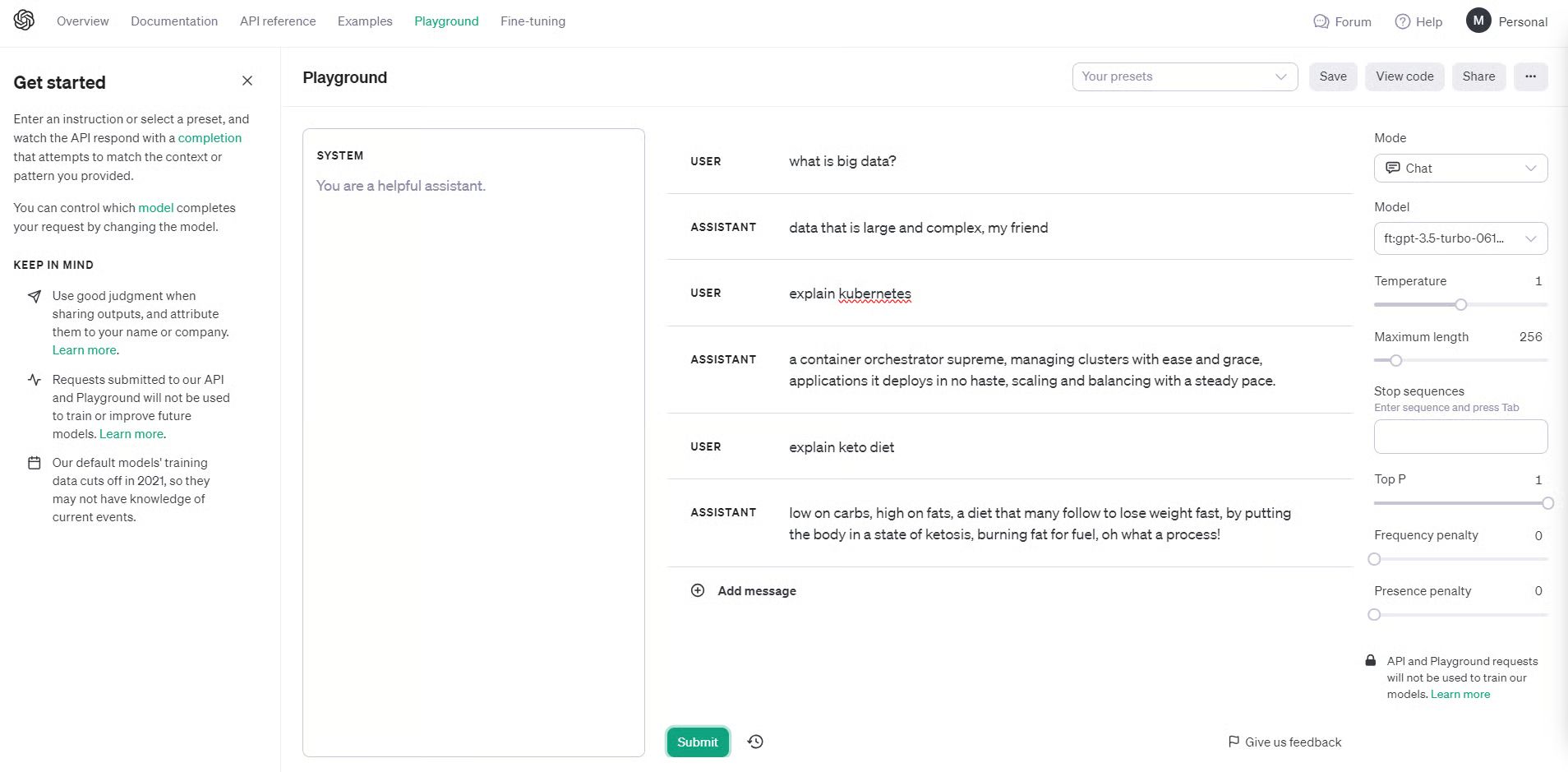
Once the tuning job completes, you can now use the fine-tuned model through API or using the playground available on platform.openai.com.
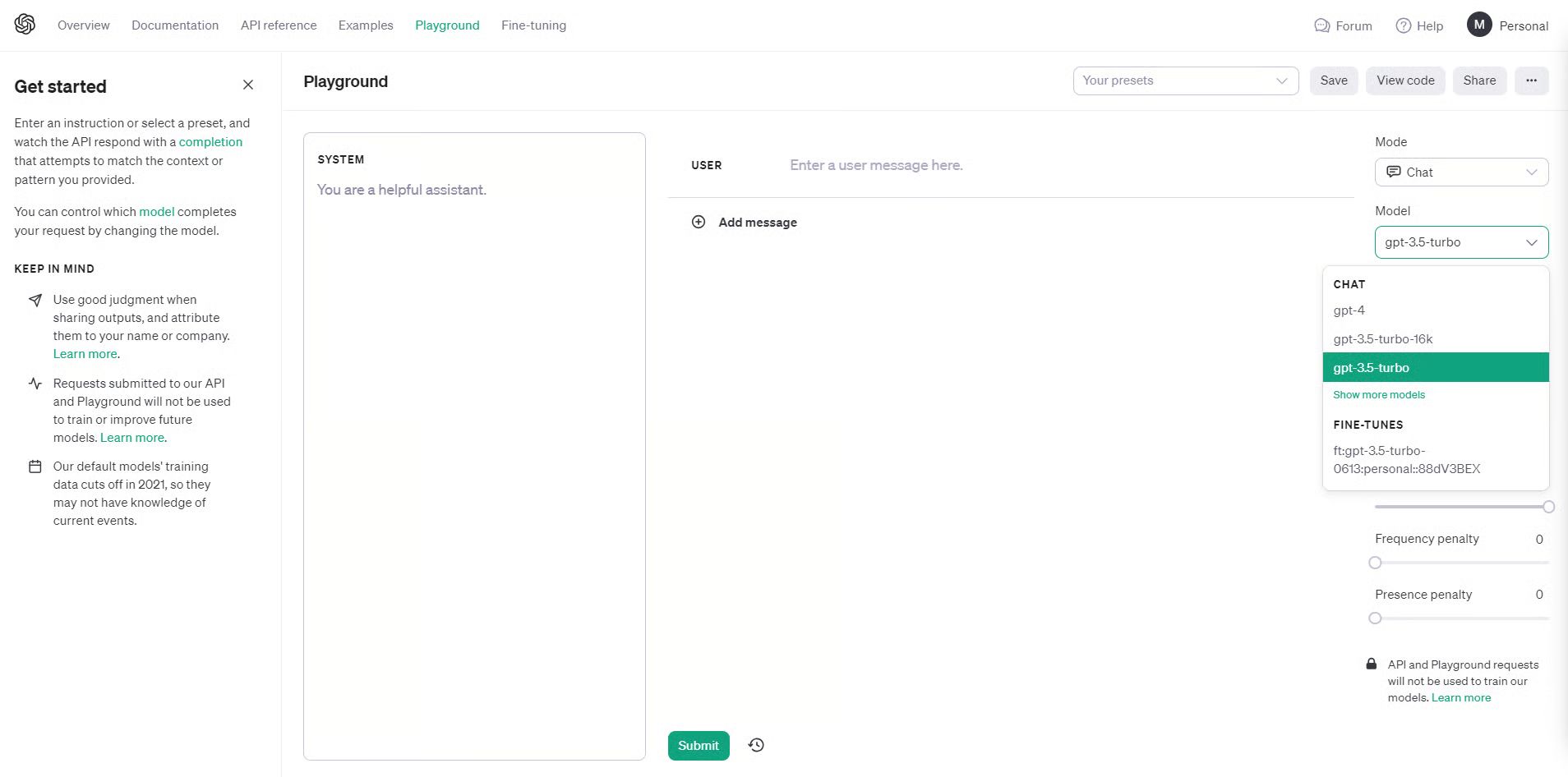
Notice that under the Model dropdown, there is now a personal 3.5-turbo available for selection. Let’s give it a try.
Cost of fine-tuning GPT 3.5-turbo
There are three expenses related to fine-tuning and using the fine-tuned GPT 3.5-turbo model.
- Training data preparation. This means organizing a dataset of text prompts and wanted responses designed for your specific application. The expense will depend on the time and effort needed to gather and format the information.
- Initial training cost. This is billed per token of training data. At $0.008 per 1,000 tokens, a 100,000 token training collection would cost $800 for the initial fine-tuning.
- Ongoing usage costs. These are billed per token for both input prompts and model responses. At $0.012 per 1,000 input tokens and $0.016 per 1,000 output tokens, expenses can grow rapidly depending on application usage.
Here's an example of usage cost scenarios:
- Chatbot with 4,000 token prompts/responses, 1,000 interactions per day: (4,000/1000) input tokens x $0.012 x 1,000 interactions = $48 per day (4,000/1000) output tokens x $0.016 x 1,000 interactions = $64 per day Total = $112 per day or $3,360 per month
- Text summarization API with 2,000 token inputs, 500 requests per day: (2,000/1000) input tokens x $0.012 x 500 requests = $12 per day (2,000/1000) output tokens x $0.016 x 500 requests = $16 per day Total = $28 per day or $840 per month
Note: Tokens divided by 1000 because the OpenAI pricing is quoted per 1K token.
Conclusion
Fine-tuning isn't just for tech experts anymore. Think of it like teaching an already smart assistant to understand your specific needs and talk your language.
Yes, it costs money and takes some planning, but the payoff is huge. Instead of a generic AI that gives generic answers, you get one that truly gets your business, your style, and your customers.
The best part? Tools like OpenAI's platform make it surprisingly simple. You prepare your data, upload it, wait a few hours, and boom – you have a custom AI that works exactly how you want it to.
Whether you're running a business or just curious about AI, fine-tuning lets you turn these powerful tools into something that's uniquely yours. The technology is ready when you are.


.png&w=1200&q=75)