


If you’ve ever found yourself digging through old projects just to reuse the same API snippets… you’re not alone.
But you don’t have to do that anymore.
n8n gives you a way to build integrations visually. Instead of typing out repetitive endpoints and auth code, you just pick the nodes you need and link them together. No fiddling with OAuth tokens, no stressing about rate limits, no decoding webhook chaos.
In the next 20 minutes, you’ll learn how to:
- Build workflows visually without writing request code.
- Use triggers and actions to control automation flow.
- Start projects faster with ready templates.
- Build a Telegram Voice Agent that handles text and voice.
- Transcribe audio, run AI reasoning, and fetch data from Sheets.
- Send smart, automated replies back to users in Telegram.
Let’s get started.
1. Understanding n8n Workflows
Imagine working on a clean, visual board where your entire automation comes together piece by piece, without wrestling with long scripts or tangled logic. That’s the experience of building a workflow in n8n.
A workflow is basically a chain of building blocks called nodes, and each one has a single clear purpose. One might grab fresh data from an API, another might reshape that raw JSON into something tidy, and another might fire off an email or update a record in your system.
Connect these nodes in the order you want, and you end up with an automation that follows your exact instructions, from start to finish.
It runs when you want, does what you need, and keeps everything moving smoothly.
Get Your Time Back: Those repetitive chores typing the same data again and again, producing identical reports every week, or keeping an eye on builds don’t need your attention anymore. Let automation handle the routine work so you can put your energy into solving real problems.
Work Faster Than Ever: Processes that used to feel heavy because they involved multiple tools or custom scripts can be stitched together in n8n with ease. What once took hours turns into a quick, predictable workflow.
Connect Your Entire Stack: You probably rely on a mix of APIs, databases, cloud apps, CRMs, and who knows what else. n8n sits in the middle and helps all of them communicate without making you write any of that boring connector code.
2. Two Easy Routes to Start Building
When you’re ready to build your first workflow, n8n gives you two solid ways to get started:
- Start From Scratch: If you already have a clear plan in mind, you can open a fresh workspace and piece things together on your own. Drop in the nodes you need, link them in the order that fits your idea, and shape the workflow exactly the way you imagine it.
- Use a Ready-Made Template: If you’d rather get moving quickly, pick a pre-built workflow designed for common tasks. It’s a great way to see real examples, understand how different parts interact, and learn shortcuts you can use in your own builds.
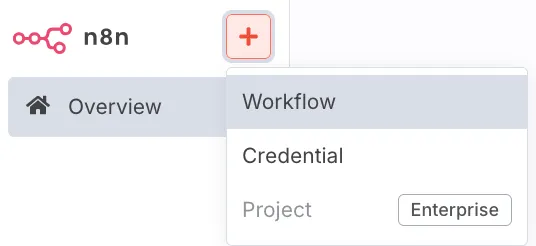
Starting a new workflow in n8n: Choose between a blank canvas ↑ or a pre-built template ↓.
Developer Tip: If you’re just getting familiar with n8n, it’s worth spending a few minutes exploring its template library. There’s a lot more in there than you might expect. You’ll find examples like syncing Slack messages to a Google Sheet, getting alerts on Discord whenever your GitHub stars go up, or automatically managing email replies.
These templates give you a clear look at the core pieces you’ll end up using often and introduce patterns that translate well into real projects.
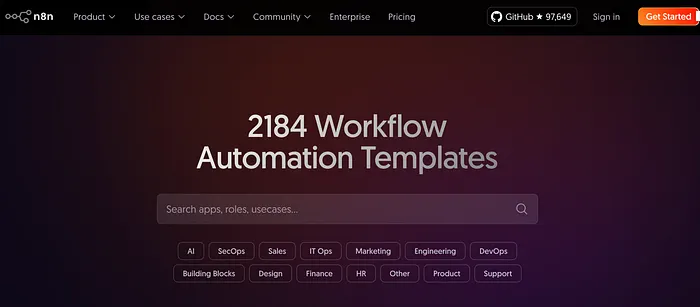
Exploring the n8n template library to find pre-built automation examples.
3. Breaking Down the Workflow Blueprint
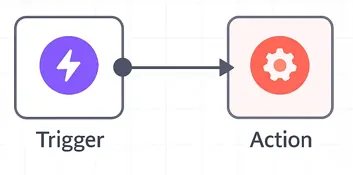
Every n8n workflow follows a similar structure with these essential pieces:
- Trigger Node: This is the starting point of your workflow. It’s the moment something happens that tells n8n to begin. Maybe it’s a Webhook receiving a request from your app, a Cron schedule firing at a set time, or a Manual trigger you click whenever you want the workflow to run.
- Action Nodes: These nodes handle the actual steps in your automation. Each one performs a single job based on the data it receives. You might use an HTTP Request node to talk to an API, a Database node to read or write records, or dedicated nodes for tools like Slack, Google Sheets, Notion, and more.
- Connections: The lines linking your nodes do more than make the workflow look pretty. They decide how data travels through the entire process. Whatever comes out of one node is passed straight into the next, creating a clear, step-by-step flow of information.
4. Real-World Project: Build an AI Agent Telegram Voice Workflow in n8n
If you want to give users a simple way to talk to your AI agent through Telegram, n8n makes the entire flow surprisingly smooth. You do not need a complicated backend or expensive infrastructure. You just chain a few nodes, connect your OpenAI agent, and your workflow starts behaving like a real voice assistant inside Telegram.
That is exactly what this n8n workflow does.
In this guide, you will learn how the Telegram Voice Agent workflow works, how each node plays its part, and how you can build a similar system for your own product.
This is one of the most powerful examples of combining messaging apps, voice transcription, AI reasoning, and database lookups into one automated flow.
Let’s break it down.
1. What This Workflow Actually Does
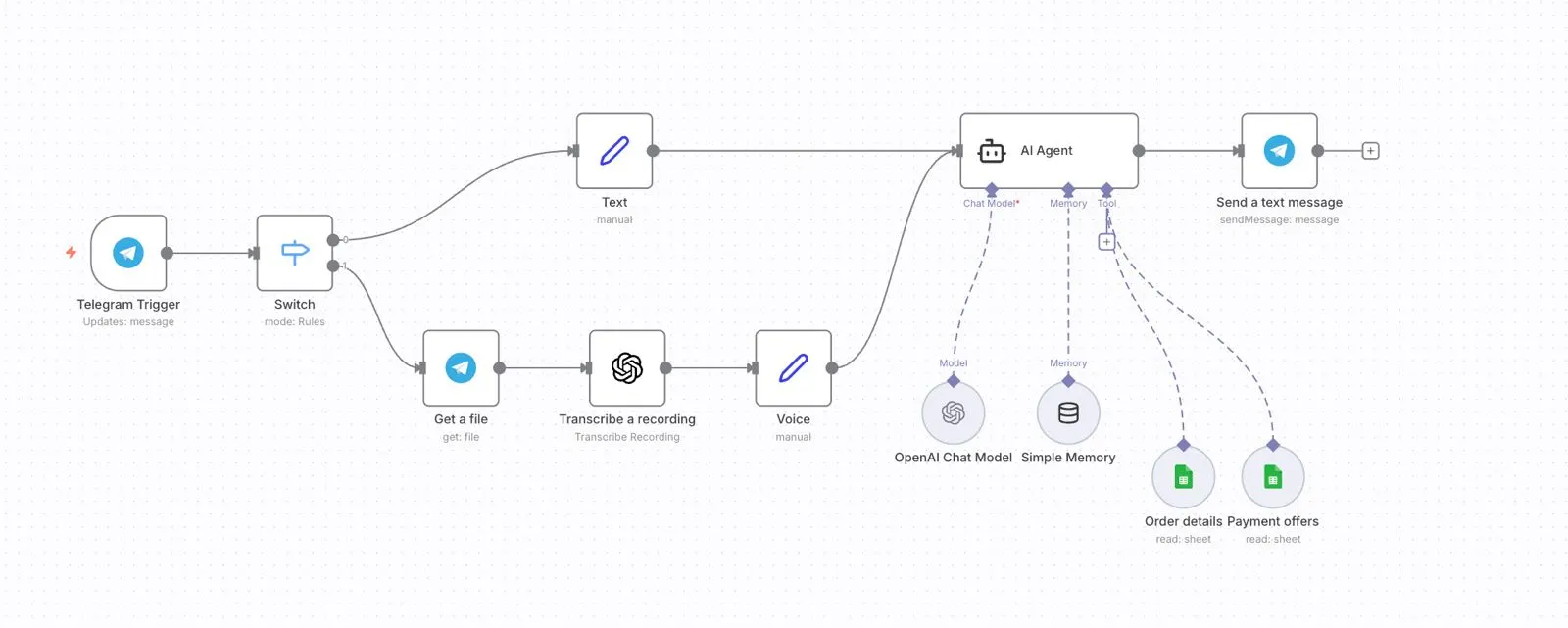
This automation turns your Telegram bot into a customer support assistant. Here is what users can do:
- Send a voice message asking for their recent order details
- Ask about ongoing payment offers
- Request tracking information
- Type or speak any general support question
- Get instant replies powered by an AI agent connected to your data sources
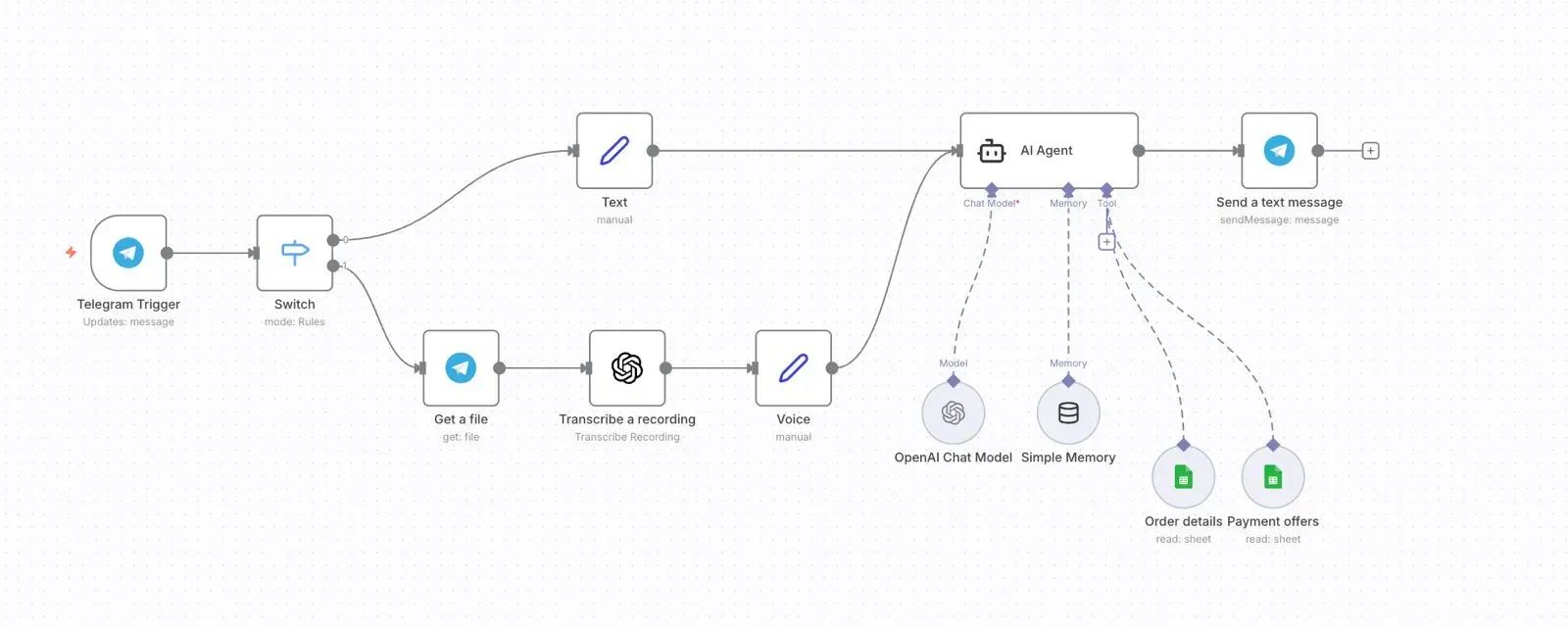
The workflow listens for incoming messages, checks whether they are text or voice, converts voice notes into text, passes the text into an AI agent, checks relevant data in Google Sheets, and finally sends a natural reply back to the user.
Everything runs automatically once the workflow is activated.
2. Key parts of the workflow
I. Telegram Trigger
This is the starting point. It listens to every message your user sends.
Trigger type: Updates: message
Pointer to use: Use a callout block titled Start here inside your blog to show this node is the entry to everything.
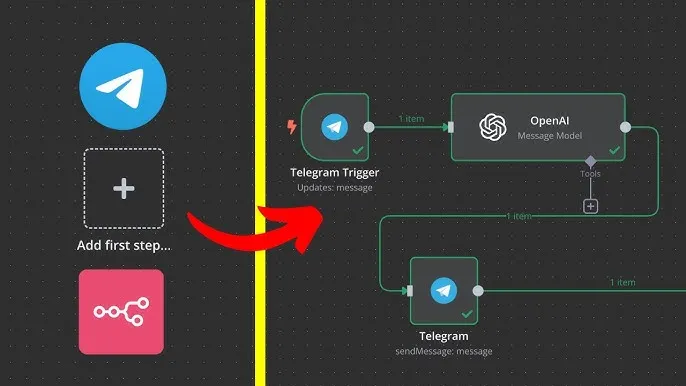
Whenever a user sends a message to your Telegram bot, this node catches the event and forwards the data to the rest of the workflow.
II. Switch Node
This node decides what type of message came in. If it is text, it takes one route.
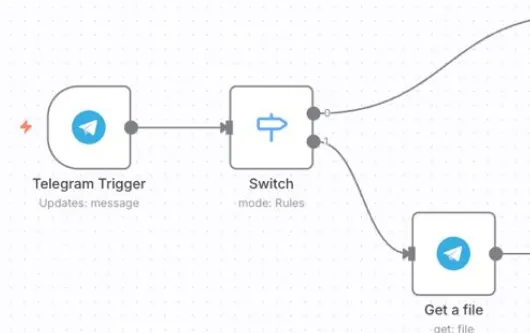
If it is a voice message, it takes another. This separation keeps the workflow clean and avoids unnecessary steps.
III. Handling Voice Messages
For voice inputs, three nodes work together:
- Get File retrieves the voice file from Telegram.
- Transcribe Recording uses OpenAI Whisper to convert speech into text.
- Voice Node cleans or formats the transcribed text.
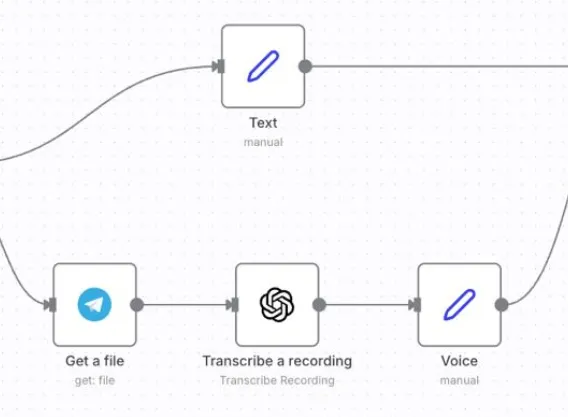
After this step, voice messages are treated exactly like text messages.
IV. Text Node
Whether the user typed the message or spoke it, the final text eventually reaches this node. It simply prepares the content before giving it to the AI Agent.
3. Important Node & Trigger
The AI Agent node is where the intelligence lives.
It takes the text message and decides what action is needed.
Thanks to the memory and tools added to the agent, it can:
- Look up order details.
- Retrieve relevant payment offers.
- Use past conversation memory for continuity.
- Generate human-like support responses.
To do this, the agent is connected to:
- OpenAI Chat Model for reasoning.
- Simple Memory for short-term context.
- Google Sheets Tools for reading order data and payment offer data.
The agent dynamically fetches only what is needed based on user queries.
4. Fetching Real Data: Google Sheets Integration
Your workflow connects two sheets:
- Order Details.
- Payment Offers.
Using these, the AI agent can reply with real and accurate information, like:
- Order status.
- Delivery updates.
- Card-specific discount codes.
- Bank partner offers.
- Payment instructions.
This is how your Telegram bot becomes a real support assistant instead of a simple chatbot.
5. Final Step: Sending the Reply Back
The final output from the AI agent reaches the Send a Text Message node, which sends the response right back to the user on Telegram.
Voice in → AI processing → Database lookup → Text out.
6. Build It Yourself: Essential Steps
If you want to recreate this in your own system, here is the quick roadmap:
- Set up a Telegram Bot API token.
- Add the Telegram Trigger node.
- Create a Switch node for text vs voice.
- Add Get File and Transcribe nodes for voice.
- Prepare text for the AI agent.
- Connect Google Sheets for data lookups.
- Build the AI agent with tools and memory.
- Send the final output back to Telegram.
Once you activate it, your bot is ready to serve users instantly.
Wrapping Up
The Telegram Voice Agent workflow brings the power of automation, AI understanding, and real data together in a clean, visual pipeline. Instead of forcing users to type commands or navigate menus, you let them speak naturally and get instant, accurate answers. This creates a faster, more intuitive support experience and removes a huge amount of manual work from your team.
With n8n, you can take voice inputs, transcribe them, run AI reasoning, and fetch details from your own data sources in a single automated flow. The best part is how easy it is to extend: add new tools, plug in more sheets, or switch the AI model whenever you want without rewriting entire systems.
If you are looking to automate customer requests, build conversational support, or create voice-based assistants for your product, this workflow is one of the most impactful starting points.
Let the bots handle the repetitive stuff while you focus on building great products.
Official Resources
- n8n Documentation: Your complete guide for node references, workflow logic, and advanced features.
- n8n Community: Join the global community to discuss workflows, ask questions, and learn from other creators.
- Workflow Templates: Explore ready-to-use automation templates and learn from real-world examples.
- n8n Academy: Step-by-step courses to master n8n fundamentals and advanced automation strategies.
GitHub Link for n8n Workflows
You can explore community workflows, contribute your own, or browse examples here:


.png&w=1200&q=75)