Copy-Paste Prompts to Build Real Apps
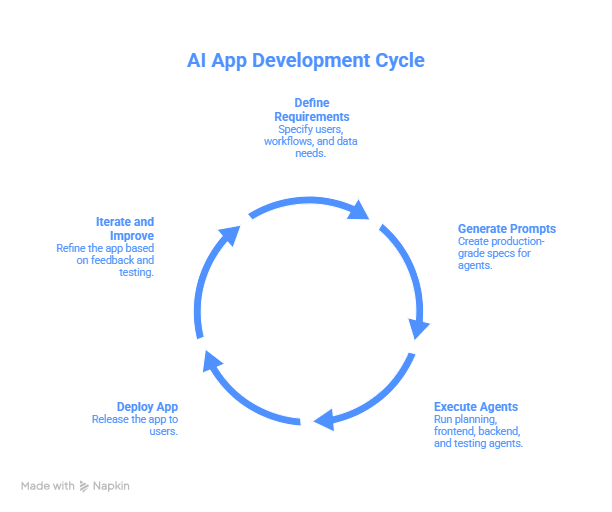
Most AI app builders fail because the prompt is generally only for UI. Emergent is different: it works like a mini engineering team, planning agent, frontend agent, backend agent, testing agent, and deployment agent all working in parallel.
That means your prompts should look less like:
“Build me an app”
…and more like production-grade specs:
- Who the user is
- Core workflows
- Data storage requirements
- Auth, payments, and permissions
- Edge cases and failure handling
Pro Tip: Treat Emergent like a dev team, not a chatbot. Let it ask clarifying questions, that’s a feature, not friction. Answer like a PM writing specs.
How to Use This Guide
- Think like a PM: Be explicit about users, workflows, data, auth, and payments.
- Copy, paste, tweak: All prompts are ready-to-use, production-style.
- Let Emergent ask questions: Clarifying questions improve output.
Iterate safely: Use testing and deployment agents frequently to avoid breaking features.
1️. Foundation Prompts: Architecture & Setup
Start serious projects correctly; these are copy-paste-ready prompts for Emergent.
1. Production SaaS Base
Build a production-ready SaaS application with:
- User authentication (email/password + optional Google OAuth)
- Role-based access control
- Persistent database with migration-safe schema
- Stripe subscriptions with free trial, feature gating, billing management
- Admin dashboard for user and metrics management
- Deployment-ready setup
Include:
- Best-practice schema and API design
- Error handling and audit logging
- Clarifying questions before implementation
Why it works: Establishes a robust foundation. Emergent coordinates multiple agents to handle auth, DB, and deployment correctly.
2. Full-Stack Architecture Spec
Plan and implement a full-stack architecture, including:
- Responsive frontend UI
- Backend APIs with REST or GraphQL
- Database schema design
- Authentication and authorization flows
- Testing coverage for endpoints and edge cases
- Deployment pipeline with staging and production environments
Show architecture decisions before implementation.
Why it works: Forces Emergent to think systemically, not just generate screens. You get a blueprint and implementation.
3. Stack Specification
Build this app using a modern production stack. Clearly define:
- Frontend framework (React, Vue, etc.)
- Backend/API layer (Node, Django, etc.)
- Database choice (Postgres, Mongo, etc.)
- Auth method (JWT, OAuth, etc.)
- Payment integration (Stripe, PayPal)
- Realtime or async processing requirements
Optimize for maintainability, scalability, and team handoff.
Why it works: Ensures Emergent considers engineering constraints and production needs.
4. Database + Auth First Setup
Design and implement:
- User table with roles, profile data, audit logs
- Authentication system with secure password storage
- Session handling and token management
- Indexing and migration-safe schema updates
- Basic audit logging
Why it works: Critical foundation for future features, prevents breaking auth or database logic later.
5. Requirements Gathering Mode
Before building, ask structured product questions about:
- Target users and personas
- Core workflows and edge cases
- Monetization strategy
- Data storage and permissions
- Feature priorities and constraints
Then propose a technical plan including frontend, backend, DB, auth, billing, and deployment considerations.
Why it works: Emergent mimics a PM + engineering team, asking clarifying questions ensures correct architecture upfront.
2️. Full-Stack App Prompts
Turn ideas into fully functional apps.
6. SaaS with Auth + Billing
Build a SaaS application with:
- Email/password login + Google OAuth
- Free trial
- Stripe subscriptions
- Feature gating based on plan
- Billing management dashboard
Include trial expiration logic and secure payment handling.
Why it works: Ships a real product workflow, not a mock UI.
7. Internal Tool with Roles
Build an internal tool with:
- Admin and member roles
- Role-based permissions
- Activity logging
- Secure internal deployment
Admins can manage users, permissions, and access logs.
Why it works: Emergent handles multi-role security, logging, and internal deployment.
8. Realtime Dashboard App
Build a realtime dashboard with:
- Live data updates
- Persistent storage
- User authentication
- Role-based views
- Activity feed
Use websockets or polling where appropriate for realtime updates.
Why it works: Adds production-ready realtime features while maintaining auth and storage integrity.
9. AI Copilot App
Build an AI copilot app that:
- Stores user context
- Maintains conversation history
- Allows file or data input
- Produces structured AI outputs
- Saves results per user
Include prompt versioning and output logging for audit purposes.
Why it works: Provides persistent state, traceable outputs, and user-specific AI functionality.
10. Workflow Automation Tool
Build a workflow automation tool that:
- Accepts triggers
- Processes tasks automatically
- Stores execution history
- Handles failures with retry and fallback
- Provides audit trails for all operations
Why it works: Production-style workflow automation with reliability and visibility baked in.
3️. Feature Add-On Prompts
Add capabilities safely to existing apps.
11. Add Stripe Subscriptions
Add Stripe subscriptions with:
- Free trial
- Monthly plans
- Feature gating per plan
- Billing portal
- Webhook handling for events
Why it works: Turns your SaaS into a monetized, production-ready platform.
12. Add JWT + Google OAuth
Add authentication with:
- JWT-based sessions
- Google OAuth login
- Account linking
- Secure token handling
Why it works: Adds flexible, secure auth for real users.
13. Add Audit Logs
Add audit logging for:
- User actions
- Data changes
- Admin actions
- Login activity
Include searchable and exportable logs.
Why it works: Provides traceability and compliance readiness.
14. Add Realtime Updates
Add realtime updates for:
- Core data changes
- Notifications
- Collaborative features
Ensure fallback to polling if websocket fails.
Why it works: Makes your app feel live while maintaining reliability.
15. Add Admin Dashboard
Add an admin dashboard with:
- User management
- Usage metrics
- Billing overview
- System health indicators
Why it works: Gives operators insight into usage, revenue, and system performance.
4️.Iteration & Refactor Prompts
Add features without breaking existing functionality.
16. Safe Feature Addition
Add this new feature without breaking existing functionality.
- Review dependencies
- Run testing agent on affected flows
- Implement feature safely
Why it works: Emergent ensures no regressions while extending your product.
17. UI Theme Change
Update the UI theme system-wide while:
- Preserving layouts
- Maintaining accessibility
- Avoiding broken components
Why it works: Provides consistent UX updates without risking stability.
18. Add Usage Limits + Trials
Implement usage limits with:
- Free tier caps
- Trial expiration
- Upgrade prompts
- Backend enforcement of limits
Why it works: Controls product access and drives monetization.
19. Extend Database Schema
Extend the database schema to support a new feature:
- Ensure backward compatibility
- Include migrations
- Maintain indexing and performance
Why it works: Adds functionality safely without breaking existing data.
20. Refactor for Scalability
Refactor relevant parts of the app for:
- Improved query efficiency
- API optimization
- Better maintainability
- Load handling
Why it works: Prepares the system for real-world growth.
5️.Testing & Deployment Prompts
Turn prototypes into production-ready apps.
21. Full Testing Sweep
Run testing agent on:
- Auth flows
- API endpoints
- Database operations
- Edge cases
- Error handling
Report failures and fix them.
Why it works: Catches bugs before they affect real users.
22. Pre-Deploy Health Check
Run pre-deployment health checks to identify:
- Broken endpoints
- Missing environment variables
- Auth issues
- Billing issues
Why it works: Ensures deployment readiness and reduces production risk.
23. Production Readiness Review
Review the system for production readiness:
- Security
- Error handling
- Logging
- Performance metrics
Why it works: Confirms your app is production-grade before going live.
24. Deploy to Production
Prepare and deploy the app to production:
- Validate deployment
- Verify post-deploy health
- Enable monitoring
Why it works: Emergent ensures a smooth, error-free deployment.
25. Load & Stability Check
Simulate realistic usage patterns:
- Identify bottlenecks
- Measure latency
- Recommend performance improvements
Why it works: Prepares your app for scaling to real users.
6️. Product & Workflow Prompts
Build apps that PMs actually ship.
26. AI Roadmap Generator
Build an AI roadmap generator that:
- Accepts skill level and experience
- Generates step-by-step plans
- Saves user roadmaps
- Allows regeneration and edits
Why it works: Produces personalized, persistent outputs.
27. Habit Tracker SaaS
Build a habit tracker with:
- User accounts
- Habit creation and check-ins
- Weekly progress charts
- Team support
- Subscription plans
Why it works: Combines core SaaS flows with paid plans.
28. Task Management App
Build a task management app with:
- Kanban boards
- Realtime updates
- Team invites
- Stripe premium tiers
Why it works: Implements collaboration + monetization features.
29. Learning Journey App
Build a personalized learning journey app that:
- Accepts goals
- Generates step-by-step plans
- Tracks progress
- Saves history
Why it works: Combines personalization with persistent state.
30. Internal Research Assistant
Build an internal AI research assistant that:
- Stores documents
- Maintains context
- Logs queries
- Tracks insights
Why it works: Adds persistent knowledge management to internal tools.
7️. Advanced System Prompts
31. Context Preservation
Ensure long-term context is preserved across sessions.
Design storage for history and state.
Why it works: Supports persistent user experience.
32. Error & Failure Handling
Add structured error handling and fallback logic.
Log failures for review.
Why it works: Improves reliability and production resilience.
33. Role-Based Feature Gating
Gate features by role or subscription plan.
Enforce rules on backend, not just UI.
Why it works: Prevents unauthorized access.
34. API Key Management
Add API key generation and management for users.
Track usage and allow revocation.
Why it works: Supports developer APIs and controlled access.
35. Team Collaboration
Add team collaboration features:
- Invitations
- Role assignment
- Shared resources
Why it works: Enables multi-user collaboration safely.
8️. Scaling & Handoff Prompts
36. GitHub Sync
Sync project to GitHub and structure the repository for team development.
Why it works: Supports collaborative engineering workflows.
37. Developer Handoff
Prepare codebase for handoff to engineers.
Add documentation, comments, and usage instructions.
Why it works: Reduces onboarding friction for engineering teams.
38. Environment Separation
Set up dev and production environments with separate configs.
Why it works: Prevents accidental production errors.
39. Secrets Management
Configure secure secrets and API key handling.
Why it works: Ensures security compliance.
40. Monitoring & Logging
Add basic monitoring and system logs for production.
Why it works: Provides operational visibility and alerts.
9️. Iteration & Growth Prompts
41. Add Analytics
Add analytics to track:
- User activity
- Feature usage
- Conversion events
Why it works: Measures engagement and informs growth decisions.
42. Feedback Collection
Add in-app feedback collection and storage.
Why it works: Captures user insights directly in the app.
43. Onboarding Flow
Add user onboarding with guided setup and tooltips.
Why it works: Improves adoption and retention.
44. Feature Flags
Add feature flags to safely roll out new functionality.
Why it works: Enables incremental and controlled deployments.
45. Usage-Based Pricing
Implement usage-based pricing and metering.
Why it works: Monetizes based on real consumption.
Final Production Prompts
46. Security Review
Run a security-focused review of auth, APIs, and data handling.
Why it works: Ensures your app meets production security standards.
47. Performance Optimization
Optimize slow queries, API calls, and frontend performance.
Why it works: Improves scalability and user experience.
48. UX Polish
Polish UI/UX for production quality.
Why it works: Enhances usability and retention.
49. Production Launch Checklist
Generate a checklist for production launch readiness including:
- Auth
- Payments
- Testing
- Monitoring
- Rollback plans
Why it works: Prevents oversights before going live.
50. Post-Launch Monitoring
Set up monitoring and issue tracking for post-launch.
- Capture errors
- Track metrics
- Alert on anomalies
Why it works: Maintains system reliability and quickly addresses issues.
Why These Prompts Work With Emergent
- Multi-agent parallel building
- Requirements-driven generation
- Auth, Stripe, database handled natively
- Built-in testing + deployment
- Iterative changes without full rebuilds
Stop building toy demos. Start building real, shippable software systems.