


What is Replit?
Replit is an AI-powered platform that lets you create and deploy apps from a single browser tab. The platform eliminates the complexity of traditional app-creation environments by combining coding, deployment, and collaboration tools in a single interface.
Typically, you must install programs, languages, and packages to build apps. However, on Replit, you can rely on AI to configure your environment so you can start building without coding experience.
Replit takes you from idea to app as fast as possible.
The platform provides all the tools you must create amazing applications from one browser tab—no installation required. Replit includes AI coding tools, real-time collaboration, and project sharing to give you a head start on your app creation journey.
Why Replit is a Game-Changer for Product Managers?
Replit empowers Product Managers to go beyond just writing specs — it lets you build, test, and iterate ideas instantly, all from the browser.
You don’t need to set up environments, install tools, or even write perfect code. With Replit, you can:
- Prototype user flows in real-time – test an idea visually before assigning it to developers.
- Speed up feedback loops – skip the "wait for dev" cycle. Create quick versions of what you're envisioning.
- Mock APIs or data – simulate backend responses and test frontend behavior before engineering is ready.
- Collaborate better with engineers – share a live link to your project, make comments directly in code, and iterate together.
- Experiment with AI and automations – build quick tools using GPT or Python scripts to boost productivity.
Replit is like Google Docs for code — it makes the PM workflow more hands-on, creative, and independent without requiring deep technical expertise.
It's not about becoming a full-time developer — it's about making your ideas real faster and collaborating smarter.
Who is it for?
- Product Managers: To prototype features, test user flows, simulate APIs, and communicate ideas clearly with developers.
- Developers: To code, test, and deploy projects quickly without worrying about environment setup.
- Students & Learners: To practice coding in various languages, experiment with projects, and collaborate on assignments.
- Startups & Founders: To build and ship MVPs rapidly with minimal infrastructure overhead.
- Designers & No-Code/Low-Code Enthusiasts: To explore adding interactivity to designs or build basic tools with minimal technical knowledge.
- Educators & Mentors: To teach coding in a collaborative, browser-based environment that works on any device.
- AI & Automation Hobbyists: To experiment with Python scripts, AI prompts, or build lightweight tools using APIs and AI models.
Key Features of Replit
- Browser-Based Development Environment: No setup required — code, run, and deploy projects directly from your browser on any device.
- Multi-Language Support: Supports over 50 programming languages including Python, JavaScript, HTML/CSS, Java, and more.
- Real-Time Collaboration: Collaborate live with others in the same workspace — ideal for team reviews, prototyping, or mentoring.
- Built-In Deployment: Host and deploy web applications instantly, with a shareable URL. No external servers or hosting needed.
- AI-Powered Coding (Ghostwriter): Integrated AI assistant helps write, complete, and explain code—useful for both beginners and advanced users.
- Templates and Starter Projects: Access a library of pre-built templates to kickstart projects, from web apps to machine learning models.
- Version Control & Branching: Track changes, create branches, and revert updates—ideal for structured development and team workflows.
- Package Management: Easily install and manage dependencies within the platform, without terminal commands or local config.
- Team and Education Tools: Manage teams, assign projects, and monitor progress — useful for classrooms or collaborative learning environments.
- Notebook Support: Write and run interactive code cells in Python Notebooks for data science, automation, or AI experiments.
Key Differences b/w Replit & Traditional IDEs (VS Code, PyCharm, etc.)
Replit:
- Fully browser-based with no installation required
- Works on any device with a browser
- Instant setup - ready to code in seconds
- Real-time collaborative editing (like Google Docs)
- Built-in AI assistance (Ghostwriter)
- One-click deployment with shareable URLs
- Supports 50+ languages out of the box
- Pre-built, beginner-friendly templates available
- All projects stored in the cloud and accessible anytime
- Integrated Python Notebooks
- Target audience: Beginners, PMs, educators, rapid prototyping users
- Use case focus: Prototyping, learning, quick MVPs
Traditional IDEs (VS Code, PyCharm, etc.):
- Requires local installation and setup
- OS-dependent, often requires configuration
- Requires environment setup and configuration
- Limited collaboration - external plugins/tools needed
- AI assistance available via extensions (e.g., GitHub Copilot)
- Needs external setup for deployment (e.g., Heroku, Vercel, AWS)
- Language support via extensions/plugins
- Typically no pre-built templates; need to set up from scratch
- Projects stored locally unless synced with Git
- Requires Jupyter or plugins for notebook support
- Target audience: Primarily developers with technical experience
- Use case focus: Full-scale application development
What is Replit Agent?
Replit Agent uses AI to set up and create apps from scratch. Describe your app in everyday language, and it can set up and create your Replit App in minutes.
Agent uses powerful AI technology to transform your ideas into applications and seamlessly add new features by describing what you want.
Features
Agent uses several industry-leading AI models to create your apps. The core technology uses the following models:
- Agent v1: Claude 3.5 Sonnet
- Agent v2: Claude 3.7 Sonnet
Chat with Agent in your Replit App to receive the following support:
- Create full-stack apps from scratch
- Add advanced features and integrate complex APIs
- Design, create, and modify database structures
- Streamline environment setup and dependency management
Usage
Agent is available only in Replit Apps created from an Agent prompt.
You can access Agent in your Replit App workspace by selecting the Agent tool.
How to Access the Agent ?
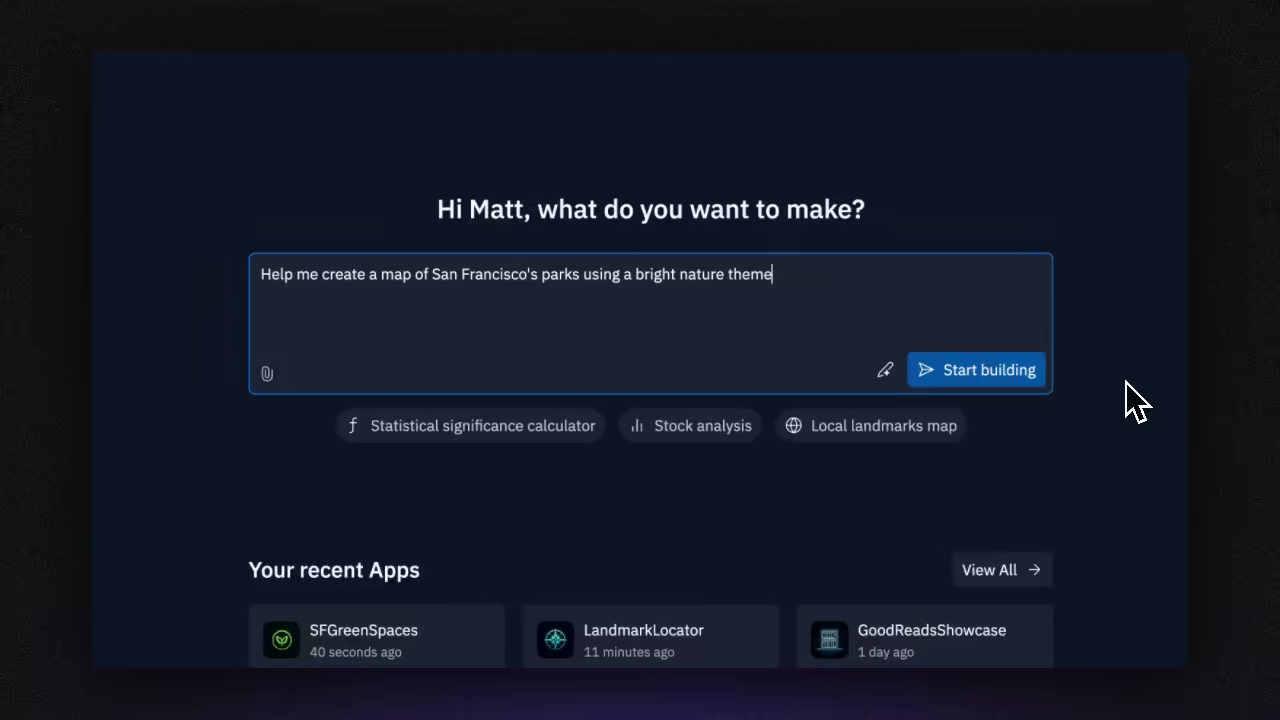
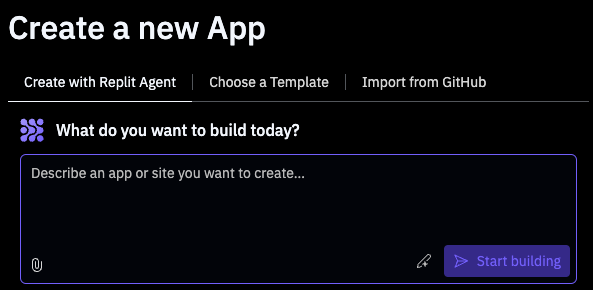
From the Create a new App screen, select the Replit Agent tab to enter a description of the app you want as shown in the following animation:
Replit Documentation
If viewing a Replit App started by Agent, you can locate the Agent tool in your workspace in one of the following locations:
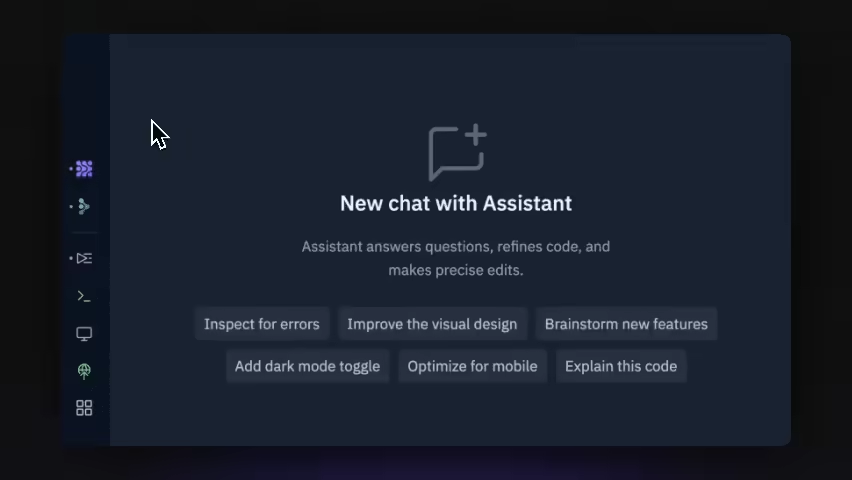
From the left tool dock, select [Icon] Agent as shown in the following animation:
Replit Documentation
Create your app using Replit AI
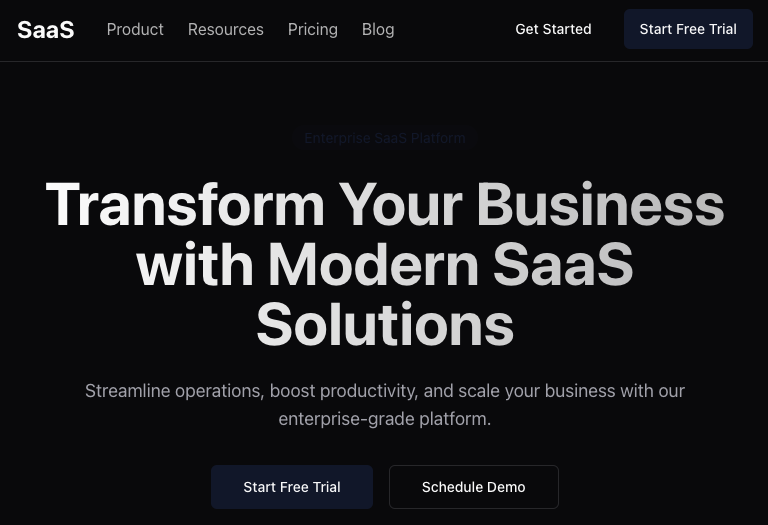
Learn how to create your Replit App using the Agent and Assistant AI tools in this guide. Follow the steps below to build a polished business website. Use Replit’s AI features to create an app, and refine it until it matches your desired design.
Replit Documentation
1. Create an App
Navigate to the Home screen and select Create App:

Replit Documentation
Select the Create with Replit Agent tab as shown in the following image:
Replit Documentation
2. Craft your Prompt
To ask Agent to create your Replit App, enter your prompt in the text area. A prompt is a description of the task you want AI to perform.
You can include text and file attachments in your prompt. Follow these steps to submit both in your prompt:
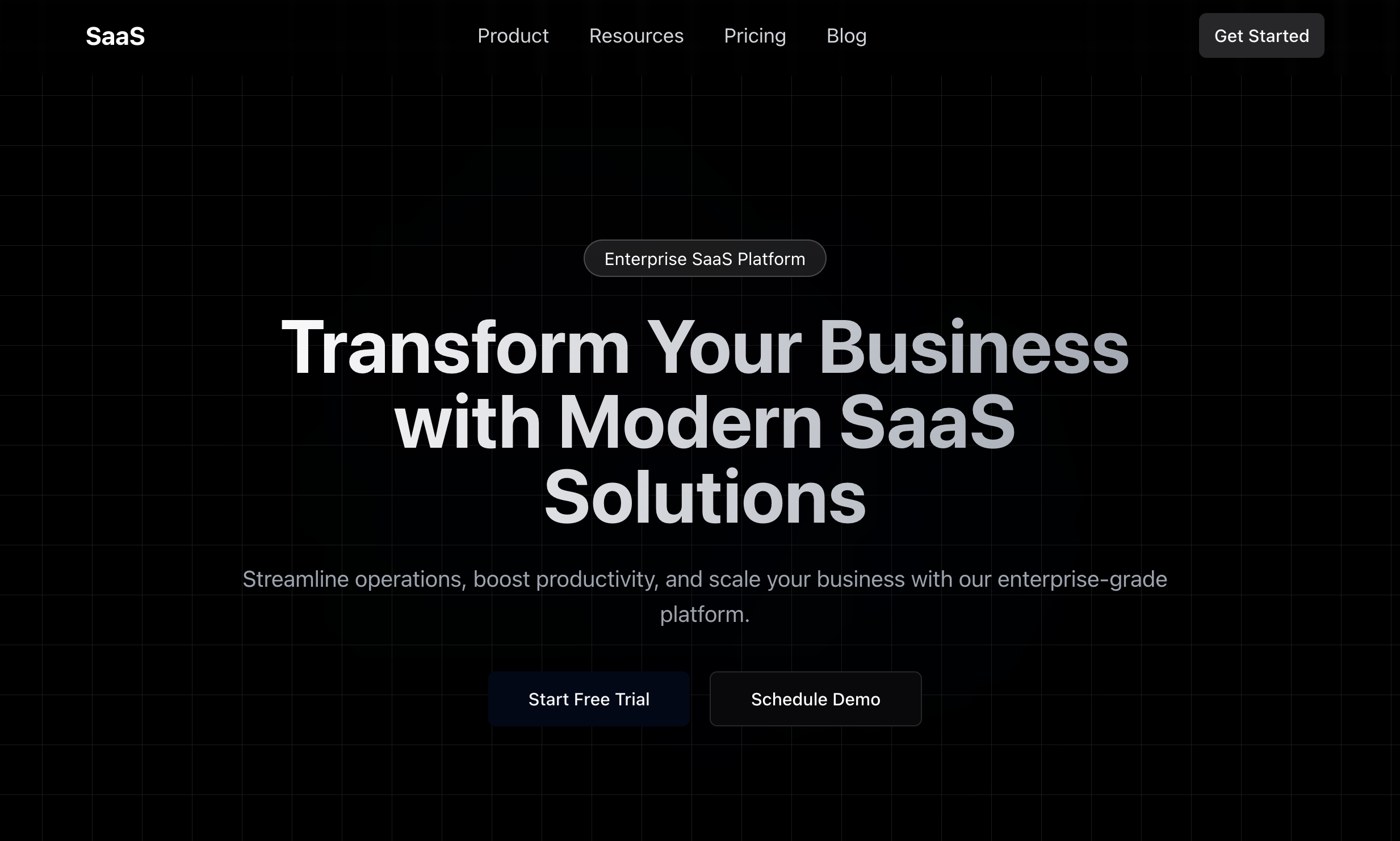
- Copy the following image:
Replit Documentation
- Paste the image into Agent text area.
- Enter the following prompt in the text area:
- Copy
- Build a website for a SaaS B2B website that looks like the attached file.
- Select Start building.
3. Review and approve the Agent's Plan
After you submit your prompt, Agent sets up your Replit App and provides updates on its status in real time. You can monitor and view the history in the Progress tab.
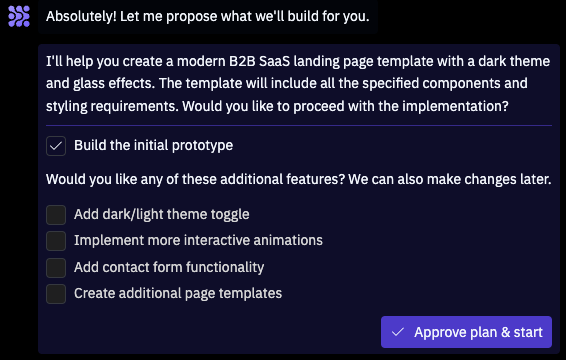
When Agent finishes setup, it prompts you with what it intends to build and options to include additional features as shown in the following image:
Replit Documentation
Leave the additional options unchecked and select Approve plan & start.
4. Test the App
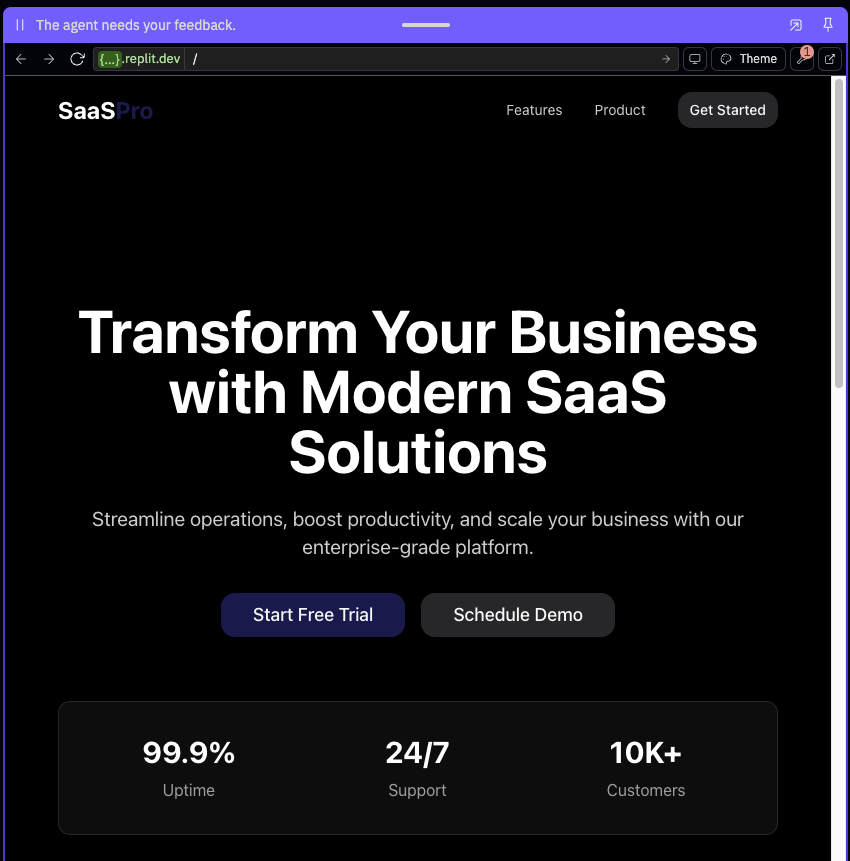
After Agent builds your app, navigate to the Preview tab, where you can interact with the website. The website should resemble the following image:
The generated website might differ since Agent can return different results for the same prompt.
Replit Documentation
Since the prompt only includes information about the landing page, Agent might omit content creation for the links on the page.
The next step demonstrates how to use Assistant to add those pages.
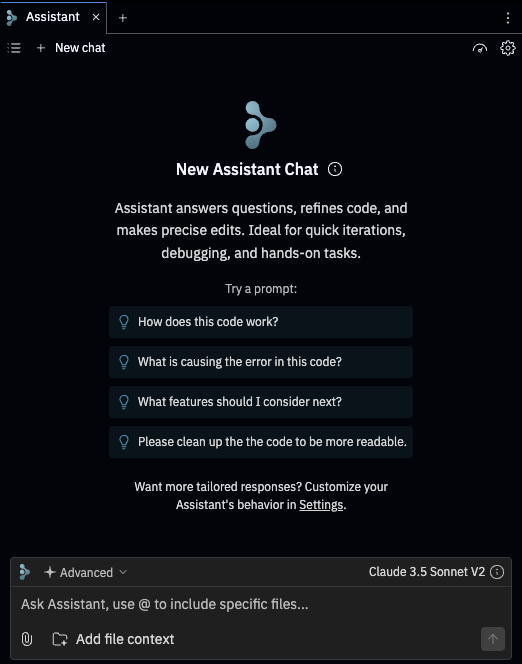
5. Improve the app using the Assistant
Navigate to the Assistant tab, which should resemble the following image:
Replit Documentation
Enter the following prompt in the text area and submit it:
Create pages for each of the links in the navigation bar.
You can select Preview code changes to view the Assistant’s planned changes.
Select Apply All and confirm your selection if prompted.
Assistant and Agent, which rely on popular AI models, occasionally produce results that don’t fulfill your request. If you encounter issues, follow up with a prompt that describes the error messages or the incorrect behavior. Alternatively, you can use the Rollback feature to restore your Replit App to a previously known working state.
At this point, you should have a navigable website that includes sample text and functional links.
Build from Scratch
Learn how to create a Replit App from scratch. Choose your language, frameworks, and databases.
Create your app from a Template
Learn how to create your Replit App from a Template in this guide. A Template is a set of ready-made setup and configuration files that get you coding faster.
This tutorial demonstrates how to build a web app using a Replit Template for Express.js, a popular backend JavaScript framework. Templates provide ready-made project configuration files to get you coding faster, but exclude application logic to let you build your own ideas from scratch.
For tutorials on building apps in other ways, see Quickstart Guides.
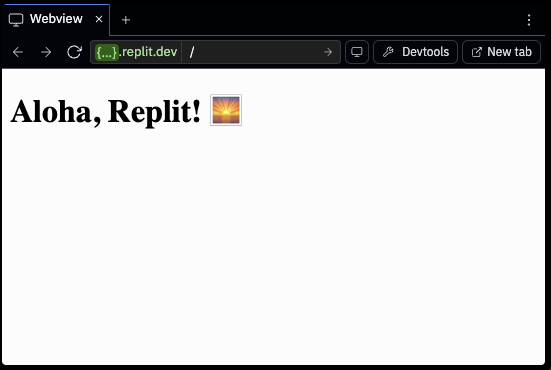
When you complete the tutorial, your app should resemble the following image:
Replit Documentation
1. Create an App
Navigate to the Home screen and select Create App:
Replit Documentation
2. Choose a Template
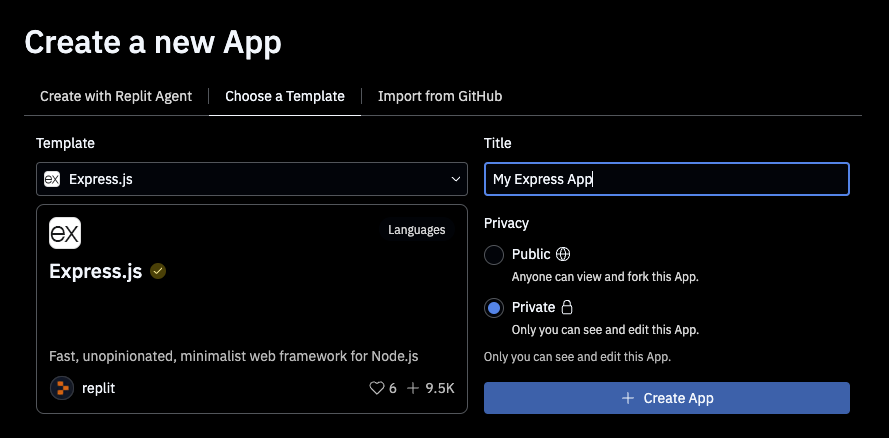
Select the Choose a Template tab and enter “Express.js” in the search field to locate the corresponding Template as shown in the following image:
Replit Documentation
Set the App’s title in the Title field and make sure Private is selected. You can modify these values later.
Select Create App to proceed.
3. Modify the app using the Assistant
Navigate to the Assistant tab.
Assistant is Replit’s AI-powered tool that specializes in building smaller changes to your app.
Enter the following prompt in the text area and submit it to modify a specific file:
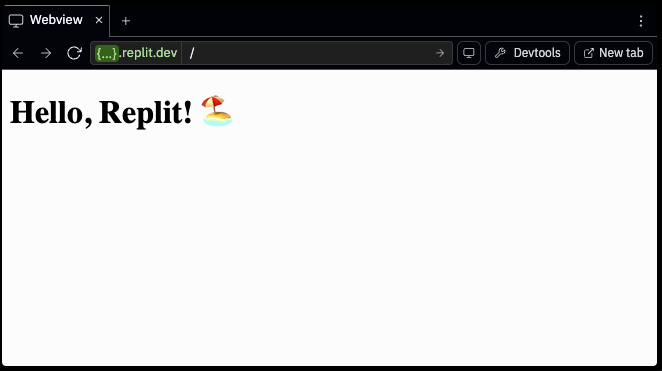
Update the endpoint in index.js to say "Hello, Replit!" followed by a random cheerful emoji.
You can optionally refer to a specific filename by preceding it with the @ character.
Select Apply all to accept changes or Preview code changes to view them.
After applying the changes, you should see the updated message in the Preview tab as shown in the following image:
Replit Documentation
4. Modify the code Directly
Navigate to the Files tab to access your Replit App’s files.
Select index.js to open a file editor tab.
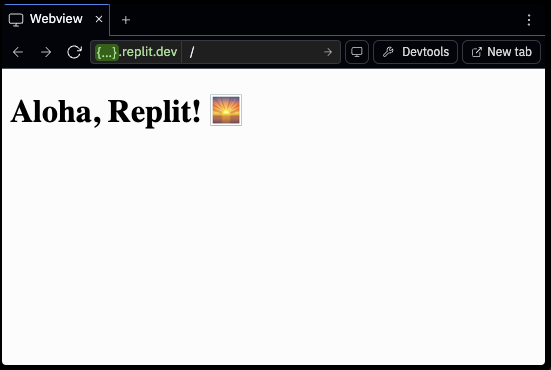
Locate the endpoint and change the message from “Hello, Replit!” to “Aloha, Replit!”
If you’re unsure where to edit, replace the endpoint with the following code:
`app.get('/', (req, res) => { const emojis = ['😊', '🎉', '✨', '🌟', '💫', '🌈', '🎨', '🚀']; const randomEmoji = emojis[Math.floor(Math.random() * emojis.length)]; res.send(`<h1>Aloha, Replit! ${randomEmoji}</h1>`); });`
Switch to the Preview tab and select the refresh button.
After the browser reloads, the page should resemble the following image:
Replit Documentation
Explore
Try the tasks in the following sections to build your knowledge of Replit.
Try Assistant’s recommendations
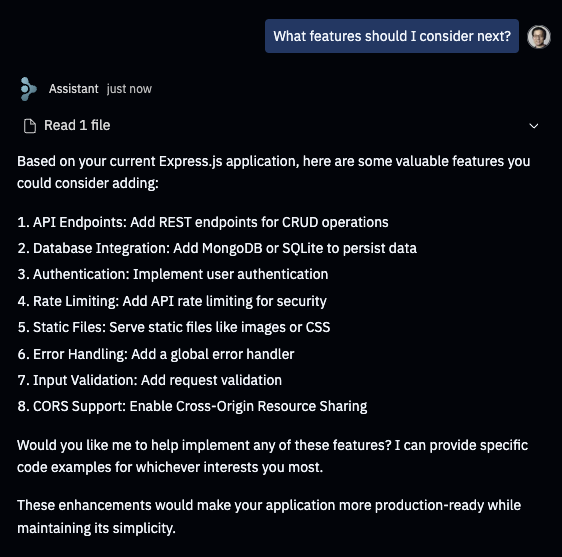
In addition to adding or modifying features in your app, Assistant can provide suggestions or ideas to extend its functionality. Follow these steps to request a feature recommendation and implement it using Assistant:
1. Ask the Assistant for recommendations
Navigate to the Assistant tab.
Enter the following prompt in the text area and submit it:
What features should I consider next?The assistant might respond with the options shown in the following image:
Replit Documentation
2. Request a feature
Enter the following prompt in the text area and submit it:
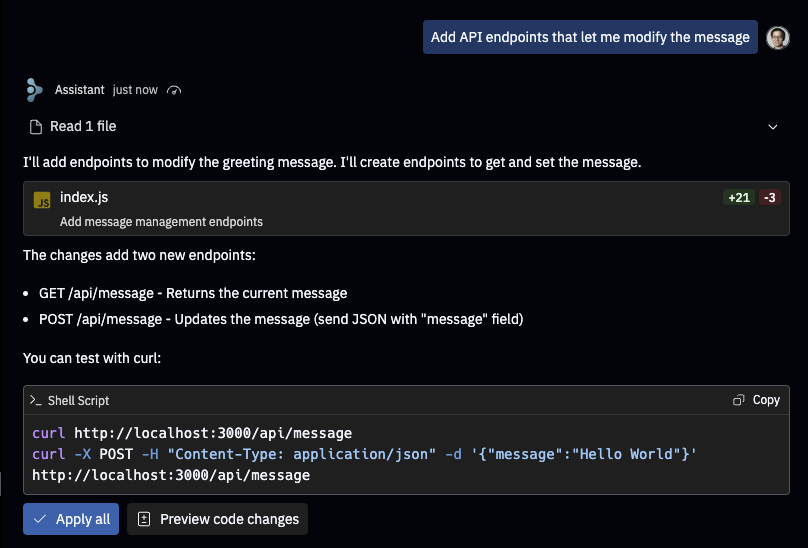
Add API endpoints that let me modify the message
The assistant might respond with the implementation described in the following image:
Replit Documentation
Select Apply all to make the code changes.
3. Test the changes
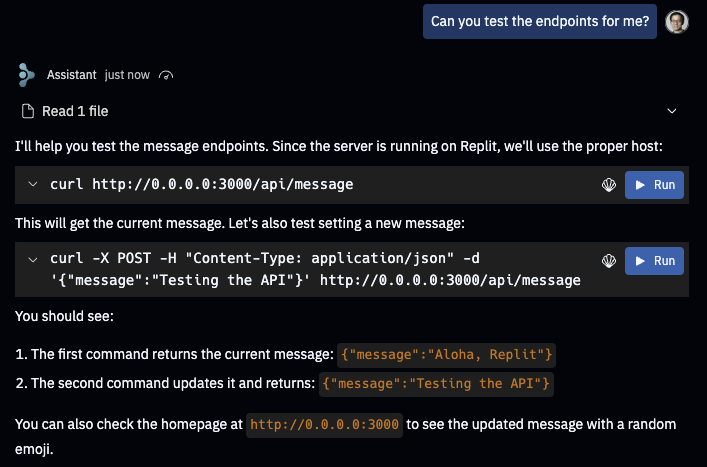
Test the API endpoints by navigating to the Shell tab and running the shell commands recommended by Assistant.
Alternatively, ask Assistant to test the endpoints. In the response, you should see action buttons such as Run and Run in Shell as shown in the following image:
Replit Documentation
Select these to execute the commands to retrieve the current message and update it.
Verify changes to the message by navigating to the Preview tab and selecting Refresh in the address toolbar.
Conclusion
Replit is an AI-powered platform that transforms app development by allowing users to create and deploy applications entirely from a browser tab without installation requirements.
The platform combines coding, deployment, and collaboration tools in a single interface, making app development accessible even to those without coding experience. Key features include browser-based development, multi-language support, real-time collaboration, one-click deployment, AI assistance through Ghostwriter and Agent, and pre-built templates to accelerate development.
For product managers, developers, students, startups, and educators, Replit offers significant advantages over traditional IDEs by eliminating setup time and providing instant access to development environments from any device.
The platform's AI tools—particularly Replit Agent, which can create full-stack applications from natural language descriptions—represent a powerful approach to streamlining the development process from idea to implementation. With capabilities for rapid prototyping, real-time collaboration, and seamless deployment, Replit effectively removes traditional barriers to app creation.
__________________________________________________________________________________
Stay Updated: Follow The Product Space for the latest insights and resources on AI in product management.
Experts predict that 2025 will be a pivotal year for AI integration in product management. Want to stay ahead of the curve?
Join The Product Space’s AI for Product Management Course – your accelerated path to mastering AI tools and building revolutionary products.
.png&w=1200&q=75)