Whenever there are Product teardown challenges or competitions, you might've wondered how do people come up with the best form of a teardown for this particular product.
In this article, let us explore what a product teardown is, why it's a valuable exercise for aspiring product managers and product enthusiasts, and exactly how to do one for any product.
We'll go through the teardown process step by step, using some of the most useful frameworks (AARRR, JTBD, SWOT, UI/UX tools, user journeys). By the end, you'll feel that you too can teardown your favorite app, give any actionable insights, and share your findings with a bit of storytelling flair on LinkedIn or any other platform as well. Let's dive in!
What is a Product teardown and why is it important?
A product teardown is a very good exercise where you break down the product into layers (its functionality, UI/UX, user needs, etc.) and often compare it with competitors, analyze its performance, and benchmark it – all to fully understand the product’s strengths and weaknesses such that you can provide your recommendations, if any.
This exercise helps aspiring product managers, to build their product sense. It forces you to think from scratch: Why was the product designed this way? What user problem was it solving? Where does it wow the users, and where does it frustrate them? By asking these questions, you’re effectively training yourself to think like a PM who built the product.
Some Key Benefits:
1. Understanding user flows and engagement
2. Sharpening your eye for UX
3. Competitive and market insights
4. Practice in critical thinking
How to do a Product Teardown?
Lets take a look at the step by step process to perform a product teardown:
STEP 1: Choosing the Product
First step is to choose the product that you want to perform a teardown on. The product can be your favorite app, it can be a competitor to the current product that you are working on or even any new tool which is very niche but has some potential to change the world.
Then you define the scope of the teardown by asking yourself what you want to learn or demonstrate with this analysis. Are you evaluating the onboarding experience? The overall user experience and UX design ? The growth strategy of the product? Having a clear objective will focus your efforts.
Tip: When you are practicing, you have the liberty to create a problem statement of your own, or use any AI tools to give you really good problem statements, which you can work on.
STEP 2: Understand its users
Before you start with the teardown, think about how the current users of the product use this product by identifying the target users of the product and, if possible, create one or two user personas to represent them. Who are they? What are their goals, motivations, and pain points? What context are they using the product in? Defining the user is helpful as it helps with the rest of the teardown.
A great framework to use here is Jobs to Be Done (JTBD). This approach asks: What "job" is the user hiring this product to do? In other words, what fundamental problem or need is the product fulfilling for the user.
Tip: When you are practicing, The Jobs to Be Done framework is all about uncovering the user needs. It encourages you to look beyond features and ask why users use this product in the first place. You can also use techniques like the "5 Whys" to drill down to root motivations
STEP 3: Create a User Journey
After you have identified the users, then write down the key steps the user takes to use the product and achieve their goal. Start from the very beginning: How do they discover and download/sign up for the app? What’s the first thing they see or do? Then what’s the next main step? And so on, through to achieving the core task and beyond.
Identify the key touchpoints and interactions along this journey. For a mobile app, the journey might look like: Visit App Store page → Install → Sign up or onboard → Land on main screen → Use core feature X → Receive some feedback/reward → Come back next day via notification, etc. For each step, note what the user is trying to do, and how the product supports that.
Tip: When you are practicing, pay attention to any "aha moments" – the points where a user truly gets the value of the product. These are critical for activation and engagement. Also note any gaps or friction.
STEP 4: Evaluate the UI/UX
After evaluating the user journey, next you can evaluate the UI/UX of the product. This is the part of the teardown where you critique the design: what works well and what doesn't, from a usability standpoint. It helps to have a checklist or some UX heuristics as reference. Jakob Nielsen’s 10 usability heuristics are a classic guide – for example, visibility of system status, match between system and the real world, user control and freedom, consistency and standards, error prevention, etc.
As you go through the product screen by screen, take notes and screenshots. Mark the good, the bad, and the ugly. Maybe the onboarding has a delightful animation (good!), but a certain settings page is buried three clicks deep (bad). Perhaps the color scheme is pleasing and on-brand, but some text is hard to read on a small screen. These UX details are important parts of the teardown.
Tip: When you are practicing, refer this website for the different psychological factors involved using this website https://growth.design/psychology which will help in figuring out what works best.
STEP 5: Analyze Key Metrics
A very good teardown will include what are the key business and product metrics of the product you have chosen, using frameworks like AARRR or GSM frameworks, where you get the L1, L2 metrics along with the North Star Metrics of the product.
By applying AARRR, you ensure your teardown covers not just the user's perspective but also the product's perspective on growth. It's a handy checklist to evaluate the business viability of the product and identify which stages are strong or weak.
Tip: AARRR stands for Acquisition, Activation, Retention, Referral, Revenue – the stages a user goes through from discovering the product to becoming a loyal, paying customer.
STEP 6: Perform a SWOT Analysis
It’s useful to zoom out and do a quick SWOT analysis of the product – identifying its internal Strengths and Weaknesses , and external Opportunities and Threats. SWOT is a classic business framework to evaluate a company or product's competitive position, and it's a great way to summarize your teardown findings in a strategic context.
Summarizing your findings into SWOT categories provides a clear snapshot of the product’s standing. It helps you (and your readers) see the product’s situation at a glance.
Tip: When practicing please do go in depth to identify the Strengths and Weakness as well as the Opportunities and Threats such that it helps in giving the insights in the best way possible.
STEP 7: Provide Insights and Recommendations
Finally, you should collate all your key findings into a very good summary, and if needed, list down your recommendations. After all, a product teardown isn't just about listing observations; it's about drawing insights from them. Ask yourself: What are the 3-5 most important things I learned about this product? And if the product team hired you as a PM tomorrow, what would you do next based on this teardown?.
When writing recommendations, tie them back to your analysis. If you noted a weakness or threat, often the recommendation is to fix or mitigate that. If you saw an opportunity, perhaps the recommendation is to pursue it with a new feature. Be sure to also consider effort vs impact – you can note quick wins vs long-term ideas.
Tip: Post this step, double-check that your teardown met the initial goal you set.
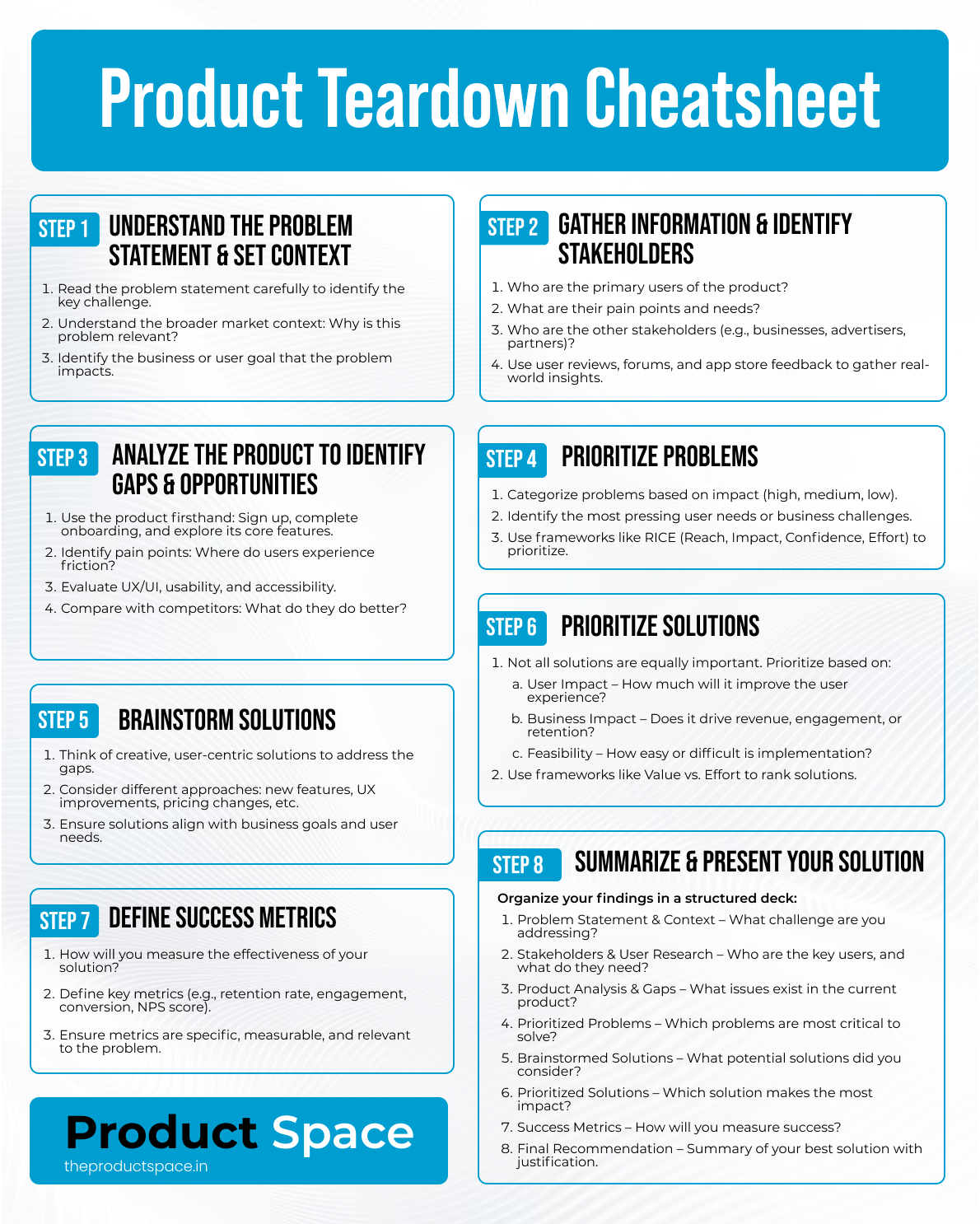
Here's a quick cheat sheet for you: