
Discovery is Broken Without Direction
Imagine your team is trying to improve user retention. You run interviews, dive into metrics, and brainstorm ideas. Soon, your backlog is flooded with suggestions - "let’s launch a referral program", "what if we improved onboarding?", or "maybe we need gamification?"
But which of these ideas actually solve the root problem?
This is the trap most product teams fall into: confusing output with outcomes and treating every idea as a possible solution without a clear link to user needs or business goals.
Opportunity Solution Trees (OSTs) help fix that.
Originally introduced by discovery coach Teresa Torres, OSTs are a lightweight yet powerful visual framework to help product teams:
- Stay focused on measurable outcomes
- Deeply explore customer opportunities
- Evaluate multiple solutions systematically
- Drive faster, more confident product decisions
In this article, we’ll unpack everything you need to know from theory to real-world usage to bring OSTs into your product toolkit.
What is an Opportunity Solution Tree?
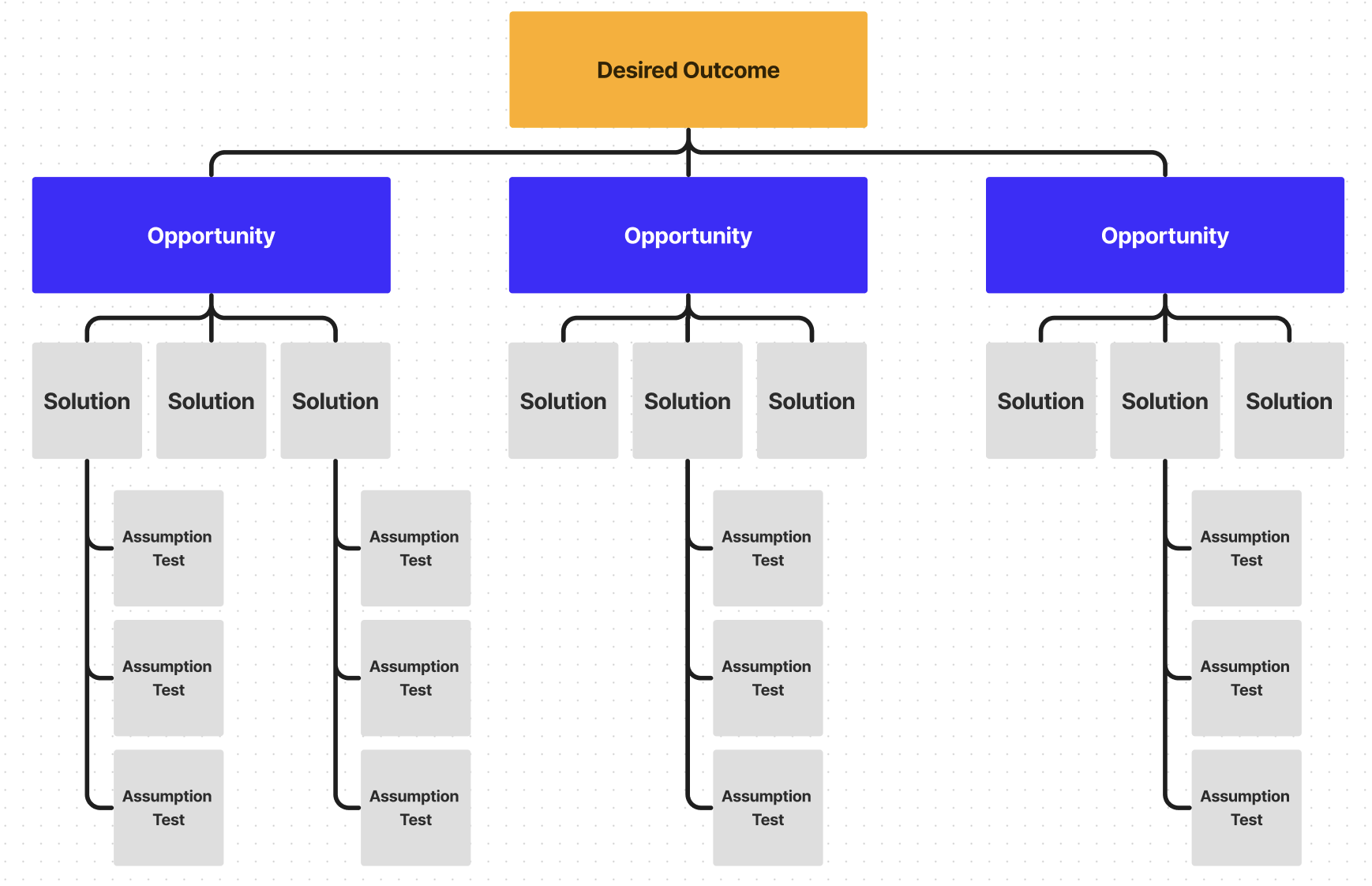
An Opportunity Solution Tree is a structured visual map that connects your desired outcome with:
- Customer opportunities (their unmet needs, problems, or desires)
- Potential solutions (ideas your team could build)
- Underlying experiments (ways to validate those ideas)
It starts from the top-down:
This tree structure helps you reason clearly:
- What are we trying to achieve?
- What’s stopping our users?
- What are all the ways we could solve this?
- How do we test which ones work?
Why OSTs Matter More Than Ever
In fast-moving teams, there’s pressure to ship fast often at the cost of understanding the “why” behind what we build. OSTs offer a structured way to pause, zoom out, and think holistically.
- Move from output to outcomes: Most teams focus on deliverables. OSTs force you to define a measurable product goal first, so everything else ladders up to real impact.
- Explore the problem space deeply: Instead of jumping to solutions, OSTs push you to explore multiple customer opportunities and build empathy before deciding what to build.
- Balance creativity with rigor: You get space for divergent ideation while maintaining alignment, focus, and prioritization no more idea soup.
- Make decisions transparent: Stakeholders can visually see how and why you’ve chosen a path. This increases buy-in and trust in product decisions.
- Enable continuous discovery: OSTs are living documents, as you learn more from customers and experiments, the tree evolves. It helps you stay discovery-first without being chaotic.
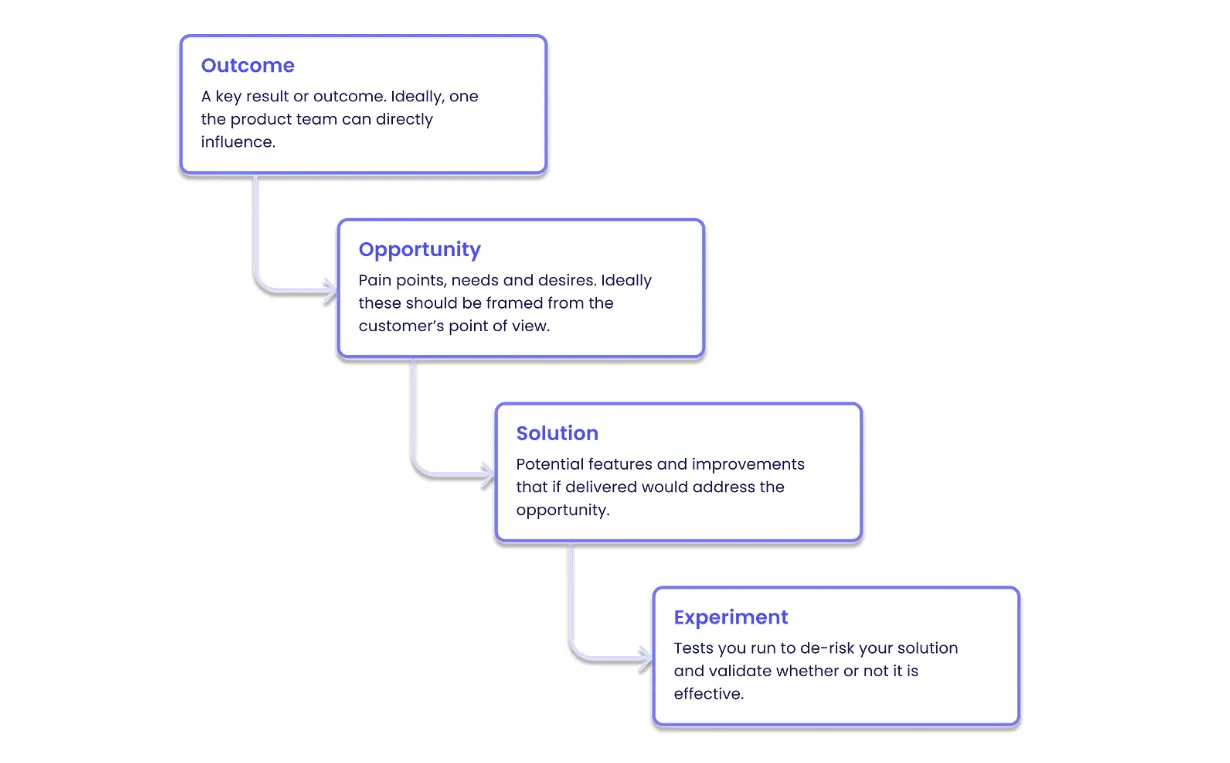
The Four Layers of an OST
Let’s break down each layer of the Opportunity Solution Tree with detailed steps and examples.
1. Outcome: Define the North Star
Start with the desired outcome a measurable goal you’re trying to achieve. This anchors your entire tree. It must be specific, impact-driven, and trackable.
Examples:
- Increase free-to-paid conversion from 8% to 12%
- Reduce cart abandonment by 25%
- Improve DAU/MAU ratio by 15%
- Increase course completion rate from 40% to 60%
Tip: Use OKRs or North Star Metrics as your source for defining outcomes.
2. Opportunities: Discover What’s Holding Users Back
Next, map opportunities the underlying problems, needs, pain points, or desires your users have that relate to the outcome.
Opportunities are not feature ideas. They are phrased from the user’s point of view:
- “Users feel overwhelmed during onboarding”
- “Buyers don’t trust the pricing page”
- “Learners lose motivation after the first week”
Sources to identify opportunities:
- User interviews and ethnographic research
- Jobs-To-Be-Done (JTBD) statements
- Support ticket analysis and NPS responses
- Funnel drop-off and behavioral analytics
- Journey mapping and emotion mapping
A great opportunity is a customer need that, if solved, has the potential to move your outcome.
3. Solutions: Explore the “How Might We”
Once opportunities are mapped, brainstorm possible solutions to address them.
Ask yourself:
- “How might we help users feel more confident?”
- “What are different ways to reduce confusion here?”
- “How have others solved this?”
You’ll generate a mix of:
- Quick UX/UI fixes
- New feature ideas
- Copy improvements
- Workflow optimizations
- Experiments and nudges
Example:
For opportunity: “Users don’t complete checkout due to last-minute surprise costs”, possible solutions:
- Show delivery fees upfront
- Offer free delivery threshold
- Run an A/B test with all-inclusive pricing
Group and map these under their respective opportunities.
Important: Don’t fall in love with your first idea. The OST encourages divergence, explore 4–5 options per opportunity before converging.
4. Experiments: Validate Before You Build
Finally, for each high-potential solution, design an experiment to test it quickly and cheaply.
Experiments could include:
- Unmoderated usability tests
- Low-fidelity prototypes or mockups
- Wizard-of-Oz MVPs
- Email or landing page tests
- Concierge onboarding
The goal is to reduce uncertainty before committing engineering resources.
Example:
If your solution is “Add a progress bar to motivate users”, your experiment might be:
- A Figma prototype shown in user tests
- A quick A/B test for a subset of users
- A user survey with mockups
Use learning from experiments to prune or extend your tree.
Real Example: OST in a Fintech App
Outcome: Increase 30-day retention of new users by 20%
Opportunities:
- Users don’t understand how the app helps them save money
- Users forget to log daily expenses
- Users feel overwhelmed during onboarding
Solutions:
- For “Don’t understand value”:
- Add onboarding video demo
- Show potential savings on home screen
- For “Forget to log”:
- Push daily reminders
- Enable receipt scanning
- For “Feel overwhelmed”:
- Break onboarding into steps
- Use progressive disclosure
Each solution is then tested through:
- User surveys and interviews
- A/B testing
- Onboarding flow instrumentation
This structured discovery helped the team learn fast, reduce waste, and drive meaningful retention uplift.
Here’s a Miro template you can try!
Tips for Making OSTs Work in Real Teams
- Build collaboratively: Involve PMs, designers, and engineers. OSTs are best done with the team, not handed off to them.
- Use the right tools: Start with sticky notes on a whiteboard, or go digital with Miro, FigJam, or Whimsical. Use a visual format to show branching logic clearly.
- Tie it back to metrics: Every path in your OST should ladder up to a measurable product goal. Don’t map ideas without grounding them in impact.
- Keep iterating: Your first tree is not final. As you run interviews and experiments, update your tree, add new opportunities, drop invalidated solutions.
- Prioritize ruthlessly: Not every branch deserves attention. Use effort vs impact scoring, confidence levels, and user pull to focus your discovery energy.
Common Pitfalls to Avoid
- Jumping to solutions too early: Always build out opportunities before ideating solutions. Otherwise, you risk solving surface-level symptoms.
- Vague or unmeasurable outcomes: If your outcome is “Improve user experience”, your tree has no anchor. Be specific.
- Mapping only one solution per opportunity: If you’re only exploring one idea, you’re not really discovering, you’re executing.
- Treating OSTs as one-time activities: This isn’t a sprint deliverable. OSTs are a living part of your continuous discovery practice.
Final Thoughts: A New Way of Thinking, Not Just a Tool
Opportunity Solution Trees aren’t just a product discovery template. They’re a way to think and work differently:
- With customer empathy at the core
- With a focus on outcomes over outputs
- With multiple bets, not single guesses
- With shared context across your team
If you're feeling stuck in a build trap, if your backlog feels like a black hole, or if you're unsure why you're building half the features on your roadmap, OSTs might just be the reset button you need.
.png&w=1200&q=75)