


The AI Feature Trap
Most AI features fail for one of three reasons:
- They are technically impressive but cognitively confusing.
- They remove control without increasing clarity.
- They add automation but reduce trust.
AI does not automatically improve user experience.
In fact, AI increases UX risk.
Because AI introduces:
- Uncertainty
- Probabilistic outputs
- Non deterministic behavior
- Latency
- Invisible reasoning
Traditional UX patterns were built for deterministic systems.
AI changes the contract between user and product.
If you design AI features like regular features, you will break trust.
This guide will help you design AI features that:
- Enhance clarity
- Preserve user agency
- Build trust progressively
- Increase adoption
- Scale responsibly
This is not about UI polish.
This is about product judgment.
Part 1: Understand the Core Shift AI Introduces
Before designing AI features, internalize this:
Traditional software gives answers.
AI gives suggestions.
Traditional UX optimizes task completion.
AI UX must optimize confidence.
Traditional flows are linear.
AI flows are exploratory.
If you do not redesign mental models, users will feel loss of control.
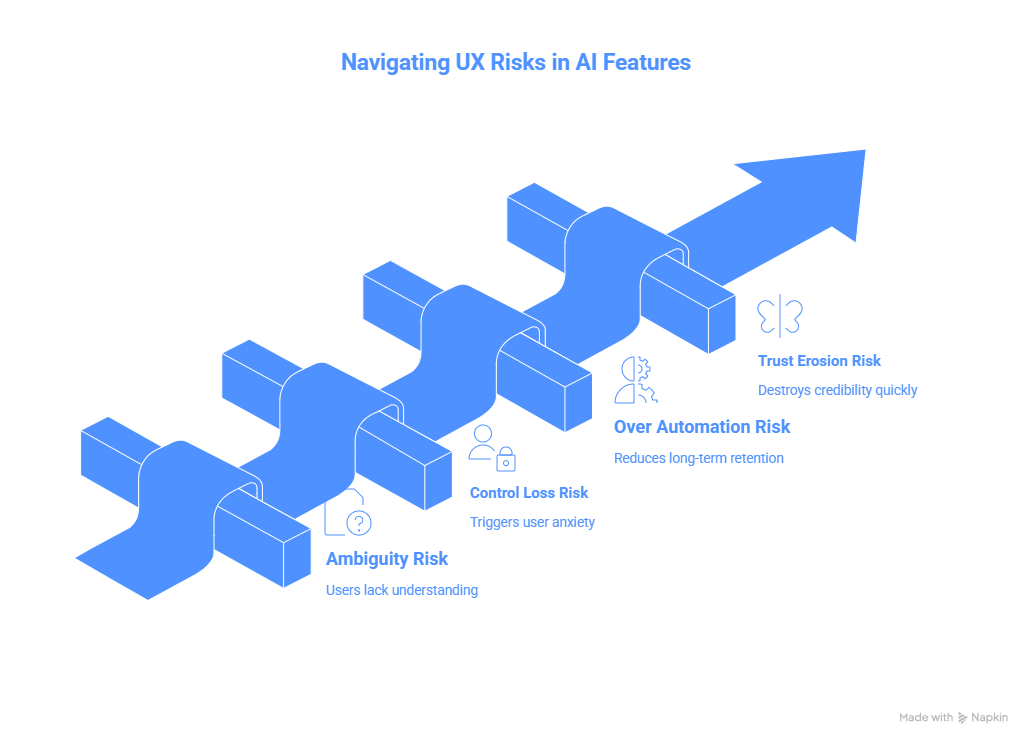
Part 2: The Four UX Risks of AI Features
1. Ambiguity Risk
Users do not know:
- What the AI is doing
- Why it produced that output
- How reliable it is
If users cannot form a mental model, adoption drops.
Solution:
Make system state visible.
Examples:
- Show reasoning summary
- Highlight confidence level
- Provide edit options
- Allow version comparison
2. Control Loss Risk
If AI auto acts without confirmation, it triggers anxiety.
Never remove user agency without progressive trust.
Start with:
- Suggest
- Preview
- Confirm
- Then automate
Control must be earned.
3. Over Automation Risk
If users stop thinking because AI thinks for them, long term retention suffers.
AI should augment cognition, not replace it.
4. Trust Erosion Risk
Hallucinations destroy credibility faster than slow UI ever could.
Design for graceful failure.
If AI is unsure, say so.
Clarity builds trust.
False confidence kills it.
Part 3: A Framework for Designing AI Features
Use this five step design model.
Step 1: Define the Job to Be Done
Ask:
Is the user seeking speed, insight, creativity, or automation?
Different goals require different AI UX patterns.
Example:
Speed focused AI
Use autofill, smart defaults.
Insight focused AI
Use summaries, pattern detection.
Creativity focused AI
Use iterative suggestions.
Automation focused AI
Use batch processing with oversight.
Do not mix all four in one surface.
Step 2: Define Human vs AI Boundaries
Explicitly answer:
What decisions remain human?
What decisions are AI suggested?
What decisions are AI executed?
Write this in your PRD.
If you cannot articulate it clearly, the UX will feel unstable.
Step 3: Design Transparency Layers
Transparency does not mean exposing raw tokens.
It means:
- Show why this output was generated
- Show input signals used
- Show editable parameters
- Show fallback state
Example:
Instead of:
Here is your roadmap.
Use:
Based on retention drop in onboarding and high churn among segment A, here is a suggested roadmap.
Small additions change perception dramatically.
Step 4: Design for Error Recovery
AI will be wrong.
Design graceful correction flows:
- Easy edit
- Quick regenerate
- Clear reset
- Feedback loop
Users must feel safe experimenting.
Safety drives usage.
Step 5: Introduce Progressive Automation
Start with:
Manual mode
Then:
Assist mode
Then:
Auto mode with review
Then:
Full automation for trusted users
Trust compounds.
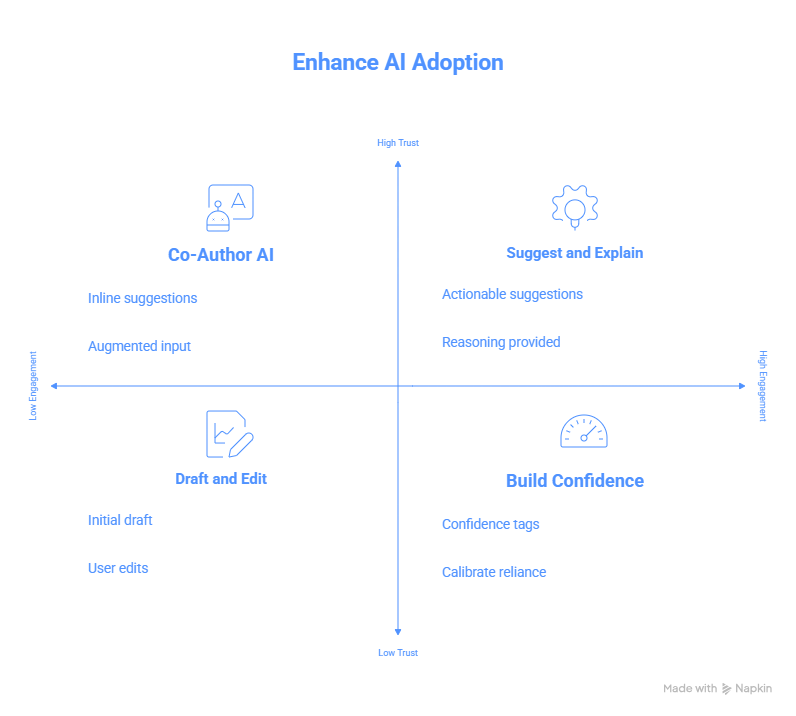
Part 4: Patterns That Work in AI UX
Here are patterns that consistently improve adoption.
Pattern 1: Draft and Edit
AI generates a first draft.
User edits.
This preserves agency and increases productivity.
Pattern 2: Suggest and Explain
AI suggests action.
Shows reasoning.
User confirms.
Pattern 3: Side by Side Comparison
Original vs AI version.
Comparison builds trust.
Pattern 4: AI as Co Author
Instead of replacing user input, augment it.
Example:
Inline rewrite suggestions.
Not full takeover.
Pattern 5: Confidence Indicators
Low, medium, high confidence tags.
Helps users calibrate reliance.
Part 5: Metrics for AI UX Success
Do not only measure clicks.
Track:
- Adoption rate of AI feature
- Edit rate after AI suggestion
- Regeneration frequency
- Trust score via survey
- Retention among AI users vs non users
- Time to task completion
- Error correction rate
If users constantly regenerate outputs, you have quality issues.
If they never edit outputs, you may have blind reliance risk.
Part 6: Case Example Framework
When evaluating an AI feature, structure your internal design doc like this:
Problem
User segment
Current workflow
Pain point
Why AI is appropriate
Human vs AI boundary
Transparency plan
Failure handling
Rollout plan
Risk mitigation
Success metrics
This forces clarity before shipping.
Part 7: Common Mistakes Teams Make
Adding AI because competitors did.
Hiding AI limitations.
Removing manual workflows too quickly.
Shipping without internal usage testing.
Treating AI like a marketing feature instead of workflow improvement.
Part 8: Senior PM Perspective
Senior PMs should ask:
Does this AI feature deepen our moat?
Does it generate proprietary data?
Does it improve retention?
Does it create habit?
Does it increase switching cost?
If AI is surface level, it is copyable.
If AI is embedded in workflow, it becomes defensible.
Final Principle
AI features should:
Reduce cognitive load
Increase clarity
Preserve agency
Build trust progressively
Enhance decision quality
If it does not do these, remove it.


.png&w=1200&q=75)