
While the rest of the industry is hyper-focused on the rumor mill surrounding the next major model release, the Gemini API team quietly deployed a utility that fundamentally changes the economics of building AI apps.
I stumbled across it last week.
At first glance, the endpoint looks standard. But when you dig into the billing documentation, you realize something is unusual. Google has structured the pricing in a way that effectively subsidizes your infrastructure.
The storage is free. The query-time embeddings are free.
You pay a flat one-time fee of $0.15 per 1 million tokens to index your data, and that is it. This means you can deploy production-grade Retrieval-Augmented Generation (RAG) systems without the usual "DevOps tax."
I have spent the last quarter deep in the trenches of a complex document parsing project. If you have ever built a RAG pipeline from scratch, you know the misery: wrestling with vector stores, debugging chunking algorithms that split sentences in half, and paying monthly fees for database instances that sit idle half the time.
What Is Gemini API File Search?
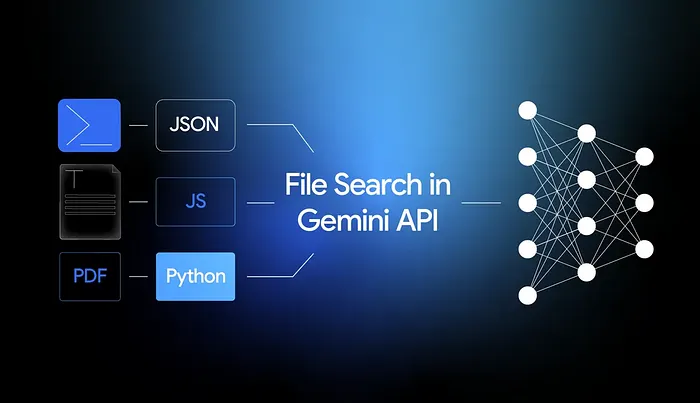
The new Gemini File Search API abstracts that entire mess away. It handles the plumbing so you can focus on the application logic.
Naturally, I don't trust documentation or marketing hype. I need to see the stack trace. So, I spent the weekend throwing actual code and heavy documents at this API to see if it actually works or if it’s just a toy.
The results were unexpected. Here is a breakdown of what File Search actually does, how the mechanics work, and whether you should delete your Pinecone account or keep it.
What is "File Search" Actually Doing?
Think of File Search as "RAG-as-a-Service." It is Google’s answer to the friction developers face when trying to give an LLM long-term memory.
It is a fully managed retrieval layer native to the Gemini API. It owns the whole vertical: ingestion, chunking, embedding, storage, and retrieval.
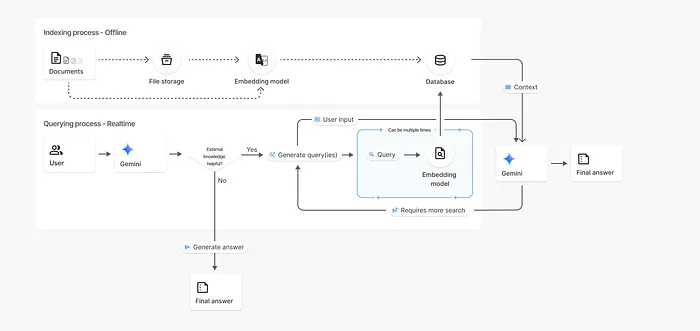
The workflow looks like this:
- You push a PDF or text file to a "File Store."
- Google automatically segments it and runs it through their
gemini-embedding-001model. - These vector embeddings are stored in Google’s internal vector DB.
- When you prompt the model, you simply attach the
toolsparameter pointing to your store.
You don't configure a database. You don't write a retrieval script. You don't manage dimensions.
The Two-Step Architecture
The system operates in two distinct modes: The Setup (Offline) and The Execution (Runtime).
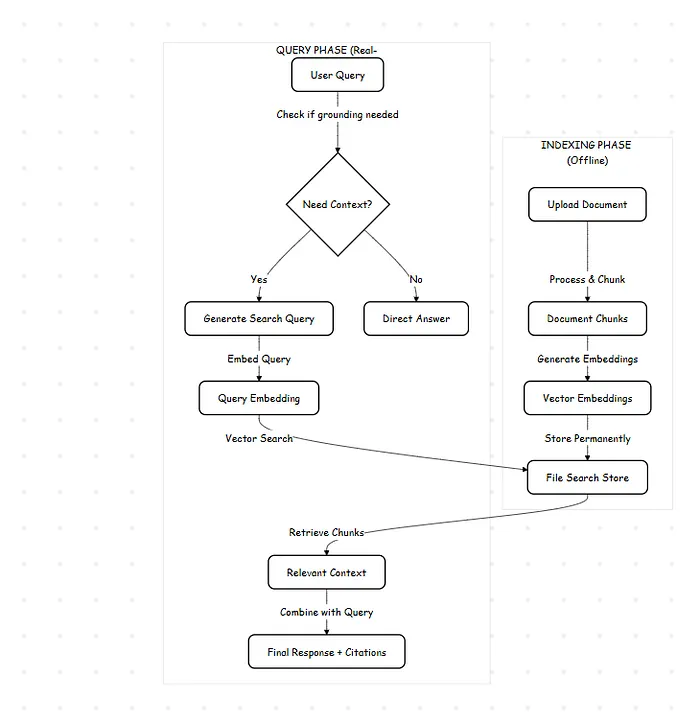
1. The Indexing Phase (Offline)
This is the "one-and-done" step. When you upload a document, Google's backend processes it immediately. It slices the text based on either standard defaults or your specific instructions.
Crucially, while the raw file (the PDF itself) is purged from the staging area after 48 hours, the extracted knowledge (the vectors) persists in your File Store indefinitely. That is why the storage is free—you are storing mathematical representations, not just raw bytes.
2. The Query Phase (Real-time)
This is where the magic happens. When you send a user query to generateContent, the model acts as an agent. It analyzes the prompt to see if it requires external data.
If the model detects a need for facts:
- It generates its own search queries based on your prompt.
- It converts those queries into vectors.
- It scans your File Store for similarity.
- It pulls the relevant text chunks.
- It synthesizes an answer with citations linked to the source.
It’s dynamic. The system might perform multiple lookups for a multi-faceted question, all within a single API latency window.
Semantic vs. Literal Search
Standard search engines look for matching strings of text. File Search looks for matching concepts.
If your user asks, "Why is the engine overheating?" a keyword search fails if the manual only mentions "coolant failure" or "radiator blockage."
File Search works because the vector for "overheating" lives in the same mathematical neighborhood as "coolant failure." It retrieves the right answer even if the vocabulary doesn't match.
Pricing Model
Here is why the pricing model is disruptive compared to the "Do It Yourself" approach.
Gemini File Search Costs:
- Indexing: $0.15 / 1M tokens (One-time fee).
- Storage: $0.00.
- Search: $0.00.
- Running Cost: You only pay for the tokens retrieved and fed into the prompt.
Traditional RAG Costs:
- Vector DB: Monthly hosting fees (Pinecone/Weaviate) + scaling costs.
- Embeddings: API costs every time a user asks a question (to embed the query).
- Compute: Server costs to run the retrieval Python logic.
- Maintenance: Engineering hours spent fixing the pipeline.
Google has essentially turned RAG from a monthly subscription service into a one-time ultra-low capital expense.
Forget Vector DBs: The "Native" RAG Approach with Gemini API
If you have been building RAG (Retrieval-Augmented Generation) pipelines recently, you know the drill. It usually involves a headache of distinct steps: parsing PDFs, chunking text, generating embeddings, spinning up a vector database (like Pinecone or Milvus), and finally, retrieval.
It works, but it is heavy.
Google’s Gemini API has quietly introduced a feature that essentially collapses this entire stack into a single API call. It’s called File Search, and it effectively allows you to dump documents directly into the model's context without managing your own retrieval infrastructure.
Here is how to skip the vector database fatigue and build a document-chat bot in about 20 lines of Python.
Why This Matters (The 2M Context Window)
The traditional RAG approach was born out of necessity because LLMs had tiny memory limits. You couldn't fit a whole book in a prompt.
However, with Gemini 1.5 Pro supporting up to 2 million tokens, the game has changed. You don't always need complex retrieval logic. You can often just give the model the files, let it index them natively, and ask questions. Google handles the chunking and embedding behind the curtain.
The Build: Chatting with a PDF
Let's build a script that takes a technical manual (PDF) and answers specific questions about it.
1. The Prerequisites
You will need the Google Generative AI SDK. If you haven't grabbed an API key from Google AI Studio yet, do that first.
2. Authentication & Configuration
We start by importing the library and setting up the client.
3. The "No-Code" Ingestion
This is where the magic happens. In a traditional setup, you would be writing a script to parse PDF text right now. With the Gemini API, we just upload the raw file. The API handles the MIME type detection and parsing.
Note: These files are not stored permanently by default. They are meant for active session usage.
4. Activating the "File Search" Tool
We don't just prompt the model; we have to explicitly tell Gemini to use its internal retrieval tool. We do this by passing file_search into the tools parameter during model initialization.
This tells the model: "Don't hallucinate. Look at the document I gave you."
Actually, the cleanest way to do this in the current SDK version is strictly via the generate_content method utilizing the file handle directly.
5. The Query (Putting it together)
Now we simply pass the file handle along with our prompt.
When to use this vs. Traditional RAG?
Is traditional RAG dead? No.
If you have 50,000 distinct PDFs, you cannot dump them all into a single context window (yet). You still need a vector database to find the relevant PDF, and then you can feed that PDF into Gemini.
However, use this Gemini Native approach if:
- You are analyzing a specific, large document (financial report, legal contract).
- You want to prototype fast without setting up Pinecone or Weaviate.
- You want higher accuracy (letting the model see the whole file reduces context loss from bad chunking).
Final Thoughts: The "Good Enough" RAG
We often over-engineer solutions because we enjoy the complexity. We build elaborate pipelines with LangChain, Pinecone, and custom chunkers because it feels like "real" engineering.
But for 90% of use cases, internal tools, documentation bots, and customer support agents managing that infrastructure is just overhead. It is the "DevOps tax" I mentioned earlier.
Gemini’s File Search isn't just a feature update; it is a signal that RAG is becoming a commodity. When the model provider handles the retrieval, the value shifts from "Who can build the best vector pipeline?" to "Who can ask the best questions?"
If you are still paying $70/month for a managed vector database to index a few hundred PDFs, it is time to refactor. The code is simpler, the latency is better, and frankly, your wallet will thank you.
References & Further Reading
If you want to verify the pricing or dig into the raw Python SDK, here are the primary sources used for this analysis:
- Official Documentation: Gemini API File Search Guide: The definitive guide on how the
toolsparameter functions. - Pricing Details: Google AI Pricing Page: Source for the $0.15/1M token indexing fee and storage policies.
- SDK Repository: Google Generative AI Python SDK: The GitHub repo for the
google-generativeaipackage used in the code snippets. - DeepMind Technical Report: Gemini 1.5 Pro Technical Report: For the deep dive on how the context window and retrieval architecture actually function under the hood.


.png&w=1200&q=75)